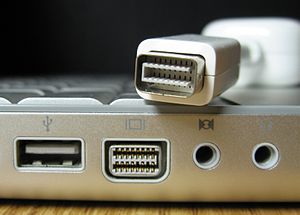
monster cable itv link

Hi

I was just wondering if I can use the MonsterCable iTV Link wire to connect my MacBook to a television like I used to do with my iBook G4 14"? Do I need some sort of adapter?

Thanks.

Posted on May 20, 2007 5:51 AM

Reply
15 replies

May 20, 2007 7:55 AM in response to Sergey Khodjamirian

Hi Sergey,

The cables you need depends on what sort of TV connection you want to make, and that depends on what connections your TV has.

The Macbook will require an adaptor, and then you'll need a cable from the adaptor to the TV. There are mini-DVI to Svideo/Composite, mini-DVI to VGA and miniDVI to DVI cables. You'll then need a cable from the adaptor to the TV, either composite, Svideo, VGA or DVI, depending on what the TV has..

May 22, 2007 4:32 AM in response to Alex Dawson

Hi,

That cable looks a lot like my cable and it DID work with my previous iBook.

However I have tried plugging the cable into my MacBook and there seems to be no port that works. The port that I used to insert it into my old iBook has a label that looks like a rectangle with two vertical lines on each side

( http://images.apple.com/r/store/gallery/ibookg4/images/ibookg4side2004.jpg - the one next right next to the audio jack in this photo)

My MacBook has a port an identical label, but the actual port looks very different and thus the Monster Cable doesn't fit in.

So I am wondering perhaps I just need some sort of adapter?

thanks

May 23, 2007 6:25 AM in response to Alex Dawson

Apple makes several adapters. I have their "Mini-DVI to Video Adapter", which outputs both composite and S-Video. It cost $19 at MacMall. I just searched the Apple store and couldn't find it!! However, it's at MacMall at:
http://www.macmall.com/macmall/shop/detail~dpno~285975.asp

Works great, as does their "Mini-DVI to VGA Adapter"

Dual 2GHz G5 Mac OS X (10.4.8) MacBook 2Ghz/2GB

May 23, 2007 12:24 PM in response to mafo

I just bought the Moster Cable mentioned above plus the Mini-DVI to video adapter and the work well together on a Sony Bravia LCD TV. The Monster Cable is $29.95 at Fry's and is 10' long. The Manhattan Village Apple store carried the adapter, but I think I bought last last one.

You will need to activate the video-out signal by pressing the apple-key + F7. It won't show up on the television otherwise.

Enjoy,
Carlos Marques

May 25, 2007 10:56 PM in response to Alex Dawson

The adapter is made by Apple (as I mentioned) and it connects to the Monster cable. I use the two pieces and it works beautifully. The Apple-adapter is called "Mini DVI to Video." One end of the adapter is the Mini-DVI and the other end has an S-Video and an RCA jack.

The Monster cable is pretty intricate. One end has a mini-jack, which plugs into the headphone plug on the Mac. The same end also has an S-video wire that plugs in the Apple adapter.

The other end of the cable has left and right audio RCA plugs plus an S-video plug to use on the TV.

We wouldn't need the Apple adapter if the Mac had a S-video jack built into the Mac.

At least it works,

Carlos Marques

May 26, 2007 2:08 AM in response to C Marques

This is what my cable looks like:

http://www.electronicsoutfitter.com/images/items/135814-mc123521.jpg

you say that the end that connects to the mac has an RCA jack that goes into the microphone port of the mc - thats correct. But at the same end there is no s-Video. It is rather a rectangular thing.

perhaps we are talking about different monster cables here.

May 26, 2007 4:41 AM in response to C Marques

Problem is the monster cable you have is not the one he has. The cable he has has a mini vga not an s-video, hence what you did will not work for him. No one I can find makes a mini dvi to mini vga adapter.

Also wouldn't it have been cheaper to buy the correct monster cable instead of having the adapter and the wrong cable.

This is the one that works with the MacBook.

http://www.monstercable.com/computer/productPageComputer.asp?pin=2697&LastPage=A pple%20Products

Mort

May 26, 2007 10:10 AM in response to First Magus

Sergey's cable IS different from mine and is actually better than mine. He does not need the Apple adapter.

Sergey, if that flat end is the mini-DVI plug then it should fit and work with your MacBook but you still need to tell the computer to send out the signal.

To do this, press the apple-key + F7 to program the command. I'm not sure if your problem was not seeing the picture on the TV or the plugs not fitting correctly. I'm not a computer expert by any means. Someone here helped me in accomplishing the same thing you might be trying to do also.

The cable that Mort referenced is really what I needed and wish I knew about it before I bought everything, lol. You could take everything to the Apple store for an evaluation on what is needed.

Regards,
Carlos Marques

May 26, 2007 12:38 PM in response to C Marques

Hi.

I have problems with connecting the cable.

The cable i have used to connect straight into the audio jack and mini-VGA (as I've learned here) of my iBook. which looks like this:

http://upload.wikimedia.org/wikipedia/en/thumb/2/2b/Mini-VGA.jpg/300px-Mini-VGA. jpg

My MacBook has a port, but I understand it is a mini-DVI port like in this picture

http://upload.wikimedia.org/wikipedia/commons/thumb/4/4f/Kobushi-mini-dvi.jpg/30 0px-Kobushi-mini-dvi.jpg

So I guess I need some sort of mini-VGA to mini-DVI adapter.

This thread has been closed by the system or the community team. You may vote for any posts you find helpful, or search the Community for additional answers.

monster cable itv link

Welcome to Apple Support Community
A forum where Apple customers help each other with their products. Get started with your Apple Account.