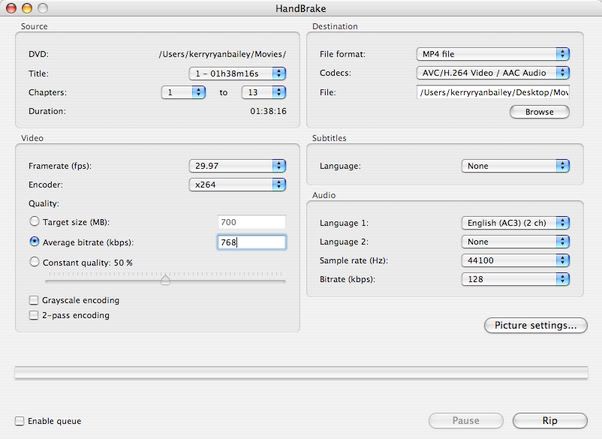
HANDBRAKE H.264 PROBLEM SOLVED!! DOWNLOAD HERE!!!

This is a version of Handbrake that enables the "Baseline" profile instead of the "Main" profile. That was the whole problem with the videos not being able to transfer to the iPod when using the H.264 codec. Now, I tried it & it works great!

Here you go: http://s8.yousendit.com/d.aspx?id=0RVTS3ESHZ1Z535XQLI2Z25GHD

P.S. Thanks to Azdude for getting get me file.

Posted on Oct 26, 2005 12:11 AM

173 replies

Oct 28, 2005 1:08 PM in response to Community User

Where did you tell handbrake to send the file, because I retyped the destination in spotlight and nothing was found !!

Handbrake said in the left hand bottom corner, "Done" !!

Also what did you put in 'Audio' section under languages????
Because in the 'Handbrake' tutorial it said to choose English (mpeg),
but when I looked there was no such chioice!!!!!!! Uffff!

Oct 28, 2005 3:58 PM in response to Joel Henriques

I think for 4:3 content ripped at 320:240 I agree. But if you rip it mp4 instead, you can exceed the 320:240 limitation. I'm currently ripping a 704:327 mp4 file to see how it looks on the iPod and on TV. MP4 files are limited by 230400 pixels in any ratio. The 704:327 maintains the same aspect ratio for the movie Batman Begins. Supposely, if you rip it at this resolution, even though the ipod will scale it down to fit it's screen, it will display it at this resolution on the TV (with scaling where appropriate).

Glor

Oct 28, 2005 4:05 PM in response to brendan sheehan (jnr.)

First thing to do is open up Handbrake. Then select a DVD/Folder image. Then choose your Destination. After that, do all your settings & hit Rip.

Now, everytime you open Handbrake, it will remember where you wanna save your videos.

This thread has been closed by the system or the community team. You may vote for any posts you find helpful, or search the Community for additional answers.

HANDBRAKE H.264 PROBLEM SOLVED!! DOWNLOAD HERE!!!

Welcome to Apple Support Community
A forum where Apple customers help each other with their products. Get started with your Apple Account.