Mac Book Pro (Late 2008) and glossy screen

what are photographers who use their Mac Book Pro for digital photography to do now that the new Mac Book Pro only comes with a glossy screen? I have several friends who are now in trouble. they cannot use the glossy screen as it is impossible to calibrate and get accurate colors. One has already returned a 24" iMac with glossy screen and had to upgrade to a Mac Pro and a LaCie LCD display. the rest depend on the Powerbook G4s and Mac Book Pros as they shoot extensively on sites, not in a studio. Who do we complain to so that Apple will give back the non-glossy screen option. The 17" Mac Book Pro still allows choice but its too large for lugging around from shoot to shoot.

Apple Powermac G4 (AGP), Mac OS X (10.5.5)

Posted on Oct 15, 2008 9:35 AM

Reply
129 replies

Nov 8, 2008 4:07 AM in response to Jaisen

{quote:title=Jaisen wrote:} If you can afford a 2k+ laptop you can certainly afford a 10$ piece of plastic, especially if that prevents you from migrating to windows. Enough with the drama already...

{quote}


So you pay £2000 for a professional laptop for your work only to stick a cheap peice of plastic over the screen?.

If you've bothered to read threads by graphic professionals/photogs who have gone down this route and given posts on the results they tell us this is not the answer.
So being flip telling people to 'stop the drama already' just because it may not be an issue that affects you shows you dont know what you're talking about sadly.

Nov 8, 2008 4:45 AM in response to CClaire

So being flip telling people to 'stop the drama already' just because it may not be an issue that affects you shows you dont know what you're talking about sadly


Jaisen Posted: Oct 15, 2008 2:00 PM

CClaire Replied: Nov 8, 2008 4:07 AM

Being flip and dramatic tends to invite criticism for being flip and dramatic.

Nov 8, 2008 5:02 PM in response to thanon

I don't know the monitor market very well, since I've got the large iMac screen and an older still working NEC 19" CRT serves well for a second monitor. I know the Eizo's are generally on their pro models very good. And I think Nec has some good LCD's as well. I'm with you, I prefer the matt screen, but If the glossy were a great monitor, I've sorted adjusted to the idea. I'll probably get a knew iMac a couple of updates of models up the road as the one I have now is still doing the job and it will no doubt be a glossy.

Nov 12, 2008 4:58 AM in response to capaho

capaho wrote:
How any graphics designer can say these computers are unsuitable for professional work is beyond me.

A lot of people are spending a lot of time hypothesizing about potential problems that don't actually exist, or that are exaggerated well beyond reasonableness.


And yet again you feel like you can speak for the rest of us "actual graphics professionals" while in reality you aren't even in the field. Why do you keep on thread jacking other peoples threads with you baseless cheerleading?

Please just go away, we all know that you love your MBP and don't have an issue with the screen. You've made that abundantly clear while at the same time not considering anyone elses requirements in a laptop.

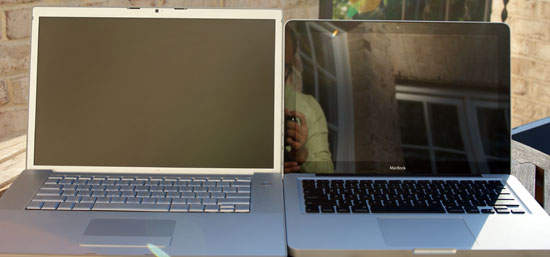
Oh yeah, that was a great review from anandtech, and I quote "Glossy screens are in, unfortunately." Yes, over-reacting to the reflections, because there aren't any,

http://images.anandtech.com/reviews/mac/MacBookPro2008Update/mattevsglossy.jpg

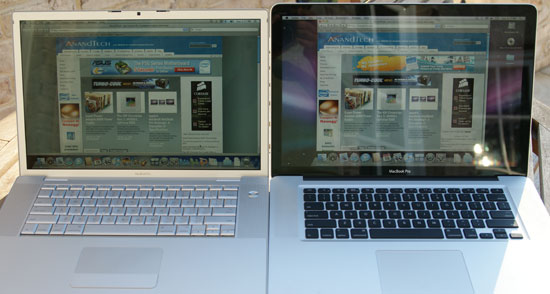
even compared to the old glossy MBP:

http://images.anandtech.com/reviews/mac/MacBookPro2008Update/MBP-oldvsnew.jpg

Dec 29, 2008 8:14 AM in response to dosers

I'm not sure about the iMacs but on my new Macbook Pro i'm very less than satisfied with the glossy screen. Just before I had my 1st generation intel macbook pro replace, they had replaced the original matte screen with a glossy one. though that one seemed much better than the one that came on my new one. I don't remember noticing any problems with the color and everything looked good.
But on my new MacBook Pro, the color looked off right from the beginning. I spent a long time trying to calibrate it and on the 5th try got it looking ok.
But overall the monitory puts a strain on my eyes and the colors just seem off.

The tint changes dramatically with even a tiny shift in viewing angle. if i simple nod my head up and down the color changes before my eyes as if you're wearing gradient tinted sunglasses. I use my computer mainly for music so it's not critical but if I do some design work. If I was a professional photographer or designer I'd be ****** as ****. Also, the black frame on the screen reduces the actual viewable screen space.

I'm comparing the clarity and readability of the text to my girlfriends old white intel Macbook, and the colors and clarity are actually better on hers.
I find the brightness settings to be to extreme on mine. Full brightness the white is almost painful, drop down to half and everything gets very dark. Fuction was better on older macbook pro and on my g/f's macbook. 😟

Lastly, the new keyboard. Love the feel, but not so happy with the look.
the back lighting of the keys glare through the tiny spaces/cracks from under the keys. I use the computer for DJing and in dimly lit situation that glare is ugly and distracting. I end up turning off the key back light most of the time, but luckily i type well and don't need to see most of the keys.
when i do need to turn it back o, ironically i have to use my flashlight.
silly. But the black keys are much easier to see the letter than the silver ones and i get less typos with this design.

i think one thing nobody seemed to mention is that they purposely make cosmetic changes every couple of years to all of their products not because there is a demand or need, but because it is for marketing purpose. anybody who knows macs can look at what you've got and know about how old it is. everybody gets the "new" fever and wants to have the newest model, even if it's not the best design.
just look how often the ipod's design has changed, it's like every other week.

so in 2 years, no matter what, you're gonna want a new one cause your **** looks dated, even if you don't need all the new bells and whistles.

Last comment. My 1st generation macbook pro, tho it ran hot and the 1st hard drive was defective, never crashed on my (after replacing the hard drive).
My first day using Photoshop (older version under Rosetta) i had about 5 things open and had been working for 30 minutes, had not saved. Photoshop didn't crash, it just disappeared as did all other programs opened. Firefox, Preview, Text.
No crash error message... just gone! All my running programs shut off and disappeared. Of course I lost my work. This only happened once and of course I began saving right away and often. Something that used to be a habit of mine back in the PC days. I'll keep an eye on this to see if it happens again.

OK sorry for the short novel.

Dec 29, 2008 6:56 PM in response to duskdjtilldawn

The tint changes dramatically with even a tiny shift in viewing angle. if i simple nod my head up and down the color changes before my eyes as if you're wearing gradient tinted sunglasses.


That is the gradient effect that is characteristic of TN panel displays, it's inherent in the physical construction of the TN panel itself and has nothing to do with the glass panel.

Also, the black frame on the screen reduces the actual viewable screen space.


If the black frame were viewable screen space, that would make it roughly a 16" display rather than a 15" display.

so in 2 years, no matter what, you're gonna want a new one cause your ** looks dated, even if you don't need all the new bells and whistles.


It's quite possible that in another two years LCD displays will be history and RGB LED displays will be all the rage in laptop displays, and there are no matte screen LED displays.

This thread has been closed by the system or the community team. You may vote for any posts you find helpful, or search the Community for additional answers.

Mac Book Pro (Late 2008) and glossy screen

Welcome to Apple Support Community
A forum where Apple customers help each other with their products. Get started with your Apple Account.