Ideas about "radio tuning error" or am I off to the genius bar?
iBook G4, Mac OS X (10.4.2)
Thanks MikeinRichmond! This worked for me too! Its been about a week that I couldnt listen to the radio in iTunes after doing so everyday for months now. Don't know what the deal is with all of these different fixes working for the same exact problem, but I hope what ever worked for you, keeps on working! Apple ready needs to get on this one!
Did not work for me regarding Mikeinrichmonds method 😟 Come on Apple techs where are you!! 😠
Same here in Brazil!!! No radio!
Must be these new **** laws against piracy, etc....
As if!
Got the same problem, and from the log:
3/1/12 9:01:24.241 AM [0x0-0x5b45b4].com.apple.iTunes: The plugin 'Quartz Composer Visualizer' failed to load because it has the wrong CPU architecture for this version of iTunes. (3585)
Not sure what is going on. It happens to my new machine, and iTunes has nerver run before.
Thanks Zechto, also worked for me.
Ok. I removed the Quartz Composer Visualizer plugin from /Library/iTunes/iTunes Plug-ins, cleared the cache from the iTunes Preferences Advanced tab, and the radio works. My wild guess is that the plug-in is only good for 32bit?
Thank you all. Did the /Library/iTunes/iTunes Plug-ins, cleared the cache from the iTunes Preferences Advanced tab...
But the strangest thing! It's really random...one time it works then it doesn't.
Jazz, Blues, etc... are working again but Eletronica, Oldies, etc... aren't!
Soon Apple has to say something.
Cheers.
Looks like I spoke too soon! The clearing cache plan worked for 1 day and now its up to its old stuff again. Not sure what to do now. All genres are NOT working for me. COME ON APPLE.. dont let us down!!
As suggested by a previous post, I noticed that I had several remote speakers enabled.
I went and deselected them, so only the local computer was selected.
Hey presto - the Radio categories would update & error disappeared!
I could then reenable the speakers & everything is working fine again.
Hope this helps someone :-)
It's been a long time since this problem first arose. Until it is fixed may I suggest the following workaround:
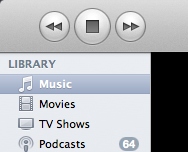
Go to your iTunes and select your Music library from the leftmost column:
In the main window, sort the list by clicking on "size": (see *** below if you don't see it)
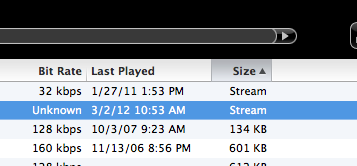
*** IF *** you are lucky enough to have played your favorite radio station recently, you may see it included in your library, with the size indicating "stream". You can then play it normally, even though the "radio tuning service" is not working.
To make this even easier, drag the entry to your Dock, your desktop, or someplace else convenient. Opening it will open iTunes and start streaming.
Hope this works for everyone until Apple fixes things.
FYI this problem occurs on every one of my Macs and Windows machines running all manner of iTunes versions. It affects OS X Panther, Tiger, Snow Leopard, Lion, OS 9, Windows XP, Vista and 7. There is nothing we can do about it.
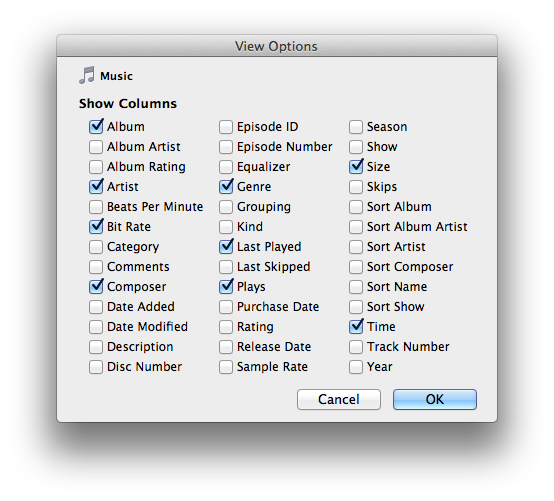
*** If you do not see "Size" then select "View Options..." from the "View" menu and select it:
This "it just works" is falling further and further from the truth. I thik apple has peaked in their usability/compatibility, and adding more and more "features" that regularly fail is a true testament to flat out profit taking. I constantly have issues with airtunes, radio, ipod freezing, etc... Never again will I buy an apple product. I never have to deal with this sometimes works, sometimes doesn't, with windows and linux. Plus the hardware is half the price. Trying to hunt these bugs down is a waste of time, and should have never made it past the development floor.
On an unrelated note, "mastered for iTunes" is a scam, and quality is not better than a CD which have been around for 30 years. It isn't hard to support a lossless (.flac) file format, considering bandwidth and storage are so cheap these days.
Thanks for this suggestion, but it hasn't solved the problem for me.
I get the error message when I click on a group of radio stations (e.g. News / talk). At the top of the screen iTunes is attempting to "refresh" this folder, but after less than a second the error message appears. Other elements of iTunes (podcasts, music library) appear unaffected.
Great!! Thanks John. That worked for me on my older mac.
It's very hard to go without music.
Turning off and on Home Sharing solved this problem for me! Easy fix, give it a shot. THANKS!
@ambercharlie
I've just turned ON and OFF Home Sharing (it wasn't on to start with) and then found all my radio stream categories appear to be loading instantly.
A few points to note:
a) I haven't tried listening to radio in 3 or 4 days, and stupidly I didn't check to see if it was still broken before attempting this solution - so I can't confirm if it was something else...
b) On Friday our ISP experienced DNS server issues and we updated new DNS server IP addresses to use GoogleDNS (set your DNS servers to 8.8.8.8 and 8.8.4.4 to use them). This may also have helped resolve the problem.
c) I have a playlist called "Favourite Radio Stations" containing (yep!) my favourite radio stations. These were unaffected by this 'bug' - only the ability to open a category in Library -> Radio was affected. (Use a playlist to avoid future issues reoccurring, and to make finding your radio stations quick and easy).
d) I strongly suspect the issue to be network / routing / web-service related - in which case it may be that none of the above have anything to do with the problem now being solved for me.
I'd be interested to hear other people's findings...
Ideas about "radio tuning error" or am I off to the genius bar?

