Apple Music : Resource Unavailable

Recently I changed my subscription plan to the students one, but my previouse one is still active. All of my music dissapeared, I cant downlod anything and when I try to play any song I get “resource unavailable” error. What does it mean?

P.S I’ve tried restarting Iphone, the app itself and logging off my apple id, nothing helped

iPhone 6s

Posted on Dec 5, 2018 5:27 PM

Reply
Question marked as Top-ranking reply

Posted on Dec 7, 2018 2:23 PM

Hello and welcome to Apple Support Communities, fvillain


If I understand your post correctly, you're not able to play music with your Apple Music Student membership. I'd like to help.


Is iCloud Music Library turned on? This guide with help you check:


On your iPhone, iPad, or iPod touch
Go to Settings > Music, and tap iCloud Music Library to turn it on. You won’t see an option to turn on iCloud Music Library until you sign up for Apple Music or iTunes Match.
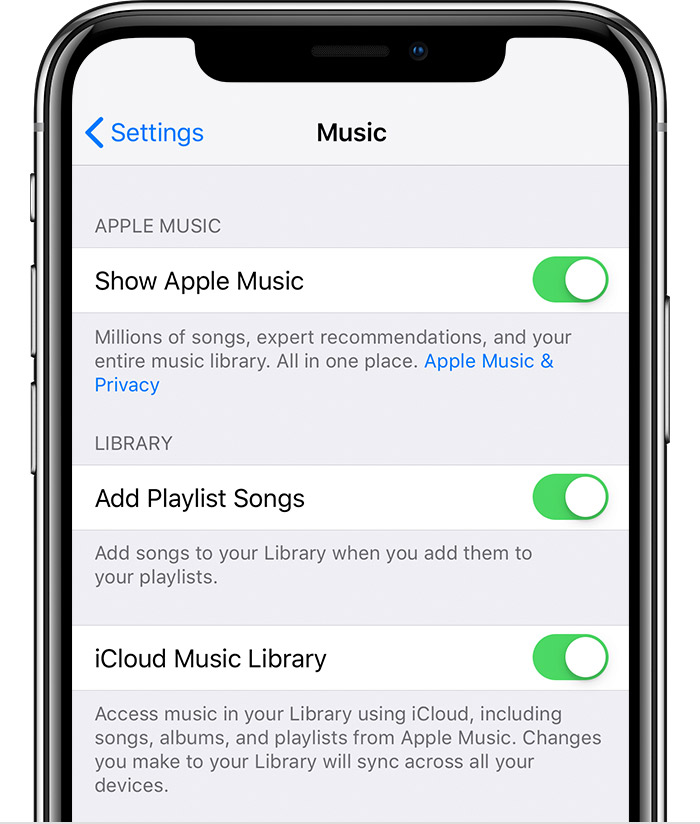
If you already have music on your device, you'll be asked if you want to keep the music that's on your device.
If you choose Keep Music*, the music from your device adds to your iCloud Music Library.
If you choose Delete & Replace, the music on your device is replaced with the content of your iCloud Music Library. 

* When you choose Merge, songs on your device that are in the Apple Music catalog become instantly available to access on your other devices. On iPhone, iPad, and iPod touch, songs that we can't match are shown on your other devices. But you won't be able to play them on your other devices until you sign in to iCloud Music Library in iTunes.


See the full article here:


Turn on iCloud Music Library with Apple Music


Let us know if that resolves this issue for you. 


Thanks for using the Apple Support Communities. Take care.

1 reply
Question marked as Top-ranking reply

Dec 7, 2018 2:23 PM in response to fvillain

Hello and welcome to Apple Support Communities, fvillain


If I understand your post correctly, you're not able to play music with your Apple Music Student membership. I'd like to help.


Is iCloud Music Library turned on? This guide with help you check:


On your iPhone, iPad, or iPod touch
Go to Settings > Music, and tap iCloud Music Library to turn it on. You won’t see an option to turn on iCloud Music Library until you sign up for Apple Music or iTunes Match.
If you already have music on your device, you'll be asked if you want to keep the music that's on your device.
If you choose Keep Music*, the music from your device adds to your iCloud Music Library.
If you choose Delete & Replace, the music on your device is replaced with the content of your iCloud Music Library. 

* When you choose Merge, songs on your device that are in the Apple Music catalog become instantly available to access on your other devices. On iPhone, iPad, and iPod touch, songs that we can't match are shown on your other devices. But you won't be able to play them on your other devices until you sign in to iCloud Music Library in iTunes.


See the full article here:


Turn on iCloud Music Library with Apple Music


Let us know if that resolves this issue for you. 


Thanks for using the Apple Support Communities. Take care.

This thread has been closed by the system or the community team. You may vote for any posts you find helpful, or search the Community for additional answers.

Apple Music : Resource Unavailable

Welcome to Apple Support Community
A forum where Apple customers help each other with their products. Get started with your Apple Account.