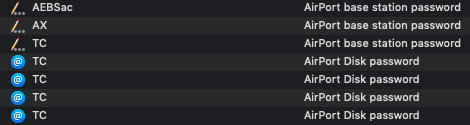
The image above is from the Keychain app on my Mac mini. At the time I took this screenshot, I had three AirPort base stations on the local network:
- AX - a 2nd gen AirPort Express base station
- AEBSac - an 802.11ac AirPort Extreme base station, and
- TC - an 802.11ac Time Capsule
You will notice that each of these base stations have an AirPort base station password. This is the same as the base station's administrator password. Only the TC has multiple AirPort Disk passwords. That is because, the TC is sharing its internal hard drive over the network using both the AFP & SMB file sharing protocols. Both of these passwords are unique to the Apple base stations.
One thing to understand is that even if you no longer have one (or any) of these base stations any longer, these passwords still reside in your Mac's Keychain database. They are not automatically removed.
The rest of the list is found either as 'Program Password' or 'Airport-network Password'. None of them are listed as AirPort base station password' or 'AirPort Disk password'.
... and that is what you would expect for non-Apple routers.
Which version of OS X or macOS is your Mac running? (Note: The image I provided is from macOS Mojave, the currently latest version of Apple's operating system.)
The following article may be helpful in understand how the Keychain works:
Unfortunately, I haven't got a clue where to look for the information about modem, router, switches, etc. Can you please inform me where to look for these data?
First, is this network you home network or a network that you connect to at another location? Equally unfortunate, would be how to tell you how to determine this easily as it would be different on the networking equipment's manufacturer.
Going back to network security, if this is your own wireless network, then if that network is configured to use WPA2 wireless security and you change your wireless network's password periodically, then it should be as secure as it possibly can be at this point in time.

