MacBook Pro fan noise

I bought my MacBook Pro in June, 2018. It is a 2017 model with 16GB RAM and I7 Processor.


Sometimes, the fan runs fast and makes a noise. I do not understand the exact reason why!

All I do is simply close all the open applications and if the noise doesn't stop, I restart the laptop.


Please help me find out what the issue is.

Posted on Dec 12, 2018 5:15 PM

Reply
Question marked as Top-ranking reply

Posted on Dec 12, 2018 6:04 PM

3..... Disable Flash in your browser.

Flash is now disabled by default in Firefox. In Chrome, you can use Flashcontrol to disable instances of Flash (it still allows you to view Flash on a per-site basis as needed). It’s one of the biggest causes of CPU/GPU stress, and will no doubt increase your Macbook Pro fan speed because Flash is so intensive on hardware.


4 ... Poor Venting or Circulation

This is the simplest of loud fan causes and also the easiest to check, fix, and resolve. Here’s the explanation: Your Mac heats up as the electrical process required to use it release energy. The fans inside are built to cool it down, but they have to work overtime when there isn’t normal airflow around the laptop.

If you’ve been working with your MacBook flat on your lap or desk, you’re effectively blocking any air from circulating underneath your laptop and forcing the fans to work twice as hard to cool the component. Or have you been using your Mac in dusty or dirty locations lately? Perhaps you had to take it to a worksite out of the office or went on vacation and took it with you.

Lint, dust, and other air contaminants can build up on your fans if you’ve been in a less than ideal environment lately, or simply over time


Solution : If you just need a short-term fix, propping your MacBook up and leaving it inactive for a few minutes to cool down before you go back to work should help alleviate the problem.

But if this is a consistent issue for you, consider investing in a high-quality laptop stand to lift your MacBook and allow for better air circulation. Also, consider using a Cooling Pad if the laptop constantly heats up.

Make sure it is not clogged with dust. Fans are noisy when they have to run faster, and it may be running faster because its clogged with dust. Dust will dramatically reduce the effectiveness of your Macbook Pro fan. It is quite easy to clean a Macbook Pro fan, you can even try to do it without opening your Macbook Pro by using a can of compressed air and pushing the air through the vents at the back of your Macbook Pro.

If all else fails, take your Mac to a nearby Apple Genius Bar to have it serviced and professionally cleaned. Also, you may need to replace the fan of your MacBook for better performance.


Best of Luck


2 replies
Question marked as Top-ranking reply

Dec 12, 2018 6:04 PM in response to SparesDelhi

3..... Disable Flash in your browser.

Flash is now disabled by default in Firefox. In Chrome, you can use Flashcontrol to disable instances of Flash (it still allows you to view Flash on a per-site basis as needed). It’s one of the biggest causes of CPU/GPU stress, and will no doubt increase your Macbook Pro fan speed because Flash is so intensive on hardware.


4 ... Poor Venting or Circulation

This is the simplest of loud fan causes and also the easiest to check, fix, and resolve. Here’s the explanation: Your Mac heats up as the electrical process required to use it release energy. The fans inside are built to cool it down, but they have to work overtime when there isn’t normal airflow around the laptop.

If you’ve been working with your MacBook flat on your lap or desk, you’re effectively blocking any air from circulating underneath your laptop and forcing the fans to work twice as hard to cool the component. Or have you been using your Mac in dusty or dirty locations lately? Perhaps you had to take it to a worksite out of the office or went on vacation and took it with you.

Lint, dust, and other air contaminants can build up on your fans if you’ve been in a less than ideal environment lately, or simply over time


Solution : If you just need a short-term fix, propping your MacBook up and leaving it inactive for a few minutes to cool down before you go back to work should help alleviate the problem.

But if this is a consistent issue for you, consider investing in a high-quality laptop stand to lift your MacBook and allow for better air circulation. Also, consider using a Cooling Pad if the laptop constantly heats up.

Make sure it is not clogged with dust. Fans are noisy when they have to run faster, and it may be running faster because its clogged with dust. Dust will dramatically reduce the effectiveness of your Macbook Pro fan. It is quite easy to clean a Macbook Pro fan, you can even try to do it without opening your Macbook Pro by using a can of compressed air and pushing the air through the vents at the back of your Macbook Pro.

If all else fails, take your Mac to a nearby Apple Genius Bar to have it serviced and professionally cleaned. Also, you may need to replace the fan of your MacBook for better performance.


Best of Luck


Dec 12, 2018 5:43 PM in response to dannythemanofpassion

Hello Dannythemanofpassion ,

Welcome to Apple Discussion.


Well there many possible cause for this .


Because the fans are used to cool the internal electronic components, forcing these components to work overtime will also kick the fans into high gear. This results in the annoying whirring noise you want to get rid of.


  1. Running Heavy Apps :

Web browsing and document editing are simple everyday tasks that wouldn’t contribute to this problem. However, if you’re using heavy creative software such as the Adobe Creative Suite, photo, and video editing applications, or graphics-intensive games you could be sending your fans into a frenzy trying to keep up.


solution: If you must run heavier programs, take all possible steps to reduce the load on your computer.

  • Only run programs you absolutely need at one time and don’t leave others idle in the background.
  • Turn down frame rates or processing speeds as needed.
  • Make sure you’re already taking all possible steps to optimize your Mac such as using it in a temperature controlled room rather than outside on an already hot day, etc.

If this is a regular problem and you can’t reduce the workload, you may need to consider buying more RAM to upgrade your mac .


2 Hidden Cpu Drain :

So you haven’t been using any noticeably heavy programs but suddenly the fans are acting up?

Especially if you’ve recently updated, changed some settings, or installed a new program, you could be experiencing some hidden background tasks that are eating up your CPU.

The easiest way to check if this is happening is to go to Spotlight (with a search icon) in the top right corner of your screen and type “Activity Monitor”.
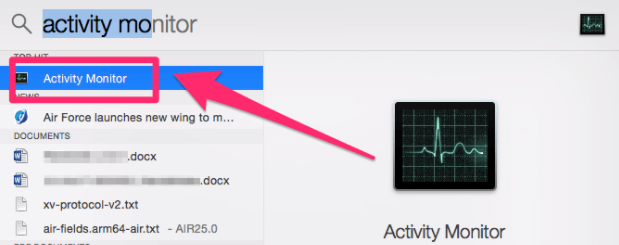


Once Activity Monitor is open, navigate to the CPU tab and look for programs that are using extremely large percentages of the available power. If you find one, then you know what your culprit is.

Keep in mind if it’s a program and not a background task (apps have recognizable names and icons, background tasks are a bit more obscure looking), then you should check #2 instead.
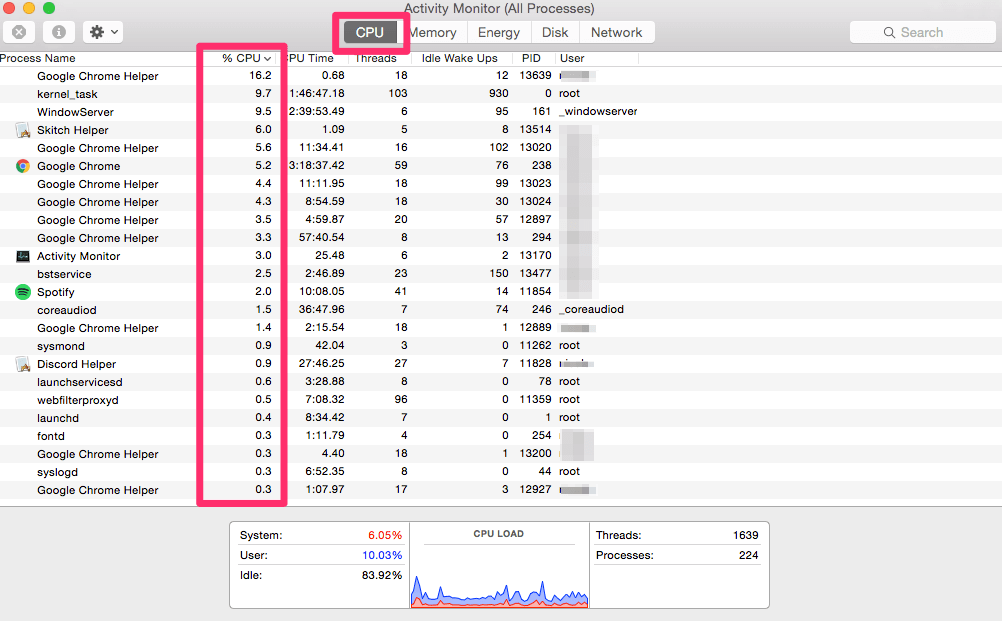


Solution : As you can see in my screenshot, I’m not currently experiencing any issues and all the usages (highlighted in red) are fairly low. But once you’ve identified tasks that are using unreasonable amounts of CPU, click on it in the Activity Monitor.
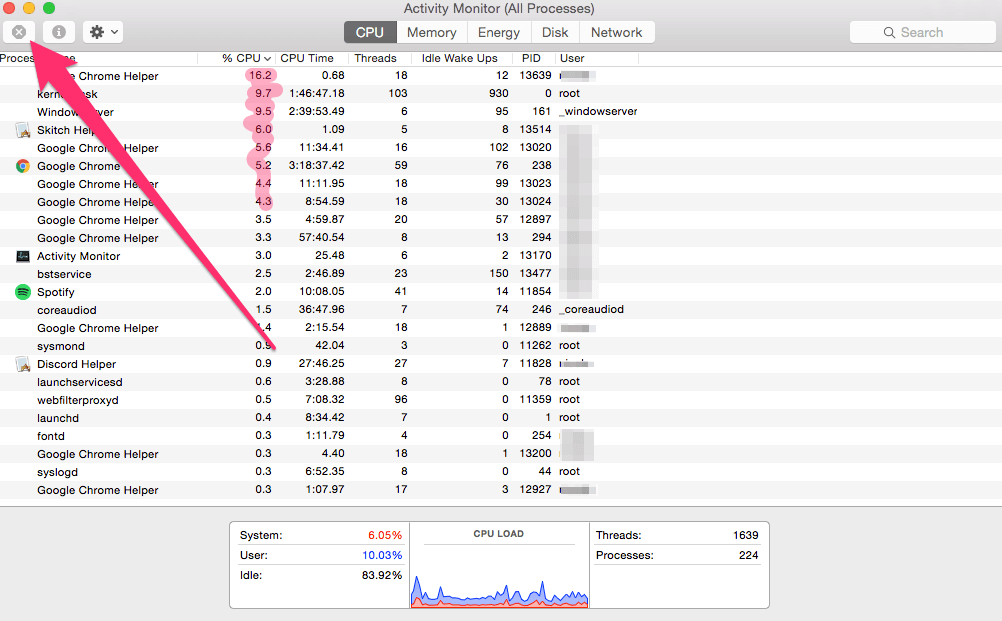
It will be highlighted in blue, and you’ll be able to click the X button in the top left corner which will quit the process. Wait a few minutes for the fans to wind down and to examine how quitting the process affects your machine.

Pro tip: make sure you’ve saved everything you’re working on before force quitting tasks from the activity monitor.

If the task re-opens later or comes back, it may be built into a specific program. In that case, you’ll need to research the program it is part of and see which setting is to blame.


Cont. ........

This thread has been closed by the system or the community team. You may vote for any posts you find helpful, or search the Community for additional answers.

MacBook Pro fan noise

Welcome to Apple Support Community
A forum where Apple customers help each other with their products. Get started with your Apple Account.