How can I delete the message " Number changed to Primary " on my iPhone ?

We have a two prepaid phone cards since Christmas. I have an iPhone and my husband has a simple flip-phone. The first SIM card did not work and the second SIM card looked his simple flip-phone . That's way, we exchanged the SIM cards and we inserted this second SIM card into my iPhone. I could not access Voicemail and send messages, just receive messages. I called Bell Customer Service from my iPhone and the automated service was unable to determine the input numbers from my keyboard.Then my iPhone went grey and there was the message: "Error performing request Unknown Error ". I called Apple Support. After that, I received an Apple survey and the message: " Number changed to Primary ". Yesterday I returned to the Bell store and they put a new (third) SIM card into my iPhone for free. Now I have connected the message: "Number changed to Primary" with every message. How can I delete this message ?

iPhone XS, 12

Posted on Feb 12, 2019 9:16 AM

Reply

Similar questions

2 replies

Feb 12, 2019 9:37 AM in response to jana41

Follow These Quick Tips To Get Rid of Number Changed To Primary Message in Message App

  • Toggle iMessage Off, wait 20-30 seconds, and toggle back on to refresh the connection to Carrier
  • Set Up Primary and Secondary numbers for SIM and eSIM support, when using dual-SIM capabilities
  • Set your default line options
  • Change the number in iMessage and FaceTime line setting

Set-Up Primary and Secondary SIMs on Your iPhone XS and XR

Once you activate a second SIM or eSIM, you must label your plans and choose which one is your primary. iMessage and FaceTime use your default line to call and send messages.


If using iOS 12.0 (Settings > General > About >Version,) you won’t see these options! Update to iOS 12.1 or above

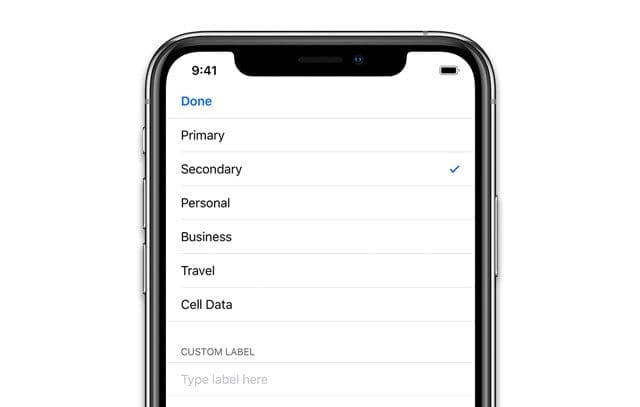
Label Your SIM and eSiM 

  • Go to Settings > Cellular and tap the number to label it
  • Tap Cellular Plan Label
  • Select a prefilled label or create a custom label

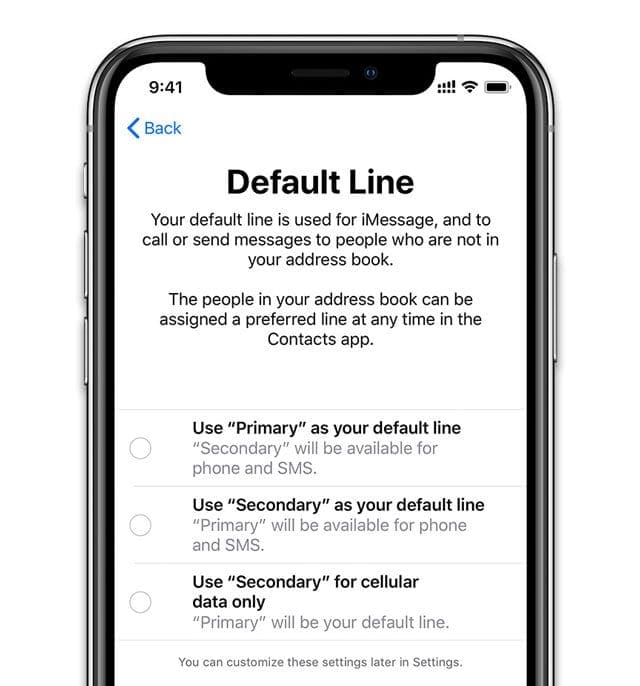
Seeing Set Default Line Screen? 

  • iMessage and FaceTime require you to set up your default number
  • Choose your options
    • Set Primary as default–voice, SMS, Data, iMessage, and FaceTime all use your primary number
    • Use Secondary–voice, SMS, Data, iMessage, and FaceTime use your secondary number
    • Set Secondary for Data only–keeps primary for voice, SMS, iMessage, and FaceTime but data uses your secondary number


To change which line iMessage & FaceTime Uses

  1. Go to Settings > Messages.
  2. Tap iMessage & FaceTime Line
  3. Select which phone number you want to use for these services


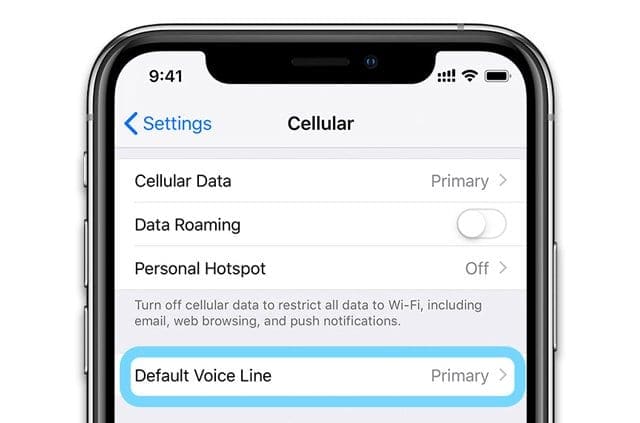
Change Your Default Voice Line

  1. Tap Settings > Cellular > Default Voice Line 
  2. Tap to change


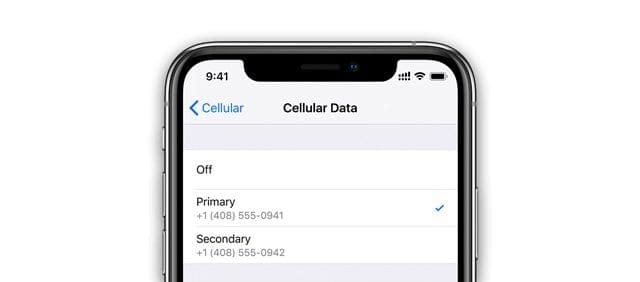
Change your cellular data number

  1. Go to Settings > Cellular 
  2. Tap Cellular Data
  3. Select which phone number you want to use for your data 


This thread has been closed by the system or the community team. You may vote for any posts you find helpful, or search the Community for additional answers.

How can I delete the message " Number changed to Primary " on my iPhone ?

Welcome to Apple Support Community
A forum where Apple customers help each other with their products. Get started with your Apple Account.