Since last update my outlook mail won't sync with mail iOS app

Mail integrated iOS app isn't fetching my emails from Outlook (gmail and corporative email are working just fine)

I think it may have stopped working since last update. Any fixes? I tried deleting the account and re adding and now my inbox in Mail app is empty and still not syncing new emails.

iPhone 7, 12

Posted on Feb 20, 2019 7:04 AM

Reply

Similar questions

2 replies

Feb 20, 2019 7:19 AM in response to Mashá

If your Gmail and Corporate email are working fine then the issue cannot be iOS update.


I have a passion and hobby to go through complete literature and review of all iOS and needless to say I haven't missed iOS 12.1.3 & 12.1.4 assessment published on various news media and on Apple web page including leading news magazines (Forbes).


No where I could find any link on the problem faced by you. Introspect and have a complete and thorough check on the way you handle settings on your iPhone.


Read often for a peaceful & stress free life.


Nevertheless try checking the following on your iPhone (See the Two pics below for better understanding)


Setting > Password & Accounts > [Tap on the account which is not synching] > Mail [Enable]


Add an email account to your iPhone, iPad, or iPod touch - Apple ...

https://support.apple.com/en-in/HT201320


Feb 20, 2019 10:19 AM in response to SravanKrA

My corporate email is hosted my google accounts and my gmail is obviously through google servers. It seems as if the problem is only with Hotmail (outlook) integration with iOS Mail app.


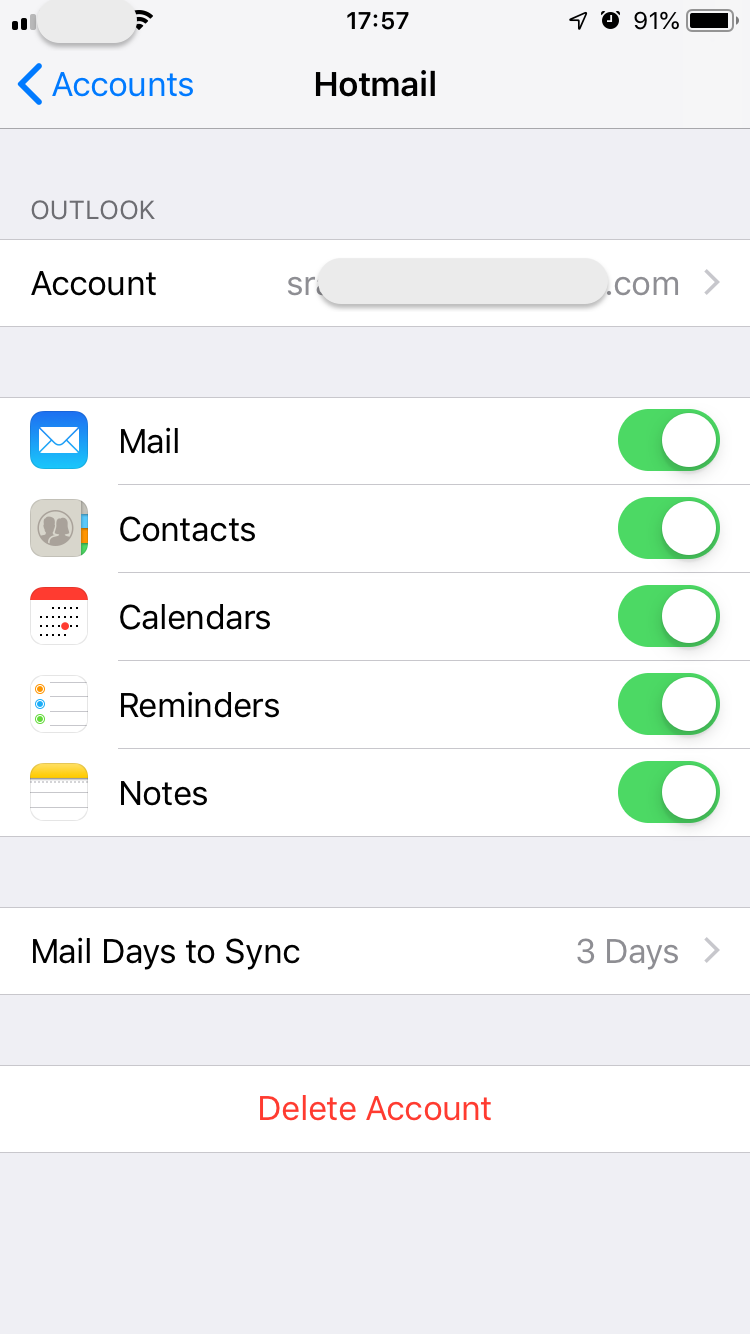
I checked and all the buttoms are activated in the Sync' options in the iPhone settings.


As you can see, it's fetching my emails for all my accounts but the Outlook one:

This thread has been closed by the system or the community team. You may vote for any posts you find helpful, or search the Community for additional answers.

Since last update my outlook mail won't sync with mail iOS app

Welcome to Apple Support Community
A forum where Apple customers help each other with their products. Get started with your Apple Account.
