Bluetooth Issues on Windows 10 Bootcamp

Hi there,


I'm having real issues with Bluetooth audio when using Win 10 through Bootcamp. My Bluetooth keyboard and mouse work perfectly fine, but audio is choppy and keeps cutting out, with no such problems on MacOS. I have my MacBook clam-shelled, but even when open the issues persist


I know this has been posted about before, but a lot of the suggested fixes talk about going into the Device Manager and enabling Bluetooth Collaboration under the Broadcom 802.11n network Adapter. However, Bluetooth Collaboration isn't an option in my settings:
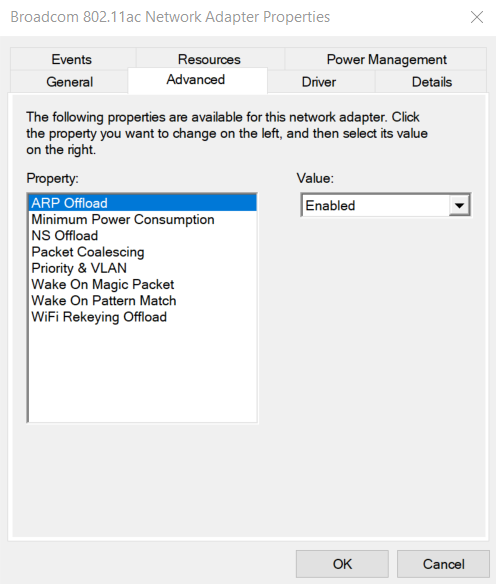


If anyone has a solution, it'd be greatly appreciated!


Thanks :)


MacBook Pro 13”, macOS 10.14

Posted on Feb 24, 2019 12:46 AM

Reply
Question marked as Top-ranking reply

Posted on Feb 24, 2019 6:34 AM

You are running a generic Windows driver, which does not have the setting.


Use If some Mac features don't work when running Windows in Boot Camp - Apple Support as reference and install the Apple BC drivers and check.

Similar questions

3 replies

Feb 26, 2019 2:50 AM in response to Wheetoz

So I've done as instructed, with the option still not appearing. I've further gone and uninstalled all the Bluetooth related drivers, before re-installing them from the memory stick, again leaving me with the generic windows driver without the option to toggle Bluetooth Collaboration. Any ideas on what do to next?


Thanks!

This thread has been closed by the system or the community team. You may vote for any posts you find helpful, or search the Community for additional answers.

Bluetooth Issues on Windows 10 Bootcamp

Welcome to Apple Support Community
A forum where Apple customers help each other with their products. Get started with your Apple Account.