Cannot Change AAC Import Settings iTunes

I have tried uninstalling iTunes, installing older versions and updating. Still no fix. I've had this problem since 2012 and I cannot change my import settings. The custom setting on AAC is locked in and gives me no way to change the custom preset. I am tech savy and I know how to change the settings. It lets me change everything else but AAC. I am on Windows 7. Somebody help!

Posted on Apr 2, 2019 11:52 AM

Reply

Similar questions

4 replies

Apr 2, 2019 1:14 PM in response to kristoffer14

It is working correctly on my Windows 7 machine. Perhaps you have misunderstood the process. It also depends on what precisely you are trying to do.


Import Settings refers primarily to importing from CD. To change that, click on Edit/Preferences/General>Import Settings and then select the format you want:
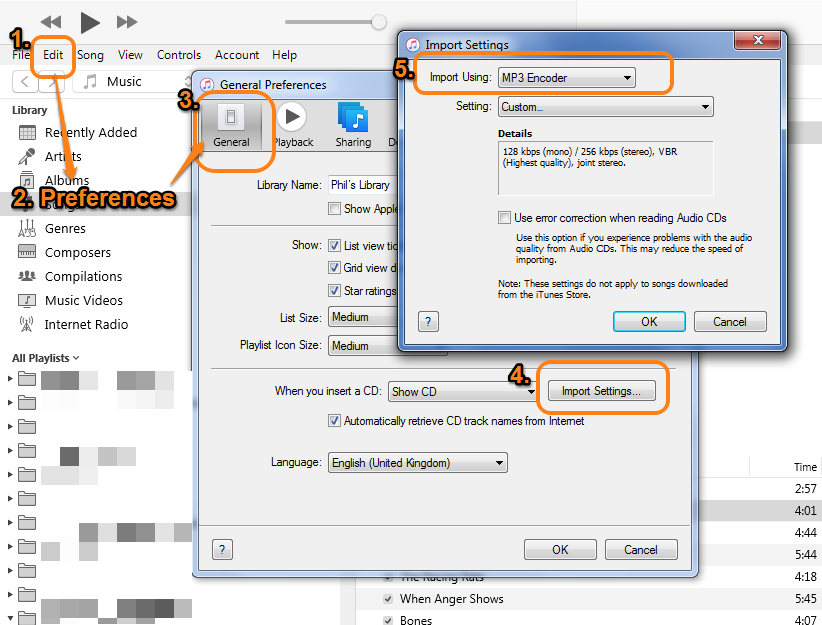


This will not affect the importing of any other source. When you import an MP3, or AAC file into iTunes, that is the format it will be imported as.


The other use for that setting is when converting existing files.


If you wish to convert a file that you have added to your Library (for example, an unprotected iTunes Store AAC file), iTunes can do that. However, the Import Using setting has to be set as outlined above. For example, if you want to convert from AAC to MP3, the Import Using setting has to be set to MP3. Once it is, the command File/Convert will show MP3 as an option.


Another way of putting this is as follows: in the screenshot below, the option File/Convert/Create MP3 version will only appear as MP3 when the Import Using is set to MP3.
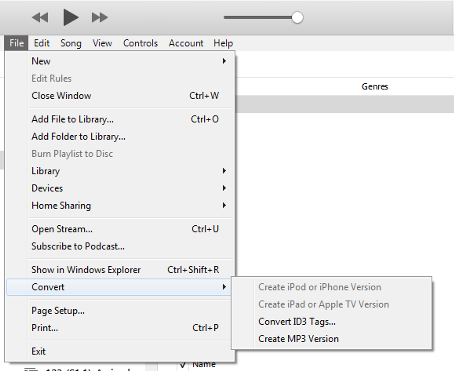


If Import Using is set to AAC, then you will see File/Convert/Create AAC version instead.


If I have misunderstood what you are trying to do, please explain further. In particular, if you cannot change the Import Using setting as outlined above, at which point does it not work? What happens? If the problem is when you try to convert an existing file, what is the format of the file you are trying to convert?

Apr 3, 2019 8:01 AM in response to kristoffer14

I wonder if the Details box provides a clue:


The obvious question is "why doesn't your Details box provide information about the sampling rate (44,100Khz) or mention the mono bit rate?" There may a be a simple and valid reason, but to me, it suggests that you have a setting somewhere on your computer that is effectively restricting your choices here.


I believe AAC-HE is meant for low bit rate use isn't it (such as digital radio)? That would that it cannot be compressed any further. More importantly, have you specifically set and audio setting on your computer that might in turn be restricting iTunes?


Apr 3, 2019 6:03 AM in response to the fiend

I know how to convert. Literally I click AAC import options and the custom setting does not pop up the window to change the settings. It simply reverts to the setting used. Like I previously said, I can open up any other codec, be it mp3 for example, and I can change the settings there. But AAC ONLY will not let me change custom import settings for the compression. I have used iTunes for years and have never ran into this problem before until this PC.

When I go to step 5 and use AAC it will not let me change the bitrate.

The screen to change the bitrate simply does not pop up.

It just selects Custom Settings with no options available.

I will post screens for you. I have seen this problem but everyone seems to think it is user error. In fact I know how to use all of iTunes as an advanced user and it is not user error I promise you.

Thanks for you help.

I need to compress some audio to AAC-HE and I can't get into the screen to change it.

This thread has been closed by the system or the community team. You may vote for any posts you find helpful, or search the Community for additional answers.

Cannot Change AAC Import Settings iTunes

Welcome to Apple Support Community
A forum where Apple customers help each other with their products. Get started with your Apple Account.