If you do not need the WiFi signal that is provided by the Time Capsule, then it would probably make sense to turn off the WiFi function on the device.
Assuming the Time Capsule is now operating correctly, you can use the Comcast WiFi to back up over the Comcast wireless network or connect a Mac directly to one of the 3 LAN <--> Ethernet ports on the Time Capsule to connect to the network and back up that way.
Wait for the backup to complete first, before you make any other changes.
Open up AirPort Utility. It is located on your Mac as follows: Finder > Applications > Utilities > AirPort Utility
Click on the picture of the Time Capsule
Click Edit in the smaller window that appears
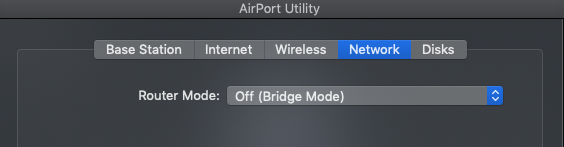
Click the Network tab at the top of the page and make sure that the Time Capsule is set up in a Router Mode of "Off (Bridge Mode)"
Click the Wireless tab at the top of the page and change the setting for Network Mode to "Off"

Click Update at the lower right of the window and the Time Capsule will save the new settings and restart

