Converting formulas from Excel to Numbers

I don't seem to have any issues getting the following formula to work on Excel but can't seem to get it to return a value in Numbers:


=SUM(LARGE(B1:B45,{1,2,3}))


I'm trying to get it to sum the total of the highest 3 numbers in the range of B1:B45.

MacBook Pro 15", macOS 10.14

Posted on Apr 17, 2019 6:25 PM

Reply
1 reply

Apr 17, 2019 10:57 PM in response to Platgirl

This Excel formula returns an internal array, then sums that array. Numbers supports only a few 'array' functions, and, according to your test, LARGE is not one of them.


You can get the same result as you would in Excel using the formula above with this version in Numbers:


SUM(LARGE(B1:B45,1),LARGE(B1:B45,2),LARGE(B1:B45,3))


Or you could take a more 'Numbers' approach, placing the list of values in a 45 row table Ifor space reasons, I've used a 20 row table in my example below), and replacing the range references with the 'whole column' references seen in the formula below this table.
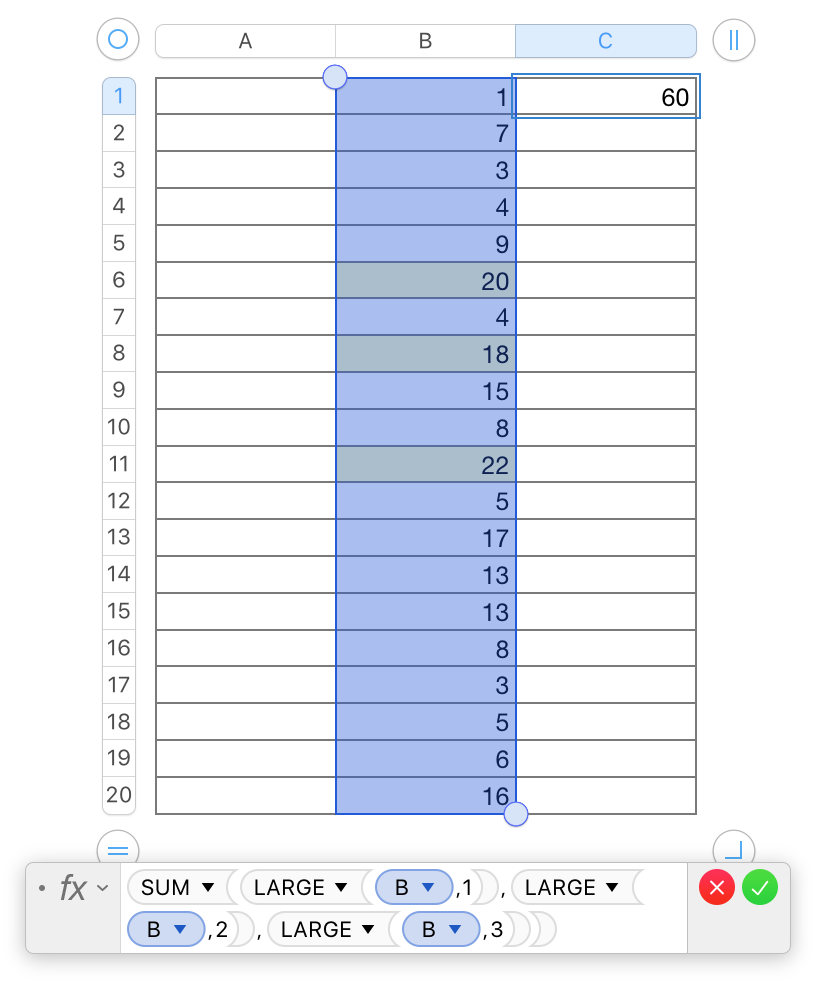
The formula (and its result) are in cell C1. The three 'LARGE' values are in the (slightly) highlighted cells in the selected range—all of column B.


Regards,

Barry


This thread has been closed by the system or the community team. You may vote for any posts you find helpful, or search the Community for additional answers.

Converting formulas from Excel to Numbers

Welcome to Apple Support Community
A forum where Apple customers help each other with their products. Get started with your Apple Account.
