
Airpod 2nd Generation White light (not flashing)
If you are trying to pair your Airpods and are becoming frustrated, there are a few wonderful troubleshooting tips you can try!
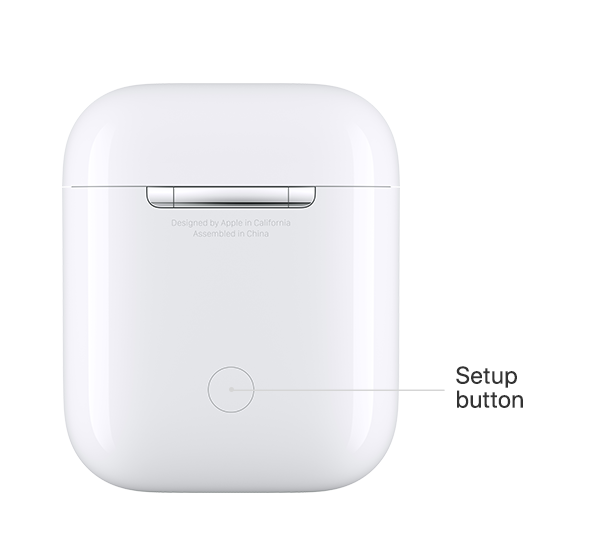
To Connect to your iPhone, iPad, or iPod touch
- Make sure that your iOS device has the latest version of iOS. Your device needs to have iOS 12.2 or later. If you have AirPods (1st generation), your device needs to have iOS 10 or later.
- Open Control Center and make sure that Bluetooth is on.
- Put both AirPods in the charging case and make sure that both AirPods are charging. Learn what to do if your AirPods or case won't charge.
- Make sure to select your AirPods as your audio device.
- Close the lid, wait 15 seconds, then open the lid. The status light
- should flash white, which means that your AirPods are ready to connect.
- If your AirPods don't connect, press and hold the setup button on
- the back of the case. Hold the setup button until you see the status
- light flash white, then amber, and then flash white continuously.
- Open the case—with your AirPods inside—and hold it next to your iPhone.
- Follow the steps on your iOS device's screen.
- Test your AirPods.
- If you still can't connect, reset your AirPods.
Tip*When resetting,Hold down the white button on the back of the case with the Airpods inside until the case flashes white and ready to pair.
Still having troubles?
Go to your iOS device and go to Settings > Bluetooth > Turn OFF, then simply restart your device.
Once your device is powered back on, go back into Settings > Bluetooth and turn ON, then go ahead and try to re-connect your Airpods.
This has worked for me! Give it a shot I hope this helps!
iPhone 6s, iOS 12