Backup failed: MacBook Pro Time Machine couldn't back up to Time Capsule

Hello


I havd been backing up my Mac Book to my Time Capsule for years but now I get an error message:

"Backup failed: Time Machine couldn't back up to Time Capsule"

Details: the backup disk image ".........sparsebundle" could not be accessed (error 112).


Some data:

MacBook Pro 13" 2017 2.3 GHz Intel Core i5

Mac OS Mojave V. 10.14.5

Time Capsule 802.11n firmware version 7.6.9 - available space 350 GB


What I did to try solving the issue:

  • restarted the Time Capsule twice
  • Verified correct version of firmware 7.6.9
  • verified MacBook and Time Capusle are on same wifi network
  • Backup verification OK, no error reported


Is there any suggestion to restore my backup to Time Capsule?


Thanks

Marco

MacBook

Posted on Jun 8, 2019 1:40 AM

Reply
Question marked as Top-ranking reply

Posted on Jun 8, 2019 4:58 AM

Can you open the sparsebundle in finder? If so it is not a network issue and is just Time Machine being difficult.


In that case about the only way to fix it is to delete the current backup sparsebundle and start again.


If you really want to keep the backup then the best idea is to plug a USB drive into the TC of equal disk capacity to the TC.. and run archive.. then you can do a quick erase and start over.


Even though the backup verified correctly there is still sufficient issues to prevent Time Machine starting.


The TC is very old and it could have some other issues..


If you cannot open the sparsebundle in Finder than you have some issue but then I don't understand how you managed to verify the backup.


Time Machine has become progressively less reliable since Sierra.. it may be a good time to think of different approach.

eg Use Carbon Copy Cloner instead.

Or get a USB drive and plug it directly into the laptop and backup that way.


12 replies
Question marked as Top-ranking reply

Jun 8, 2019 4:58 AM in response to Maltesi

Can you open the sparsebundle in finder? If so it is not a network issue and is just Time Machine being difficult.


In that case about the only way to fix it is to delete the current backup sparsebundle and start again.


If you really want to keep the backup then the best idea is to plug a USB drive into the TC of equal disk capacity to the TC.. and run archive.. then you can do a quick erase and start over.


Even though the backup verified correctly there is still sufficient issues to prevent Time Machine starting.


The TC is very old and it could have some other issues..


If you cannot open the sparsebundle in Finder than you have some issue but then I don't understand how you managed to verify the backup.


Time Machine has become progressively less reliable since Sierra.. it may be a good time to think of different approach.

eg Use Carbon Copy Cloner instead.

Or get a USB drive and plug it directly into the laptop and backup that way.


Jun 9, 2019 2:32 PM in response to Maltesi

It is not so easy to stop a Mac using the old Sparsebundle because it does not use name but UUID of the hard disk.


Since I have freed more than 1 TB of space on the TC my intention is to try rename the MacBook and start a new backup with a different name.


I would create a folder... say OldTM in the TC hard disk.

Drag the sparsebundle to this new folder.. the Mac will then no longer be able to access it and you can start a new backup.

Jun 11, 2019 5:18 AM in response to Maltesi

Carbon Copy Cloner is free for a month .. I would download it and give it a try. The advantage is hugely better logs and info if and when something goes wrong.


If you want more help do tell me a bit more..

Tell me how you have the TC setup. I would definitely avoid using wireless on these old models. As they age wireless is one of the first things affected.


I would factory reset the TC and give it a new name.. short, no spaces and pure alphanumeric. Password same rules but can be longer.


And if the TC is bridged to a different main router, I would give the TC a static IP address as this can be important.


How far into the backup did it get before it failed?

Is the computer directly connected to the TC.. this is now recommended by Apple.

Also on laptop do not use power nap .. that apparently is a main cause of failure in TM backup.

Jun 9, 2019 2:37 AM in response to LaPastenague

Hi Lapastenague


yes I can access the sparsebundle file, see its content, so it is not a network issue.

It mught be one of those strange issues within the file itself. Since I have freed more than 1 TB of space on the TC my intention is to try rename the MacBook and start a new backup with a different name. If it works and it creates a new sparsebundle filethat works than it will confirm that somehow the old sparsebundle become unusable.

Jun 11, 2019 4:03 AM in response to LaPastenague

Update: I have copied the old sparsebundle file into an external hard disk and deleted the file from the Time Capsule data folder. Then I commanded Time Machine to start a new backup and TM wrote a new sparsebundle file on Time Capsule but once again did not complete the backup giving the same error 112.

I believe there is an incompatibility of Time Machine with the Time Capsule as it has never been before for 5 years and I sincerely do not understand why, as it is creating the sparsebundle file, reading it, I can open its content (131 bands created already) but Time Machine keeps saying that cannot backup to the Time Capsule.

I hope Apple will have a word on this strange case.

Jun 11, 2019 6:21 AM in response to LaPastenague

TC setup: the TC is the primary form of wireless in our home, it receivce the external internet via ethernet from a main router of the telephone provider. All PCs and laptops are connected to TC wi-fi with no issue.

To reset the TC I need to first save somewhere else 1,5 GB of pictures, movies, music and documents, a bit too much for the moment as I do not have any other external drive so capable and the HD 1 TB I have used is alrteady 75% full.

How far into the backup? I don't know exactly, but it is around 3 minutes and more.

The macbook is connected via wi-fi, I will give it a try connecting it via ethernet but you know now a day macbook come with fantastic two USB-C and nothing else so there is an adaptor to be found first.

My laptop is not going in power nap.

Jun 12, 2019 3:59 AM in response to Maltesi

Well .. that is nasty.. !!


I cannot really follow why it should create a sparsebundle and then fail within such a short space of time.. If the TC was a more recent purchase I would spend the time with Apple to pursue it.. but since it is really due replacement anyway.. I think it is telling you time is up!!


Since Apple has gone out of the business then you will need to figure out a new approach. I do recommend to people Synology NAS or Synology router plus USB drive. The NAS is expensive and to justify the price you will need to use its' more extensive file server abilities.. plus media etc. Otherwise the Synology router will really be a better buy. I tested backup using a USB3 drive to a Synology RT2600AC and it was equal to the speed of the TC.. either Gen4 or Gen5. The NAS is considerably faster.

Jun 17, 2019 12:58 AM in response to LaPastenague

Exactly, it is nasty, and I am really upset because I don't see a single rational reason why the Time Capsule is acting like this with Time Machine in OS Mojave, or viceversa. The TC is working perfectly as wi-fi router, exchanging files like pictures, movies, music, data.

The sparsebundle is correctly created, healthy, I can see all the info in its content, several files saved in "data", but when running Time Machine it keeps telling me the error message.

It really makes me upset spending money to buy a NAS or another router when I do have 3TB space in the TC working fine with its wi-fi, and the router Technicolor TG589vn v3 of my Telephone/Internet provider with its wi-fi.

Both have USB ports, so the only money I would spend now is for a USB drive to save the backup of the MacBook.

Jun 11, 2019 4:11 PM in response to Maltesi

When I asked you to do the backup by ethernet.. I forgot how easy that statement is to make but how difficult and potentially expensive it is in reality.


Apple do sell a thunderbolt 3 to ethernet adapter for a $29 in US.

https://www.apple.com/shop/product/MD463LL/A/thunderbolt-to-gigabit-ethernet-adapter


You might find buying a proper dock like the OWC model better value as it gives you a whole range of ports and charging as well.

OR

It might really be better to rethink your whole network.


To reset the TC I need to first save somewhere else 1,5 GB of pictures, movies, music and documents


Actually you don't in terms of a reset. No reset of the TC erases the hard disk. So just to be clear what I proposed will change access to the files.. you will need to do some renaming around the network but it will not delete anything.

However, if you have all those pictures movies music and documents on a Gen4 TC without a backup.. that backup is urgent. The TC is well past its use by date. They can die suddenly and irrevocably without least sign.. except perhaps a backup failing after working fine for ages.. hint hint. And getting your files out of a dead TC can be a rather expensive process. If the hard disk dies.. very very expensive without any guarantee of success.


Just note that I am repairing a Gen4 TC right now for someone who lost all their music. This resulted in psychological trauma and manic depression. And this is far from the first one I have done. He is lucky.. the disk is OK and I recovered the files for him. Do you feel.. LUCKY??

Buy a USB drive today.. and backup your music and files.. do it.. do it NOW!! 4TB for desktop 3.5" type and 2TB for laptop 2.5" type are sweet spots since they do not use archive drives and are cheap/cheapest for capacity.


There could be an issue with your ISP supplied router not handling bonjour correctly. There is a complicated fix.. but let me first suggest you try the following.


#1 set a static IP on your TC.

This is simple..

Open the airport utility and click on the icon of the TC.. click on edit in the summary that comes up.
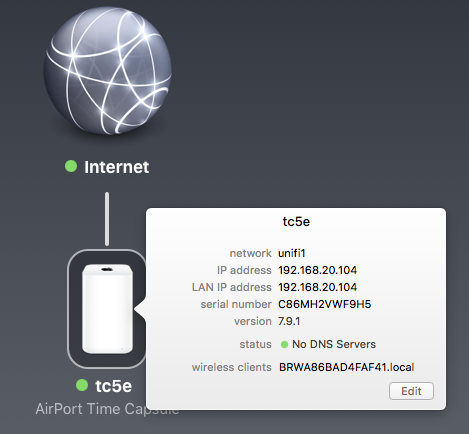


Go to the Internet tab.

It will look something like this with IP from your main router.
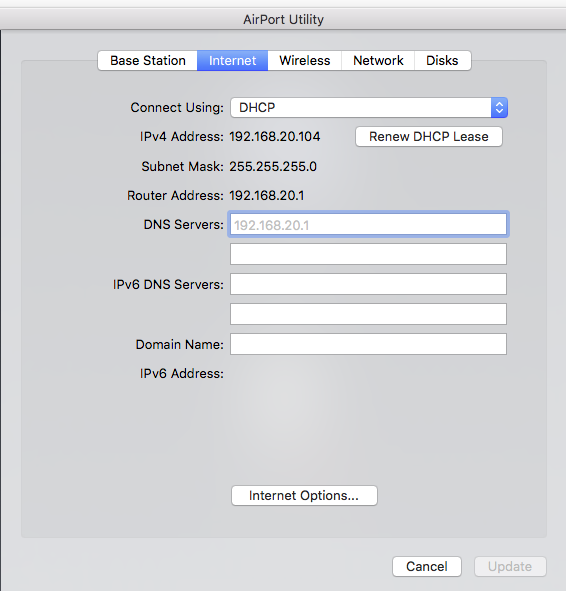

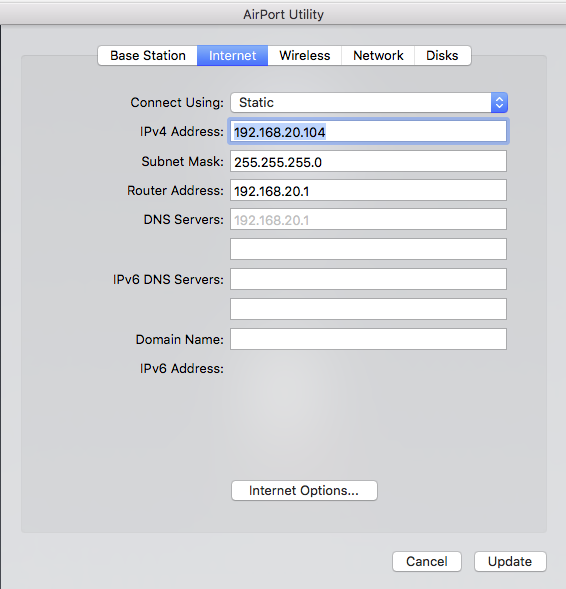
Select Static as your method of connection.



This will swap all the current values without you needing to do anything. And it will be locked.


#2 In Finder use Go / Connect to Server to mount the TC hard disk by IP address.


A menu will popup which you will type as follows.. replacing my static IP with yours.


You may need to give it a password and save that in your keychain.. do it..


#3 you now have your TC hard disk mounted in finder but using an IP that never changes.. and no bonjour requirement to find it.


In Time Machine Preferences click on Add and Remove Hard Disk.


You will see the existing TC hard disk listed by the name of the TC.. and you will also see the same disk listed by IP address.

Add this IP address one.. and use it for backup.. don't delete the original if you are asked .. just say use both.


Tell me if this improves things at all.

Jun 12, 2019 1:44 AM in response to LaPastenague

Dear LaPastenague


thank you for the suggestions.

1) backup of data on TC: in reality I have cross checked and music and pictures are already backed up on an external HD 1 TB, rest of space is occupied by two sparsebundle files: one for my macbook (copied on external HD) and one for the MacMini of the kids (which I need to copy but it is not vital).

2) I have executed a reset of the TC, and re-set up as a new network with different name

3) I have assigned a static IP address to the TC, which updated itself correctly. Then in Finder I have connected to the server and it did work correctly. In Time Machine I have selected the Data from the disk identified by the static IP address.


4) Started a new backup, Time Machine went on "preparing backup" and stayed there for 4 minutes to then stop again with same error 112.


These are the latest information, and I guess we are leading to an incompatibility of TM MacOS Mojave vs old Time Capsule....


Marco

This thread has been closed by the system or the community team. You may vote for any posts you find helpful, or search the Community for additional answers.

Backup failed: MacBook Pro Time Machine couldn't back up to Time Capsule

Welcome to Apple Support Community
A forum where Apple customers help each other with their products. Get started with your Apple Account.
