Microsoft Office on a Mac

I have aniMac 21.5" system with 4K memory. I am attempting to create and manage an inventory in Excel. The Excel file is 500 lines long, with maybe 15 cols. It generally takes Excel 5-10 min to start after a click. Tonight I attempted to delete four unused rows in the spreadsheet and got the 25 minute beachball. Very, very frustrating. The Mac is almost useless. I just ran Malware yesterday and everything came back clean. I am not certain of there is any solution to the issue.

Posted on Jun 25, 2019 8:12 PM

Reply
Question marked as Top-ranking reply

Posted on Jun 26, 2019 11:30 AM

In addition the the minimum 4 GB of RAM unless you have an SSD in the iMac you have the slowest possible combination possible for an iMac, minimal RAM and 5400 rpm hard drive.


With that in mind you might be able to get an external SSD hard drive and boot from that. Depending on what ports you have the boot speed may not be that much improved but once booted opening apps and files should be much improved.


However, do run Etrecheck and post the report as we want to make sure there is no software component contributing to the slowness.


Similar questions

6 replies
Question marked as Top-ranking reply

Jun 26, 2019 11:30 AM in response to tztriangle

In addition the the minimum 4 GB of RAM unless you have an SSD in the iMac you have the slowest possible combination possible for an iMac, minimal RAM and 5400 rpm hard drive.


With that in mind you might be able to get an external SSD hard drive and boot from that. Depending on what ports you have the boot speed may not be that much improved but once booted opening apps and files should be much improved.


However, do run Etrecheck and post the report as we want to make sure there is no software component contributing to the slowness.


Jun 26, 2019 12:10 PM in response to tztriangle

Bring up the Activity Monitor app using Spotlight search. Check that before you open Microsoft Excel that on the CPU tab of Activity Monitor it's showing at least 90% or higher "idle" in the bottom graph:

This will let you know that your system CPU activity is barely being pushed before launching Excel. Now also go to the Memory tab of Activity Monitor. You should have very low memory pressure on the graph. You can take a screen of this because this requires some interpretation. Basically, you want your "Memory Used" to be a good chunk less than your "Physical Memory" and you want your "Swap Used" to be pretty low. For the layman, a good thing is to just look at the graph: having it be no higher than say, 25% of the total height of the graph shows that your system itself is doing fine. Here is my system w/ 16GB of RAM:
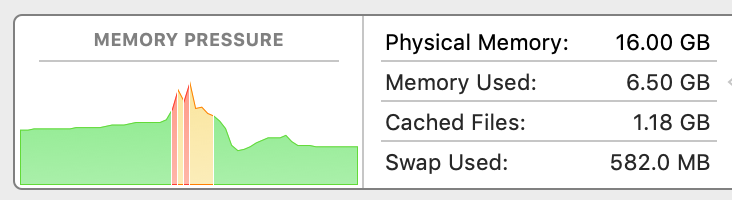
If you are correct in stating you truly have 4GB of RAM that is the bare minimum for most recent versions of macOS and, as already pointed out by other users, that's most likely your problem. I'm currently using 10gb of RAM from having a lot of junk open, and even after closing a lot I really would need to reboot and eliminate some of my startup programs to bring this down.


Just open up an Excel making a new empty spreadsheet. After it loads with merely an empty spreadsheet give it 30 seconds, and you should still be at 90%+ higher Idle for the CPU. And also check your RAM situation.


Now leave Activity Monitor open and visible, and try and do something with your inventory spreadsheet. I am guessing that your CPU idle is going to drop a good chunk, and it would be good to know what it stabilizes at, and also check your Memory tab in activity monitor and I am guessing this is really bad.


Doing this will tell you if your bottleneck is more of a CPU issue (nothing you can do about that) or a RAM issue that could be fixed with a RAM upgrade on your iMac.


Post a screenshot of the relevant information along with specifying your exact iMac year/model as listed under  > About This Mac along with your macOS version, Memory, and Processor (CPU) as listed there and I'm sure you'll get some great advice.


Additionally, Excel for Mac can be a big especially with less-than-optimal spreadsheet design. There's a difference between something functionally working, and it being poorly designed when it comes to complicated Excel spreadsheets. If nothing else I would try the free LibreOffice spreadsheet to see if it fairs better to see if its something inherent in your spreadsheet design as being very inefficient with Excel for Mac, or not.


Jun 25, 2019 9:01 PM in response to tztriangle

Please post an EtreCheck report of your system and we can look for any obvious issues. Please click the link, watch the slideshow to learn how to use the tool and download and run the free version of the app and then post the complete report it produces as your reply to this message. 

When you have run the report and are ready to reply to this message please attach the report. You will see a screen shot below that indicates where to click in your reply message.

This thread has been closed by the system or the community team. You may vote for any posts you find helpful, or search the Community for additional answers.

Microsoft Office on a Mac

Welcome to Apple Support Community
A forum where Apple customers help each other with their products. Get started with your Apple Account.



