adding a payment method to my iphone 6s

I have an iphone 6S and I need to update my payment method and when I try to do it...it has an old card number on there and it will not let me delete it and put in a new number. Can you help me with this problem?


iPhone 6s, iOS 12

Posted on Jul 2, 2019 9:25 AM

Reply
Question marked as Top-ranking reply

Posted on Jul 2, 2019 12:21 PM

Change your payment method on your iPhone, iPad, or iPod touch

  1. Go to Settings > [your name] > iTunes & App Store.*
  2. Tap your Apple ID, then tap View Apple ID. You might be asked to sign in.
  3. Tap Manage Payments. ( If you're using an older version of iOS, tap Payment Information.)


Change your payment method on your iPhone, iPad, or iPod touch

Before you change your payment information, make sure that you have the latest version of iOS.

  1. Go to Settings > [your name] > iTunes & App Store.*
  2. Tap your Apple ID, then tap View Apple ID. You might be asked to sign in.
  3. Tap Manage Payments. (If you're using an older version of iOS, tap Payment Information.) Then add, update, reorder, or remove your payment methods:

Update or add
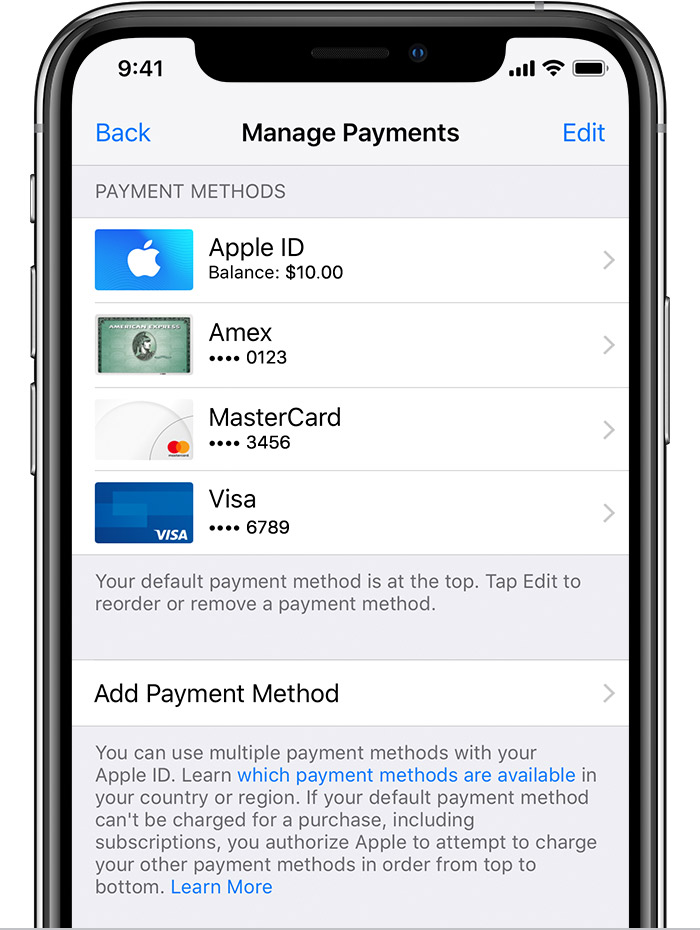
  • Update a payment method: Tap the payment method that you want to change, then edit your information. Make sure that your information matches what's on file with your financial institution. You might need to enter the security code that's printed on your credit or debit card. If you see Apple Pay after the last 4 digits of the card number, edit your billing information in the Wallet app.
  • Add a payment method: Tap Add Payment Method. You might see a suggestion to add a card that you use with Apple Pay. (If you add a new credit or debit card, you might see an option to add the new card to Apple Pay.)

Remove or reorder
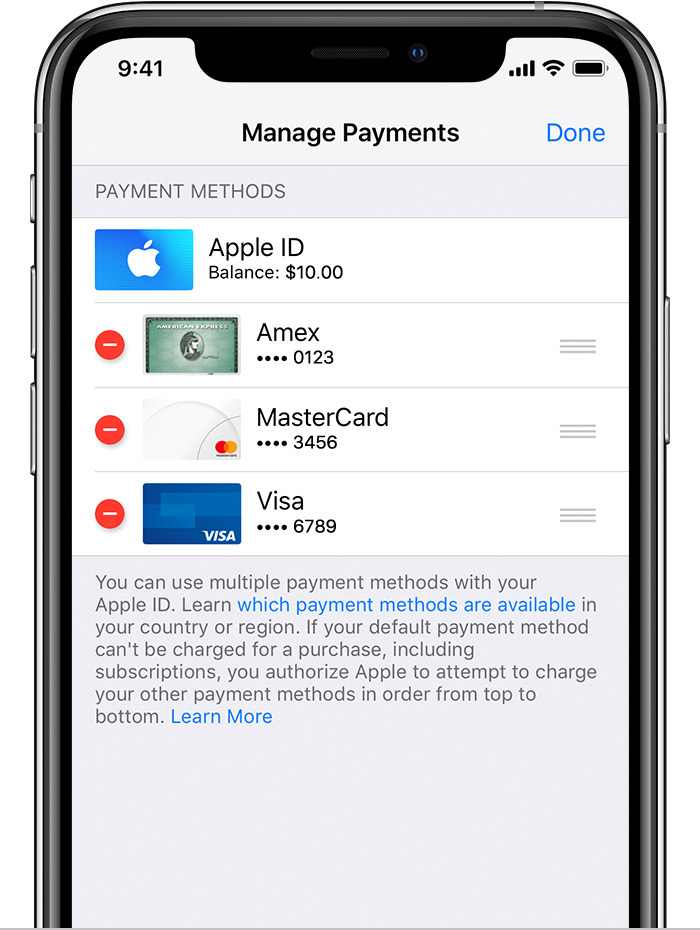
  • Remove a payment method: Tap Edit, then tap the Remove icon  or swipe left and tap delete.
  • Change the order of your payment methods: Tap Edit, then use the Move Order icon  to rearrange your payment methods. Apple will attempt to charge payment methods in order from top to bottom. You can't change the order in which Apple ID balance is charged.

*With iOS 12.2 or later, you can also manage your payment methods from Settings > [your name] > Payment & Shipping. If you have a device with iOS 12.1.x or earlier and you edit your payment methods from Payment & Shipping, all payment methods that you have on file will be removed.


Change, add, or remove Apple ID payment methods - Apple Support

https://support.apple.com/en-us/HT201266

1 reply
Question marked as Top-ranking reply

Jul 2, 2019 12:21 PM in response to Mommyholder

Change your payment method on your iPhone, iPad, or iPod touch

  1. Go to Settings > [your name] > iTunes & App Store.*
  2. Tap your Apple ID, then tap View Apple ID. You might be asked to sign in.
  3. Tap Manage Payments. ( If you're using an older version of iOS, tap Payment Information.)


Change your payment method on your iPhone, iPad, or iPod touch

Before you change your payment information, make sure that you have the latest version of iOS.

  1. Go to Settings > [your name] > iTunes & App Store.*
  2. Tap your Apple ID, then tap View Apple ID. You might be asked to sign in.
  3. Tap Manage Payments. (If you're using an older version of iOS, tap Payment Information.) Then add, update, reorder, or remove your payment methods:

Update or add

  • Update a payment method: Tap the payment method that you want to change, then edit your information. Make sure that your information matches what's on file with your financial institution. You might need to enter the security code that's printed on your credit or debit card. If you see Apple Pay after the last 4 digits of the card number, edit your billing information in the Wallet app.
  • Add a payment method: Tap Add Payment Method. You might see a suggestion to add a card that you use with Apple Pay. (If you add a new credit or debit card, you might see an option to add the new card to Apple Pay.)

Remove or reorder

  • Remove a payment method: Tap Edit, then tap the Remove icon  or swipe left and tap delete.
  • Change the order of your payment methods: Tap Edit, then use the Move Order icon  to rearrange your payment methods. Apple will attempt to charge payment methods in order from top to bottom. You can't change the order in which Apple ID balance is charged.

*With iOS 12.2 or later, you can also manage your payment methods from Settings > [your name] > Payment & Shipping. If you have a device with iOS 12.1.x or earlier and you edit your payment methods from Payment & Shipping, all payment methods that you have on file will be removed.


Change, add, or remove Apple ID payment methods - Apple Support

https://support.apple.com/en-us/HT201266

This thread has been closed by the system or the community team. You may vote for any posts you find helpful, or search the Community for additional answers.

adding a payment method to my iphone 6s

Welcome to Apple Support Community
A forum where Apple customers help each other with their products. Get started with your Apple Account.