
If playback doesn't begin shortly, try restarting your device
This is not a question, but rather a solution.
After a few hours of Macbook use, I would get the following message when attempting to watch any video across any browser:
"If playback doesn't begin shortly, try restarting your device"
At this time, my video images would be frozen, but the video would appear to have buffered a little ahead of it's current point. I could move the the slider to different stages of the video and the image at that point would appear, but it still would not play.
I tried to resolved the problem through Apple Support but this was unsuccessful. Wide spread internet searches also failed to offer a solution. Clearing caches, creating new user accounts, resetting PRAM and even a new install (but keeping my same settings I believe) failed to fix the problem.
It seems I may have found a solution though. Thinking back, it seemed the problem had started after I began playing audio through a bluetooth speaker. I tried resetting everything to do with bluetooth, but this did not help. After the problem occurred again recently, I decided to try and reconnect my bluetooth speaker, then see what I could work out from there. I did not restart my computer before doing this, so it was in a state where I could not play any videos. I found that the speaker would not hold it's bluetooth connection for more than a few seconds, never allowing me to play any sound through it. I then discovered that I could not play any music from spotify directly through the internal speakers either, even when they showed as the currently selected speaker setup.
I then discovered the following website:
https://www.makeuseof.com/tag/sound-advice-fixing-common-mac-audio-problems-os-x/
There are a number of suggestions put forward on this page which might be of help, but my solution was found in this section:
****************************************************************************************************
Reset Core Audio & Restart
Core Audio is Apple’s low-level API for dealing with sound on the Mac. Sometimes things go wrong, and this results in no audio, and sometimes even distorted, tinny or noisy sound too. Before you restart your computer, try restarting the Core Audio process.
Open a Terminal window and input: sudo killall coreaudiod
Hit return, input your administrator password and check whether your sound issue is resolved.
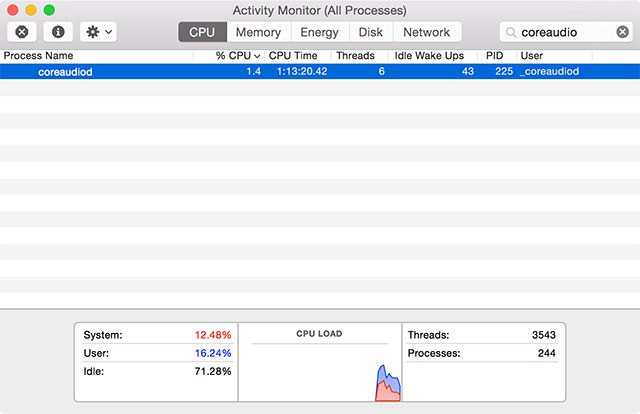
Note: You can also open Activity Monitor and search for the coreaudiod process and manually kill it.
****************************************************************************************************
Following these steps, I had to enter the above information on the terminal screen twice, but then found that my audio started playing again, without a computer restart. My videos, which had been frozen, also started playing without a computer restart. This has never happened with any other solution I'd tried.
After a few hours of use now, I have not had any further problems with videos not playing. I really wanted to get this information out there as most of my solutions had been around videos primarily (as that was the obvious problem), while completely missing the fact that sound was also not playing and fixing that fixed the video.
I really hope that this information is useful to others. My computer had been driving me crazy and it's such a relief to not have that problem anymore. Just hope it stays this way!
MacBook Air 13", 10.14
