Hi ShadowDancer1000,
Thanks for reaching out in Apple Support Communities. I understand that you'd like to know if you can move the playback controls in QuickTime. I know it's important to be able to view and control your content with minimal interruption; I'd like to help. While it's possible to move the playback controls within the window of the movie you're viewing, it's not possible to move them outside of the window. Take a look at the information below regarding moving the playback controls in QuickTime:
- "In the QuickTime Player app
 on your Mac, open a video or audio file.
 - Move the pointer anywhere over the movie to show the playback controls. Controls for audio files are always visible.
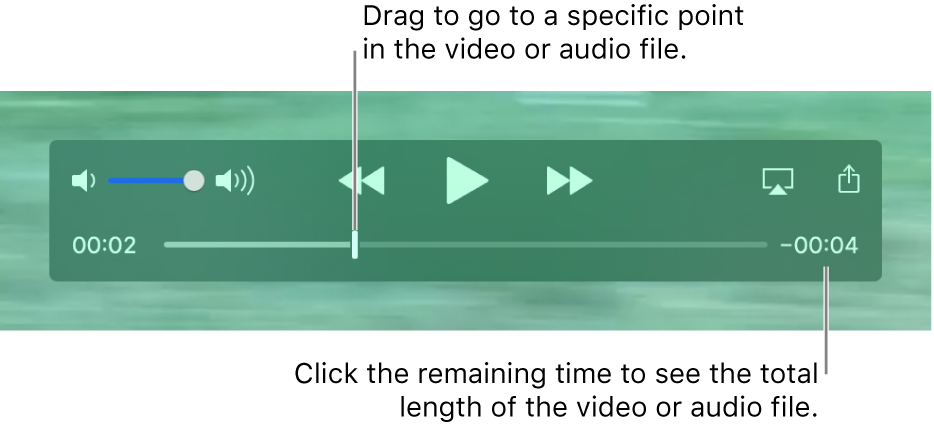
- Use the playback controls to play a video or audio file.
- To move the playback controls, drag them.
- If you want the file you’re playing to appear in front of all other windows on your screen, choose View > Float on Top so a checkmark appears next to it. Choose it again to turn it off.
You can also use the Touch Bar to play a file.
 "
"
Open and play a file in QuickTime Player on Mac
However, once the playback controls in the window are hidden you can use playback shortcuts on your keyboard and the playback controls will not appear when you use these; check out the "Movie playback shortcuts" section here: Keyboard shortcuts and gestures in QuickTime Player on Mac
If you'd like to let Apple know about features you'd like to see, let them know here: Product Feedback
Best Regards.


