Here's an alternate method, using formulas to separate the Lift values into separate columns by category, then to extract the maximum value from each of those columns to a Summary table, and finally, to use the extracted value as a search value to locate the earliest appearance of that value in the category column specific to the category in column A of the Summary table, and retrieve the date from the same row of column A of the Data table.
The Data table contains four added columns, one for each category being tracked. In use, these columns, D to G, would be hidden.
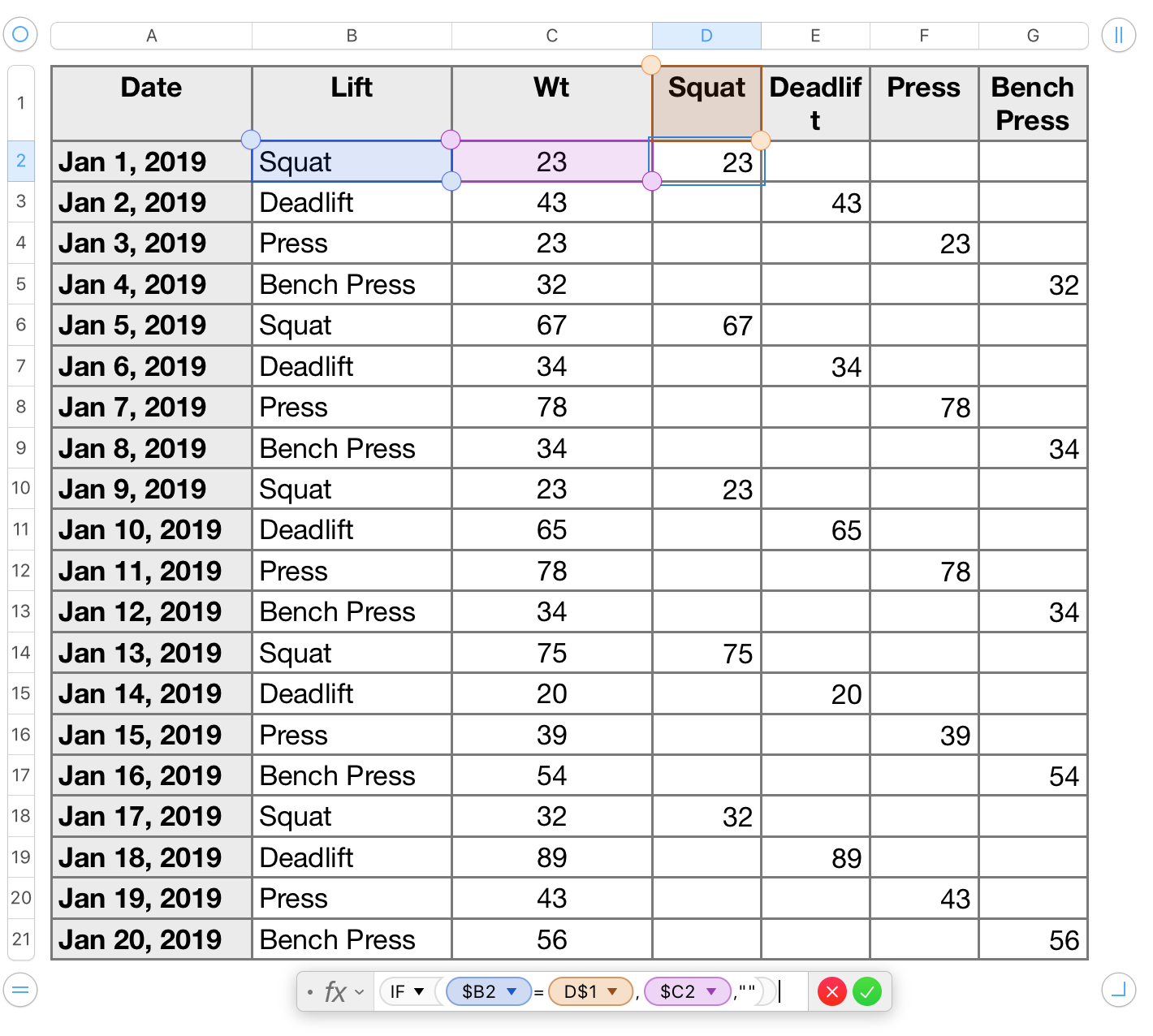
The formula is entered as shown in D2 of this table, then filled down to the end of column D, and right to column G. The formula copies the values in column C of the table into the appropriate category column, as seen in the table, and places a null string ( "" ) in 'this row' of the other three category columns.
On the summary table, the four categories are listed in column A. The table contains two formulas, one in column B, the other in column C.

The first formula, MAX(Table 1::D) returns the maximum value in column D of Table 1, the main table.
The formula is filled down column B to row 5, then each copy except the original is edited, replacing "Table 1::D" with a reference to the column containing values for the lift type listed on 'this row' of column A.
The second formula: INDEX(Table 1::A,MATCH(MAX(Table 1::D),Table 1::D,-))
is entered in C2, then filled down to C5.
On each roe, the two references to Table 1::D are edited to reference the column containing the values for the lift type on 'this row' of column A.
Match searches for the Maximum value in its assigned column, and returns a number corresponding to that values position in the list in that column.
That number is passed to INDEX, which returns the value in that position of column A of Table 1—the date on which that maximum was achieved.
MATCH can be set to accept
- the largest value that is less than or equal to the search value,
- only an exact match to the search value, or
- the smallest value that is more than or equal to the search value.
Any of the three will find the exact value in this case. But the three do not all search in the same direction. Largest and exact start at the bottom of the table and work their way up, stopping at the first exact match, if there is one; smallest starts at the top of the table, works its way down, and stops at the first exact match, if there is one.
In Row 8 of Table 1, I've changed the Press data from your original value, 65, to 78 to make two lines in the table have the same maximum value for this lift. With MATCH set to smallest, and searching top to bottom, the first instance of that max it finds in the one on row 8 of the table, so Index gets the date value from row 8 (Jan 7). With MATCH set to largest or exact, the first instance would be the one in row 12, and INDEX would return the date in that row, Jun 11.
In use, with columns D through G of Table 1 hidden, the setup would look like this:

Regards,
Barry

