Notification Mail help needed...

BTW: this is for iPhone - using 12.4 (will go to 12.4.1 soon)


I set notifications:


show previews always


and varied mail account set to:


-allow notifications

  • lock - notifications. screen and banners = checked
  • banner style = temporary
  • sound = on


problem is banners only seem to work when the mail app is live and open - and not when phone is locked or phone is unlocked without mail app open..


Q: Are the other setting to get the banners to show on lock screen and when using phone w/o mail app open?


BTW: other banners like reminders seems to be working


Thanks dave



Posted on Sep 1, 2019 10:19 AM

Reply
Question marked as Top-ranking reply

Posted on Sep 1, 2019 10:29 AM

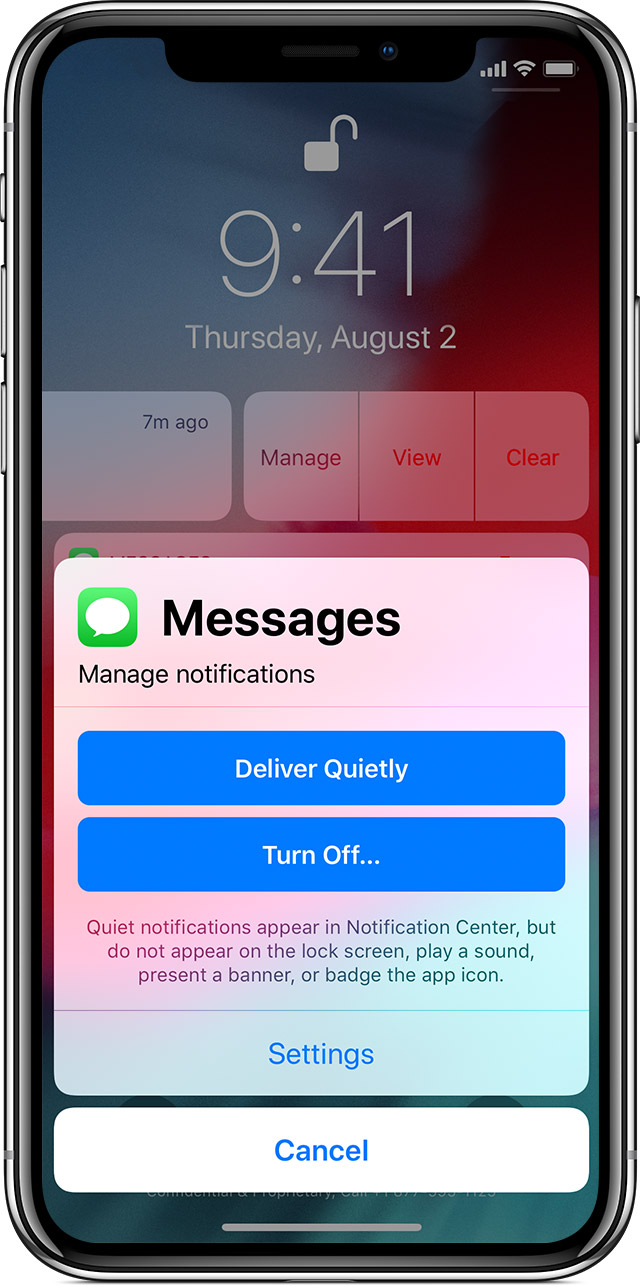
Please check if you have, unknowingly, enabled "deliver quietly" --> If yes -->


Manage notifications

To manage your notifications from the Lock screen or Notification Center:

  1. Swipe left over an alert or group of alerts.
    • Tap Manage, then select from these options: Deliver Quietly: These notifications appear in the Notification Center, but don't show up on the Lock screen, play sounds, or show a banner or badge icon.
    • Turn Off: This turns off all notifications for a specific app. To turn this back on, go to Settings > Notifications, select the app, and tap Allow Notifications. 

You can also tap Settings to change your alert styles or alert settings for a specific app. 


Similar questions

4 replies
Question marked as Top-ranking reply

Sep 1, 2019 10:29 AM in response to revDAVE

Please check if you have, unknowingly, enabled "deliver quietly" --> If yes -->


Manage notifications

To manage your notifications from the Lock screen or Notification Center:

  1. Swipe left over an alert or group of alerts.
    • Tap Manage, then select from these options: Deliver Quietly: These notifications appear in the Notification Center, but don't show up on the Lock screen, play sounds, or show a banner or badge icon.
    • Turn Off: This turns off all notifications for a specific app. To turn this back on, go to Settings > Notifications, select the app, and tap Allow Notifications. 

You can also tap Settings to change your alert styles or alert settings for a specific app. 


Sep 1, 2019 12:53 PM in response to ProustGiulio

Hi ProustGiulio,


AHA I think that was it..


For icloud account it was working cause it has PUSH available


But i have a gmail and 3rd party email that only have FETCH available - so that's why it only worked when I opened the mail app! i guess that explains it...


So what I might try is some kind of thing for VIP mail from gmail to forward to icloud mail - then it would send notification as push...


Do you happen to know of another way I could get gmail and 3rd party mail to send me notifications on iphone?


Thanks Dave

This thread has been closed by the system or the community team. You may vote for any posts you find helpful, or search the Community for additional answers.

Notification Mail help needed...

Welcome to Apple Support Community
A forum where Apple customers help each other with their products. Get started with your Apple Account.