I have an iPod Classic that my MacBook is not recognizing. It shows up in Finder but in iTunes when I click on the iPod icon it says the iPod can't be found. Any ideas on how to get my MacBook to recognize the Classic?

My iPod Classic was working fine playing songs until I tried to update the Playlist. My MacBook "couldn't find the iPod" and said I need to reset it. Unfortunately, I did so and now I can't load any songs on it. I get a message that says it can't be found - see attachment.


Any ideas how to get it going again?


Thanks,


Dick


[Image Edited by Moderator to Remove Serial Number]

iPod Classic

Posted on Sep 17, 2019 2:46 PM

Reply
Question marked as Top-ranking reply

Posted on Sep 19, 2019 8:26 AM

So the pending sectors aren't cleared. You may need to repeat the erase/restore process a few times to clear all the pending sectors. You could try formatting as MS-DOS/FAT which will make iTunes reformat as Mac OS Extended (Journaled) when it restores. Switching between the formats might help with the conversion of pending sectors into reallocations. After restoring but before adding any media check the stats again. No point trying to add media until pending is zero.


From the user tip:


Break up large transfers

Once you've restored your iPod don't rush to dump all the data back exactly as it was before. I have found that lots of large or complex smart playlists can sometimes trigger constant reboots or dumping of the iPod's library. In addition, larger transfers can fail leaving data in an inconsistent state. Try this technique for populating the iPod in stages.


In iTunes select the menu item File... New Smart Playlist. Change the first drop-down box to Playlist, the next to is and the next to Music or whatever playlist holds the bulk of the content you want on your device. Tick against Limit to, type in say 10, then change the drop-down to GB, and set the last drop-down to artist. When you click OK you can enter a name for the playlist, e.g. Transfer.
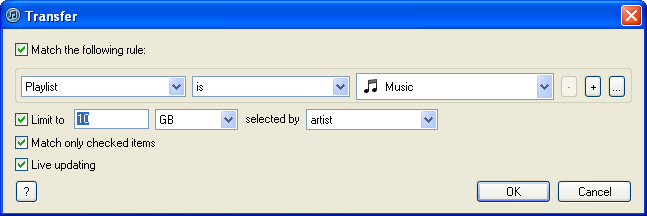


Now sync this playlist to your iPod rather than your entire library. When the sync is complete modify the rule (File... Edit playlist) to increase the size by your chosen amount, then sync and repeat. You can experiment with different size increments, if it doesn't work just choose something a bit smaller until it works each time. Before long you should have all the music that you want synced added to your device. Once that's done you can move on to other media such as podcasts, videos, photos, additional playlists, etc.


tt2

Similar questions

37 replies
Question marked as Top-ranking reply

Sep 19, 2019 8:26 AM in response to dbrown048

So the pending sectors aren't cleared. You may need to repeat the erase/restore process a few times to clear all the pending sectors. You could try formatting as MS-DOS/FAT which will make iTunes reformat as Mac OS Extended (Journaled) when it restores. Switching between the formats might help with the conversion of pending sectors into reallocations. After restoring but before adding any media check the stats again. No point trying to add media until pending is zero.


From the user tip:


Break up large transfers

Once you've restored your iPod don't rush to dump all the data back exactly as it was before. I have found that lots of large or complex smart playlists can sometimes trigger constant reboots or dumping of the iPod's library. In addition, larger transfers can fail leaving data in an inconsistent state. Try this technique for populating the iPod in stages.


In iTunes select the menu item File... New Smart Playlist. Change the first drop-down box to Playlist, the next to is and the next to Music or whatever playlist holds the bulk of the content you want on your device. Tick against Limit to, type in say 10, then change the drop-down to GB, and set the last drop-down to artist. When you click OK you can enter a name for the playlist, e.g. Transfer.


Now sync this playlist to your iPod rather than your entire library. When the sync is complete modify the rule (File... Edit playlist) to increase the size by your chosen amount, then sync and repeat. You can experiment with different size increments, if it doesn't work just choose something a bit smaller until it works each time. Before long you should have all the music that you want synced added to your device. Once that's done you can move on to other media such as podcasts, videos, photos, additional playlists, etc.


tt2

Sep 18, 2019 7:22 PM in response to dbrown048

Try reformatting the iPod with disk utility. If you cannot restore in iTunes after that find a Windows PC to restore the device with, then try restoring again on your own computer.


Many third party chargers deliver too much current for the classic and rather than cook the battery it shuts down the charging circuit. An original 1W charger or standard USB port should work.


tt2

Sep 18, 2019 8:10 PM in response to dbrown048

That sounds like you're doing something other than erasing or reformatting the drive. There is no need to copy any data to it. Aha, in the context of your device restore is an iTunes function. It means something different in Disk Utility, and is used to restore the state of one partition or drive from another or a backup. You only want to erase the drive before using the built in restore feature in iTunes to put the firmware back on the device.


tt2

Sep 19, 2019 7:21 AM in response to turingtest2

I ran a test and here's what I got:----------Test

Retracts: 889 ------------------------9--------------9

Reallocs: 12-------------------------1513 --------1840

Pending Sectors: 0 ----------------22------------42

PowerOn Hours: 2202 ---------3058--------3062

Start/Stops: 894 -------------------253----------263

Temp: Current 24c ----------------27C----------26C

Temp: Min 10c ----------------------11C----------11C

Temp: Max 50c---------------------47C----------47C


"Try the section break up large transfers"? Don't know what that means?

Sep 18, 2019 12:46 PM in response to turingtest2

Thanks, tt2, I really do appreciate your help.


I ran a test and here's what I got:

Retracts: 889 ----------------------9
Reallocs: 12---------------------1513
Pending Sectors: 0 ------------22
PowerOn Hours: 2202 ----3058
Start/Stops: 894 --------------253
Temp: Current 24c ------------27C
Temp: Min 10c ------------------11C
Temp: Max 50c-----------------47C

Looking like my HD is on it's way out?


Hopefully, tomorrow I'll more time to play with it.


Again, THANKS


Backpacker

Sep 18, 2019 7:12 PM in response to turingtest2

Thanks again for the reply.


FYI: For some reason for several years now I have not been able to charge the device using a wall plug - only connected to my computer.

Yesterday, I wanted to updated my Playlists and that when I got into trouble. The attached windows came up and eventually told me to "restore" my device - realizing that I would lose all data on it. I did so and have not been able to load anything back to it because it's not being "recognized" by my computer - even though the iPod icon shows in iTunes and Finder shows it also.


I've attached 4 shots to give you some idea of where I am. Hope you can make sense of it all.


Backpacker


This thread has been closed by the system or the community team. You may vote for any posts you find helpful, or search the Community for additional answers.

I have an iPod Classic that my MacBook is not recognizing. It shows up in Finder but in iTunes when I click on the iPod icon it says the iPod can't be found. Any ideas on how to get my MacBook to recognize the Classic?

Welcome to Apple Support Community
A forum where Apple customers help each other with their products. Get started with your Apple Account.