Iphone 11 Pro Max and Carplay not working

I have the new iPhone 11 Pro Max and a 2018 Nissan Maxima with carplay. Carplay worked with my previous Iphone X even after the IOS 13 upgrade but with the Iphone 11 Pro Max carplay just keeps saying it won't start and retries again. Any ideas?

iPhone 11 Pro Max

Posted on Sep 27, 2019 8:28 AM

Reply
Question marked as Top-ranking reply

Posted on Oct 1, 2019 8:28 PM

Found a solution here. Please buy a USB male to type c female converter. Use that to connect with the type c lightening cable comes with the iPhone 11. It works immediately when I plug in.


It is the software and hardware compatibility issue. This could be a fix before the official solution comes out.

452 replies

Dec 4, 2019 3:52 PM in response to KingGoodz

Ive been able to get my iPhone 11 Pro Max to connect (outlined below). The connection is not great - there were 1 second pauses in the music and streaming for most of my morning commute. Oddly, the became less frequent after about 45 minutes.


Here is what I did

Car: BMW i3

CarPlay Connection: Cordless

  1. Deleted all phones stored in the car’s ‘Manage Mobile Devices’ menu (Bluetooth and CarPlay)
  2. Deleted all connections from my phone from the General > CarPlay menu
  3. Used the ‘Forget this Network’ from the General > WiFi > i > ‘Forget this Netwok’
  4. Disconnected the chord I use to charge the phone when I drive
  5. I then did a full phone shutdown General > Shutdown
  6. Then I turned the car off and back on
  7. Then I went through the standard setup process with the car and phone (add device in the car, chose CarPlay option) and then connected to my phone
  8. it took about a minute and then it connected.


so good luck - not sure if this will work with chorded connection approach.

Dec 29, 2019 1:18 PM in response to jaybarns

I think I found The ultimate solution: using the original USB-C to lightning cable coming up with the iPhone 11 Pro Max, then purchase a USB-C female to USB male.


it works!!!


I have a been troubled by this connection issue since November 8, 2019. I have a tried below solutions and it just works sometimes:


1, using a new lightning cable coming with the AirPods 2 box, it only works 20% of the chance


2, I read on the thread from the forms that I will need to reset the phone and use the iPhone as a new iPhone, do not restore all settings from the iCloud back up, this does not works


I mean USA so just go to Amazon purchase a USB-C to USB a converter I have posted the link Below


USB C Female to USB Male Adapter (2-Pack), QianLink Type C to USB A Adapter, Compatible with Laptops, Power Banks, Chargers, and More Devices with Standard USB A Ports (Gray) https://www.amazon.com/dp/B07S617LN1/ref=cm_sw_r_cp_api_i_eDrcEbB81AMP4
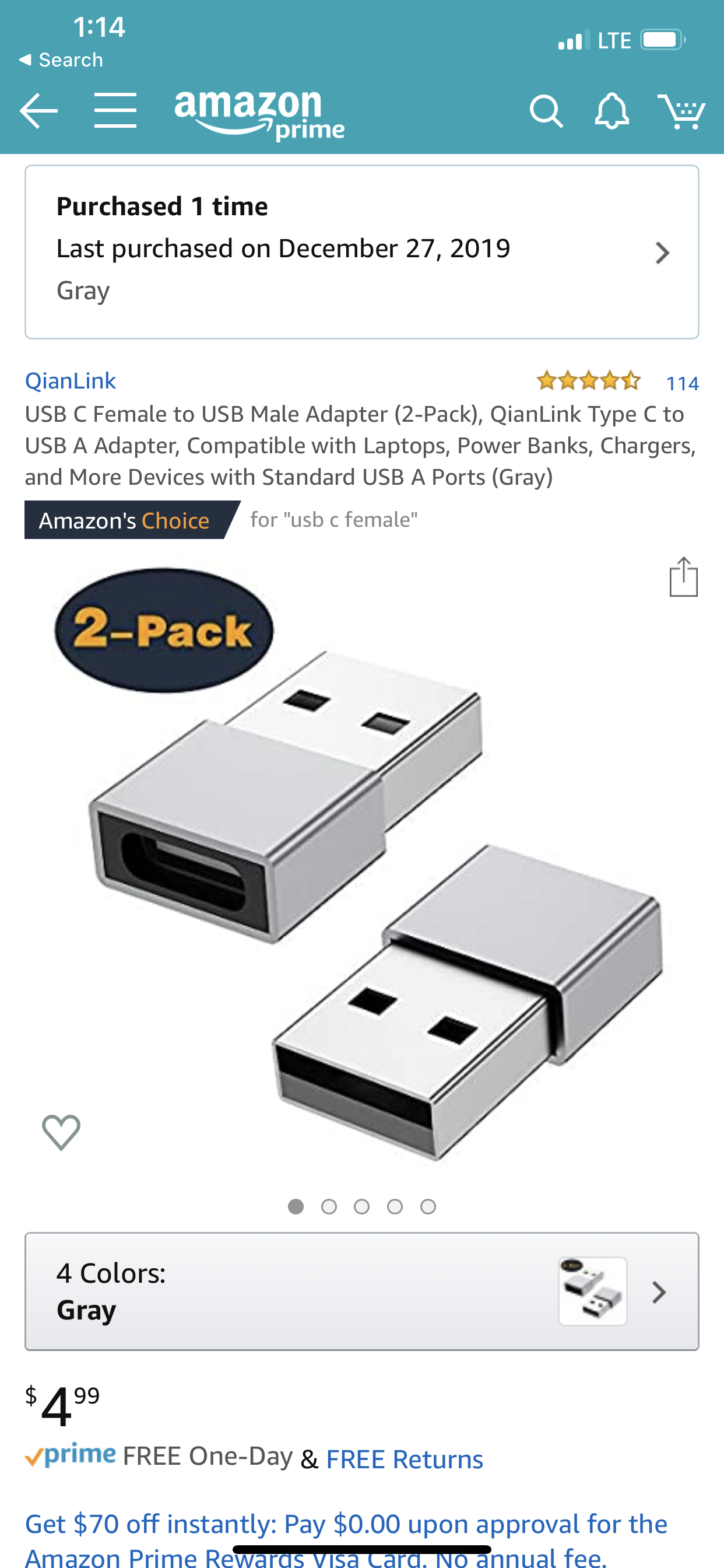


so far it works perfectly I have a been plugging and unplugging several times and each time it works flawlessly,


I assume the reason is because the USB-C to lightning cable is different with the Original lighting cable on the lightning side, you can see from the below picture it’s significantly bigger than the original one:
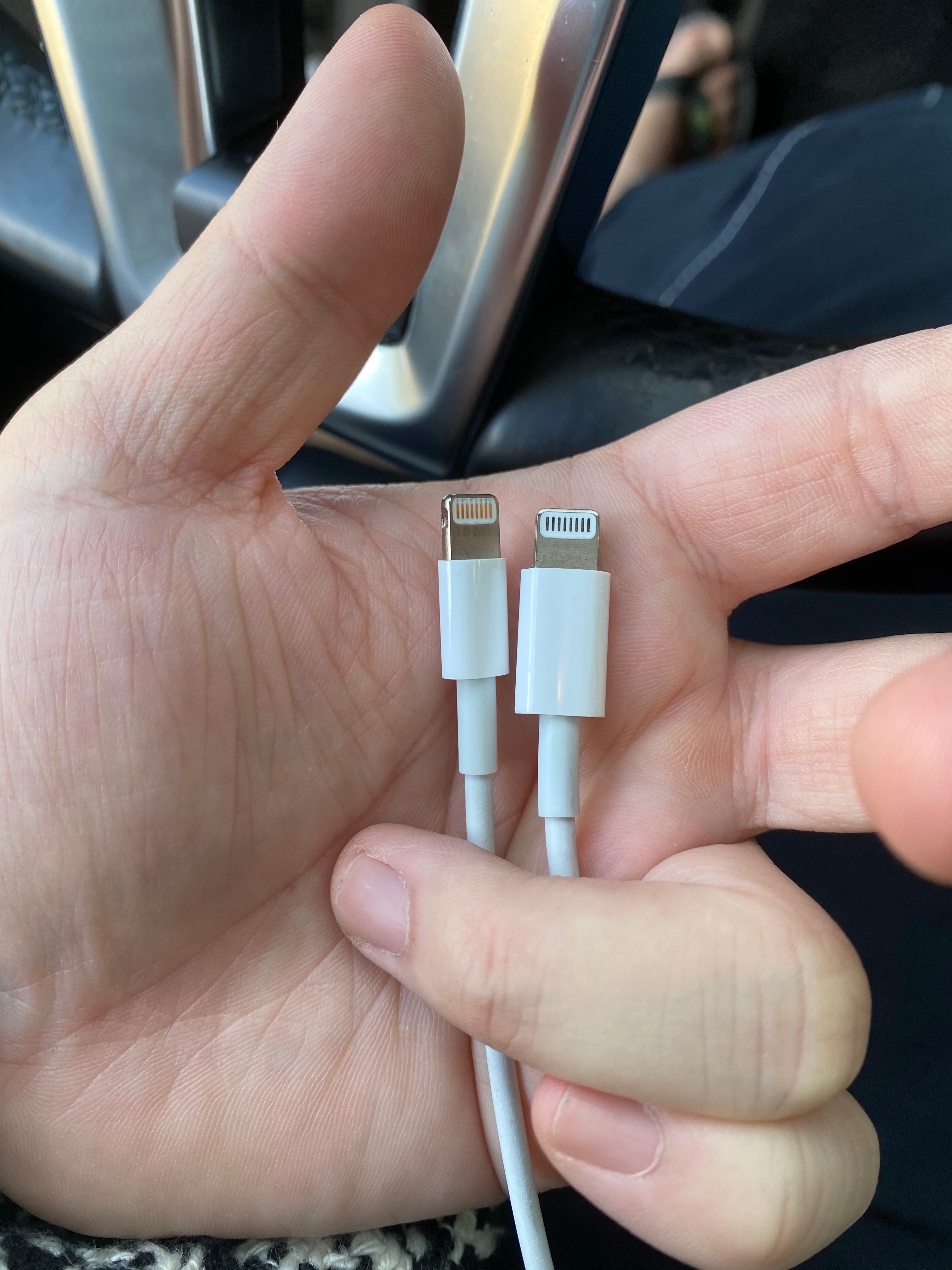


I assumed because Apple is using different chipset for this connection.


please post your feedback in this thread

Nov 15, 2019 5:40 PM in response to acbme

first of all, my problem solved, with a new lighting cable from AirPods 2 box, 11 pro max works flawlessly with CarPlay now.


Please see below are my answer:

1) 11 pro max running 13.2 and 13.2.2 and 13.3, all of them are not working with CarPlay with old lighting cable


2) I just have my 11 pro max for 1 week, before this, I have my XS MAX, and works flawless with CarPlay


3) my Apple CarPlay is after market, never been upgraded. and to my best knowledge, Apple CarPlay device is just mirroring the iOS system, like a TV receive signal through HDMI cable from a XBOX. Therefore, there’s no need to upgrade your CarPlay device


just go buy a new lighting cable, try it, then let me know how this works for you.


Thanks!

Nov 16, 2019 2:46 PM in response to Tooshy1054

CAR PLAY FIXED!


I have been so frustrated with car play since I upgraded to the iPhone 11 Pro Max. Kept thinking with every update that the problem would be fixed. My iPhone 10 worked great.


NOTE: I worked with a guy at my Apple Store & he gave me a new lightning cable right off the wall & since I plugged it in to my car I have had no trouble with car play. I had tried several old cords & they did not work. There must be something different with the newer cords. I was lucky to have been given a new cord but would have been so worth the $19 plus tax to have this issue fixed. Try it! You have 14 days to return the cable if it doesn’t work. Hope this helps!

Nov 16, 2019 3:14 PM in response to SuzThompson

Great!

for the past few days I have been telling people at this thread to buy a new lighting cable directly from Apple Store (do not buy from third-party because the lightning cable might be in stock for a long time but Apple Store has been keep their stock in a very low turn time, which means the lightning cable from Apple store must be the latest/newly manufactured)

This has been proven my theory that is the newer cable might has the different chip set Inside.


I found this on Tuesday when I use a new USB A to lighting cable from a new AirPods 2 box。

Nov 16, 2019 6:48 PM in response to Tmcgoo13

It sucks that Apple either doesn't have a clue, or doesn't care that they released an untested, unproven product in the market.

I can only get iPhone 11 IOS 13.2.2 to work as expected when fully charged.. Not 95%, not 98%, nor 99%, but 100% charged.

So, does that make it a bandwidth issue as has been suggested, or a cable related electronics issue?

I suspect Apple may already know that they may have to replace all the iPhone 11 cables which have been distributed to date..


This thread has been closed by the system or the community team. You may vote for any posts you find helpful, or search the Community for additional answers.

Iphone 11 Pro Max and Carplay not working

Welcome to Apple Support Community
A forum where Apple customers help each other with their products. Get started with your Apple Account.
