Iphone 11 Pro Extreme lens flare

Hi,

I took some low light footage on my iPhone 11 pro and it turns out useless because of how much lens flare is visible. It doesn't happen on other phones or digital cameras. The footage looks really bad. Here is an example: https://www.youtube.com/watch?v=5kCu9v7_AGE

iPhone 11 Pro

Posted on Sep 28, 2019 1:45 PM

Reply
Question marked as Top-ranking reply

Posted on Dec 28, 2019 4:41 PM

I recommend contacting Apple support. I called right away after I noticed it, was on the phone for 10 minutes, was offered 4 different options;

  1. Run more diagnostics on my end to determine if it was software
  2. Go to my local Apple store or Authorized repair to get my camera module replaced for free under my one year warranty for the product (not my Apple Care+)
  3. Send it in via mail to get the phone repaired
  4. Get a replacement device mailed to me through their mail in program for $99


I have a local Best Buy in town where I live, so I went in the next day and had them run through their procedures with diagnostic tools and checks, then proceed telling me I could either drive to an Apple store who had the part (2 hour drive) or wait a week for him to order the part. Week passed, got my phone in, took about an hour, presto, new camera setup, much better results.


If you can, definitely do #2 and get the new lens it is by far the best option. I wouldn't do #4 because you could get a refurbished one (which isn't acceptable for an investment like this to get a used item) that likely never had its lens replaced.


Best of Luck

875 replies

Jan 2, 2020 5:57 PM in response to JJoe15

So to let you guys know, I went to the service centre yesterday and the person in charge told me that lots of people have complained about it and it’s quite normal for this model, but she still gave the option for a repair. Since it was only an “authorised service centre”, she said that if I want to send it in for a check up/repair, I have to contact an Apple agent first and proceed with their recommendation. I’m gonna give this a shot and send it in for a repair on Monday ( it takes them quite a while to ship it to Singapore ) since this way I can let you guys know in detail if the repair is any good and also I can get rid of some of the scratches that I have on the lens rings ( happened by accident in the first few days of use). I’ll let you guys know in about a week from the upcoming Monday. It’s either going to be a phone replacement ( not going to be much help based on this forum ) or a camera unit replacement (that’s what I’m hoping to test).

Jan 3, 2020 1:31 PM in response to JJoe15

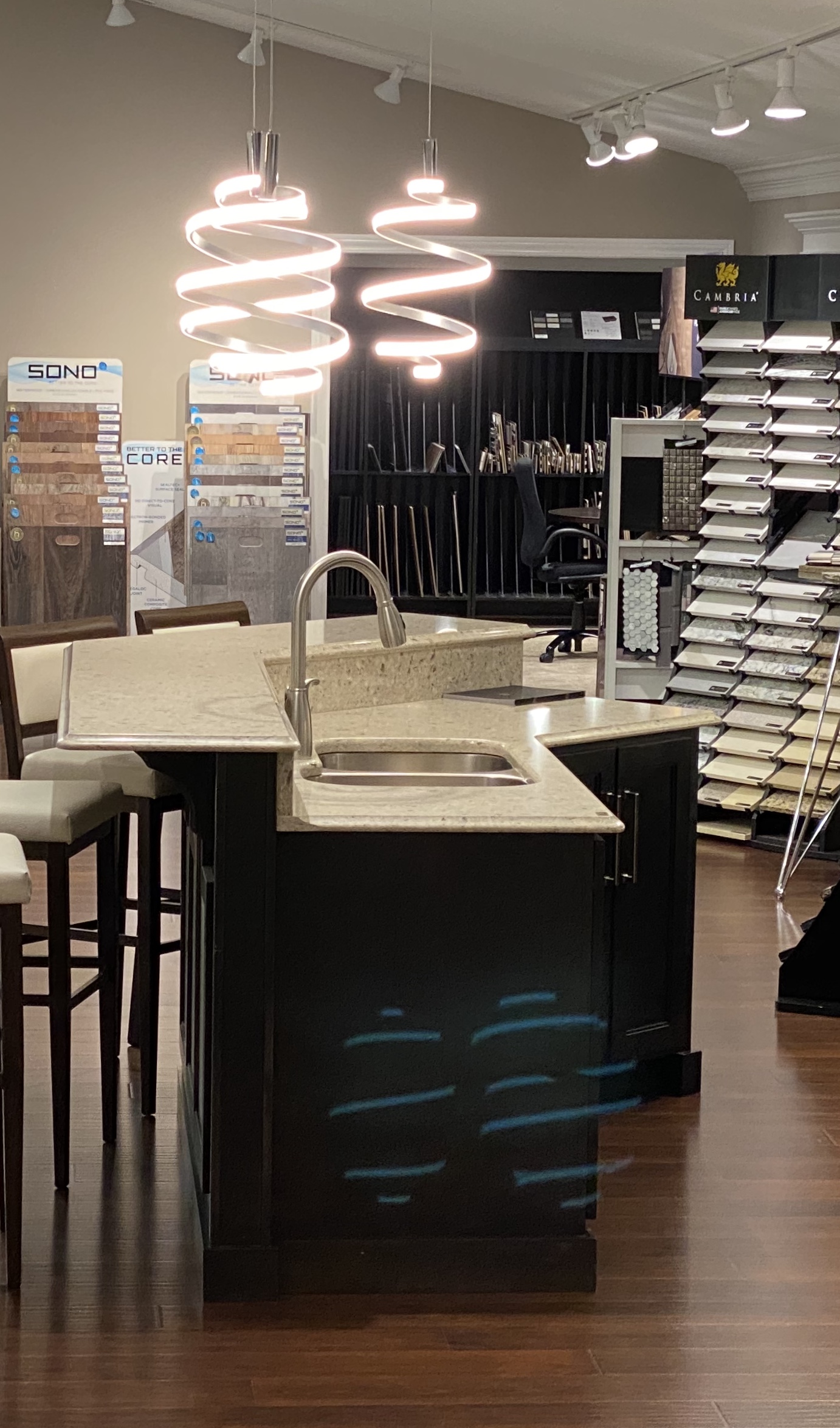
Professional videographer here. I hadn't previously heard the consternation about the lens flare issue; I've owned my iPhone 11 Pro for a few days. I noticed while shooting this room that a peculiar flare was appearing; a mirrored ghost of this bright, ornate light fixture. I went to our IT department, and we tested every iPhone since the 6s, as well as a few different Android phones.


Here's the verdict: all phones produced this flare, but none as strongly as the 11 or 11 Pro, which performed identically with the standard wide lens. I have my theories about the cause of this, but it's clearly the hardware. It affects both the wide and tele, but not the ultra wide or selfie cam.


Removing these flares isn't a huge deal in photos, but is essentially impossible for video. It's hard to understand why no professional reviewer mentioned this issue, particularly given the emphasis on this iPhone as a video production tool. I haven't decided if I will keep the phone or not, but I don't see how this could be mitigated without a hardware revision. It could be as simple as a change in the coating, but I think it's likely to be a bigger issue.


Unless Apple has secretly changed the hardware, I'm very skeptical of claims that a replacement has fixed the issue. To those who say the issue doesn't exist, it does to some extent on every phone I've tested, so that's clearly wrong.


If you point this wide or tele at a bright light source, it's going to flare, and it's unavoidable. As you can see with this shot, it doesn't even require much contrast--the room is relatively well-lit. My recommendation would be to either learn to live with the issue, or pass on this model.


Jan 3, 2020 4:54 PM in response to keenraven

Hi ! It is great to get a pro in there; someone who knows about optics & the potential issues of light reflections... Nothing to do with software at all like some would like to believe.


Light reflexions is the issue here. It must be attenuated or at least there should have been an attempt to do so, by design.


In my humble opinion the culprit hardware is fairly simple to correct. The items which could be improved for a better control of ghosting & flare are as follows:


1) The lenses covers: Absence of effective anti-reflective coating whilst both sides should be coated.

2) The lenses covers: The black blanking rings on the sapphire crystal should be either matt (best) or frosted on both sides.

3) The camera system « bump » should not be so glossy i.e. mirror like but either matt (best) or frosted.

4) The camera rings should not be so glossy i.e. mirror like but either matt (best) or frosted.

5) The camera rings should be a bit thicker i.e. think hood, except for the wide angle.


I do not know if the sensor has anti-reflective coating but that is pretty standard these days to avoid ghosting...


Would you agree ?


Your picture displays a severe example of ghosting.


Now, I feel that such defects destroy the whole idea of a “point & shoot” since a lot of post work with expensive software tools becomes necessary to “cook” the pictures trying to “erase” these ghosting & flare artefacts...

Jan 27, 2020 5:49 PM in response to JimP_Solvang

JimP_Solvang wrote:

Thanks for the post Danny. Your shot is a great example of what so many of us are experiencing with the 11 Pro camera system. Apple engineers are dug in with their position that "there are no lens flare / floating artifacts" problems.


I don't think anyone has ever said there are no artifacts.


However, the artifacts that are produced are expected and normal for this device given the design tradeoffs that were made (and need to be made to produce any product.)


Given that, if you don't want to modify your technique to avoid artifacts, the only other solution is to return or sell your phone and purchase something else.

Feb 9, 2020 5:41 PM in response to ph0b14

Hi ph0b14. First of all, hope you guys are doing OK with the fires.


Sorry to see you are one of the Global Many who have been let down by Apple regarding the lens flare/floating artifacts imaging issues with the 11Pro. It's disappointing enough that these issues are real, but absolutely mind-blowing that Apple's position on this is to (1) Insist the issue does not exist, (2) Tell concerned users that it's their shooting style that causes (in their word) "normal" lens flare anomalies and (3) Offer NO viable course of action for refunds, credits or compensation – never mind an actual plan to fix the glaring problem.


I personally did get an Apple Support rep (as well as an in-store tech and manager) to acknowledge that indeed, there seems to be excessive "lens flare-like" anomalies. Over the course of 3 weeks I received 3 replacement phones but unfortunately they all produced the same results. The outcome of my month-long Apple odyssey is that I still have an 11 Pro that still produces these undesirable floating artifacts. I no longer have the time and resources to spar with Apple and I can only guess that this is what their game plan is: to just keep denying, to simply tire us all out until our collective calls for help are just a muffled groan under the thick rugs of their outlying call centers.


Once last thing: you may receive suggestions here to send your comments to https://www.apple.com/feedback/iphone.html

Can't hurt (any more than it already does) to try. Good luck.


Oct 21, 2020 6:28 AM in response to vv303

Larger sensor, much larger lens, lenses that physically can be coated to reduce reflections, etc.


For example:


iPhone XS Sensor Size: 5.76mm x 4.29mm

Canon Mark 6 Sensor Size: 35.8mm x 23.9m


It is the laws of physics as it becomes a bigger issue as lenses are shrunk down in diameter and spacing, and as sensors are reduced in size as well.


Lens flare is just as much of an issue in smart phones from other vendors.


Samsung EU Community: Galaxy S20 Lens Flare

Jan 13, 2021 7:51 AM in response to Dogcow-Moof

The problem is not only with direct light from say the sun ect. - Even simple streetlights from meters away from you they give these green lens flare dots. It's doing it a lot on my 12 pro max, and it's not something you can always fix by angeling the phone or use a special technique, it doesnt always work with the shot you want to take. And since older iphones don't have this issue then we can only conclude it has something to do with the camera lens or the glass covering the lens. My old iphone 8 plus that I had before the 12 did not give me these lens flare dots when taking photos at night of streetlights and things like that. Others like me believe it has something to do with the coating of the glass, or the light bouncing back and forth from the glass and down to the camera lens.

Mar 20, 2021 1:29 PM in response to bobneedham

Actually it is.


As you move your own position and tilt the phone up and down, the flares will change position and either be in an area of no concern or will disappear entirely.


This is what professional photographers and videographers do every day, it's why it takes hours of adjusting camera angles and lighting before a two minute scene is shot for a movie or TV show.


I don't have any comparisons handy because I compose before I take a shot, and if I see flare I react before I ever tap the shutter button, the same as I do with my DSLR.

Mar 30, 2021 5:08 PM in response to JimP_Solvang

Yes… and as I mentioned you see the same artifacts on DSLRs and in a $40L+ cinema camera and lens.


The technical pros at Apple Stores know Apple equipment but are not experts in photography and videography, even at Los Angeles area Apple Stores. 😁


If you like, you can use your favorite Internet search engine to look for videos comparing the Samsung Ultra 21 and iPhone 12 Pro Max, and there's at least one showing they generate the exact same green orbs that are inverted reflections.


Likewise this shot from a Canon DSLR/lens combo I've posted before:


But in the end, I am more than happy to agree to disagree.

This thread has been closed by the system or the community team. You may vote for any posts you find helpful, or search the Community for additional answers.

Iphone 11 Pro Extreme lens flare

Welcome to Apple Support Community
A forum where Apple customers help each other with their products. Get started with your Apple Account.

