Is it possible to disable document revision tracking in Mojave?

How do you disable document revision tracking in Mojave? The techniques used in ElCap and prior (defaults write) appear to no longer work.


Specifically, I need to disable revision tracking for Pages, Numbers, Keynote, TextEdit, iBooksAuthor, and Preview. I would like to be able to disable it universally.

MacBook Pro Retina

Posted on Oct 5, 2019 2:20 PM

Reply
Question marked as Top-ranking reply

Posted on Oct 7, 2019 12:42 PM

Okay, I have found a work-around. It doesn't seem to break anything other than what I want to break, and that is document versioning. When performing the following procedure, it throws this warning upon exiting a document:
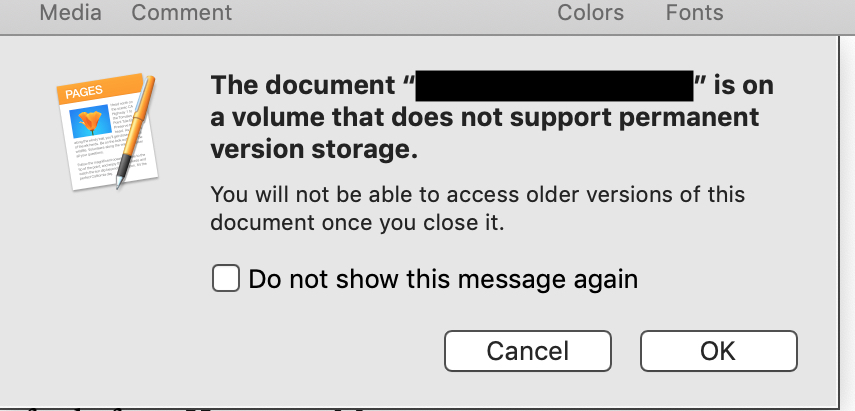

So, it appears that macOS and Pages (etc.) are cleanly handling my kludge.


Here is what I did to disable document revision tracking. WARNING! Do this at your own risk! Your mileage may vary!!

    1. Quit all apps
    2. Open Terminal and enter the commands shown below
    3. Reboot
    4. To keep TimeMachine happy, exclude <FS_ROOT>/.DocumentRevisions-V100


Terminal commands:

$ sudo su -
# rm -r <FS_ROOT>/.DocumentRevisions-V100
# mkdir <FS_ROOT>/.DocumentRevisions-V100
# chmod 0 <FS_ROOT>/.DocumentRevisions-V100
# chflags uchg,schg <FS_ROOT>/.DocumentRevisions-V100
# exit
$ 

So, what the above commands do is: delete the directory used to track revisions, create a new empty directory, deny access to that directory, then mark the directory immutable by either a user or the system.


Without that last step, document versioning would simply rename the inaccessible directory and create a new one. However, making the directory immutable blocks that mechanism.


Should you ever wish to re-enable revision tracking, you should be able to:

# chflags nouchg,noschg <FS_ROOT>/.DocumentRevisions-V100

Then delete the directory and reboot. I have not tested that, but it should work.


Similar questions

11 replies
Question marked as Top-ranking reply

Oct 7, 2019 12:42 PM in response to JRK Apple Discuss

Okay, I have found a work-around. It doesn't seem to break anything other than what I want to break, and that is document versioning. When performing the following procedure, it throws this warning upon exiting a document:


So, it appears that macOS and Pages (etc.) are cleanly handling my kludge.


Here is what I did to disable document revision tracking. WARNING! Do this at your own risk! Your mileage may vary!!

    1. Quit all apps
    2. Open Terminal and enter the commands shown below
    3. Reboot
    4. To keep TimeMachine happy, exclude <FS_ROOT>/.DocumentRevisions-V100


Terminal commands:

$ sudo su -
# rm -r <FS_ROOT>/.DocumentRevisions-V100
# mkdir <FS_ROOT>/.DocumentRevisions-V100
# chmod 0 <FS_ROOT>/.DocumentRevisions-V100
# chflags uchg,schg <FS_ROOT>/.DocumentRevisions-V100
# exit
$ 

So, what the above commands do is: delete the directory used to track revisions, create a new empty directory, deny access to that directory, then mark the directory immutable by either a user or the system.


Without that last step, document versioning would simply rename the inaccessible directory and create a new one. However, making the directory immutable blocks that mechanism.


Should you ever wish to re-enable revision tracking, you should be able to:

# chflags nouchg,noschg <FS_ROOT>/.DocumentRevisions-V100

Then delete the directory and reboot. I have not tested that, but it should work.


Oct 6, 2019 12:40 PM in response to JRK Apple Discuss

At your own peril in disabling autosave, you can do so in System Preferences : General : [√] Ask to keep changes when closing documents. Once you select that, any and all document saves are now manual, and you know this because the red traffic light in open documents has a black eye:


where with autosave on it will always be solid red indicating that nothing has accumulated in the buffer. Also, if you attempt to quit an unsaved document, you will get a failsafe dialog offering to Delete, which means abandon all saves and quit, or the Save button. The following is from Pages v8.2, but other applications will have a similar drop down sheet:


The other categorical imperative is to have consistent Time Machine backups running.

Oct 5, 2019 5:21 PM in response to sberman

I mean exactly what I stated... the built-in document versioning in many of Apple's apps. That is, the "magically saved" versions (managed by revisiond) to which you can revert a document using: File --> Revert To --> (list of file versions).


In earlier versions of macOS, you could write a string to each app's plist to disable the app's use of document versioning. Now, either that string has changed (which is what I hope has occurred!) or you can no longer simply disable it (and, instead, have to regularly manually whack <FS_ROOT>/.DocumentRevisions-V100).


$ man revisiond
REVISIOND(8)              BSD System Manager's Manual             REVISIOND(8)

NAME
     revisiond -- storage manager for document revisions

SYNOPSIS
     revisiond

DESCRIPTION
     revisiond is the daemon that manages document revisions created by applica-
     tions and system services.

     There are no configurations to revisiond, and users should not run revisiond
     manually.

Mac OS                          March 11, 2011                          Mac OS


Oct 6, 2019 1:12 PM in response to VikingOSX

Viking,


I have tried disabling AutoSave in Preferences. However, that only disables automatic saving of the document.


I have tested that by:

    1. Wipe <FS_ROOT>/.DocumentRevisions-V100
    2. Disable auto-save in System Preferences
    3. Logout and login
    4. Create a new document in Pages
    5. Save it
    6. Make changes to document, save it, and exit Pages
    7. Once again <FS_ROOT>/.DocumentRevisions-V100 exists
    8. Open document in Pages
    9. Can now revert to any of previously saved versions of document


If you observe different behavior, please let me know along with any ideas what I may be doing wrong.


THANKS!


Oct 5, 2019 10:50 PM in response to JRK Apple Discuss

So you don't want to see the following (from Pages 8.2, MacOS Mojave 10.14.6):


You're telling us how you are trying to accomplish something. What are you trying to do? Why would you possibly want to disable seeing these revisions? After all, the Apple ID is uniquely yours - if you don't want to share this document, the document is yours uniquely. If you don't want revision tracking in this contest, why would you simply not use this feature?

Oct 6, 2019 10:51 AM in response to sberman

Hi,


That is exactly what I don't want to see.


From your questions, I gather you have never had to deal with highly sensitive information and be concerned about device inspection when crossing international borders.


I only want ONE copy of any document I am working on to be resident on my computer. I do not want to be in the situation where I am forced to unlock my computer and have a custom's inspector be able to find old copies of documents buried within document revisions.


This is all a matter of maintaining document confidentiality. I need assurance that I have only one copy of any document on my computer, and no other copies -- or fragments of copies -- exist anywhere else.


I have explicitly excluded the folders containing such documents from my TimeMachine backups, and I have also excluded all the Library and system files containing any copies of documents or document metadata from my backups as well. That said, I do make manual backups of these documents, but they are strongly encrypted using a key not stored on my device and to which I do not have access when traveling.


So, the bottom line is that for reasons of document confidentiality and being able to identify every copy of a document, I do not want revision tracking enabled. Prior to Mojave, I had been able to successfully disable it. However, I no longer seem to be able to do so.

Oct 8, 2019 9:58 AM in response to JRK Apple Discuss

Pretty darn clever -- using mac OS's own features to defeat one of it's other features. "Battle of the Features" -- my feature is stronger/better/faster/smarter than your feature, etc, etc, etc


I'm writing this down right now as one of my all time favorite things to remember, hopefully, should I ever need to do something similar.


Way to go!!!!! Take that you silly OS ;-)


I really think you should make a feature suggestion to Apple that they include some clean way to implement this capability for people who travel with their laptops and don't want to have to worry about some possible change in a previous version of a file that gets them in hot water when going thru customs.


Good luck...


Oct 5, 2019 4:01 PM in response to JRK Apple Discuss

What does "revision tracking" mean to you?


In particular, some applications like Microsoft Word can actually track what additions, deletions, and changes are made from one version of a document to another. But I suspect you mean something completely different.


In Pages, for example, it is not possible to, say, revert to a two-version-old version of a document unless you retrieve it from a (TimeMachine) backup.

This thread has been closed by the system or the community team. You may vote for any posts you find helpful, or search the Community for additional answers.

Is it possible to disable document revision tracking in Mojave?

Welcome to Apple Support Community
A forum where Apple customers help each other with their products. Get started with your Apple Account.

