FCPX 10.4.7. egpu problem

So, i just updated Catalina to my macbook pro and installed FCPX 10.4.7...

Am i missing something or what the heck is going on with the external GPU support here? I'm using Blackmagic eGPU pro btw.

That checkbox is now gone (right click on fcpx program icon) where you could select the use of eGPU on 10.4.6.

FCPX 10.4.7 use now eGPU render/export only. Not for playback what i'm used to. So this 10.4.7 is useless to me right now...

Anyone have same problem?

MacBook Pro with Touch Bar

Posted on Oct 8, 2019 8:08 AM

Reply
Question marked as Top-ranking reply

Posted on Oct 16, 2019 8:51 AM

Let me preface this by saying that this is the fastest FCPX has ever run on any system i have ever had, its amazingly fast - Im super super happy with it.


My setup when i updated to FCPX 10.4.7 & Catalina was as follows:

Late 2014 5K iMac 27inch - 4 GHz Quad-Core Intel Core i7 - 32 GB 1600 MHz DDR3

AMD Radeon R9 M295X 4 GB graphics

MacOS Catalina 10.15

FCPX 10.4.7

Target Display mode with a late 2011 27inch iMac and external 55inch UHD monitor connected to an

Akitio Node Pro - Vega 64 daisy chained to an Akitio SSD bay (4TB Raid0)


The above setup worked very well in FCPX 10.4.6 & Mojave - FCPX would use both internal and external GPU in tandem and never would i experience any lag though i had to open FCPX in low resolution mode for it to work properly. I would force the eGPU & Low Resolution mode from the Finder.


Original Setup with an older iMac as a secondary display.

Before the Update - with a Vega64


After the update (to FCPX 10.4.7 & Catalina) only the internal GPU was utilised so i tried testing various setups and options finally concluding to remove the 2nd iMac (Target Display) from the equation and use an external monitor powered from the eGPU directly instead.


From the System Preferences i set one of the external monitors as the main monitor (Dragged the menu bar). Then i opened FCPX and chose through Preferences my external GPU. After that - wow - everything was been running super smooth super fast - with my usual effects maxed out. And the thing is that now the internal GPU is only used for h.264 sharing.


.


Also i have noticed that if you choose an external monitor powered through an eGPU as your main display MacOS will recognise the eGPU as your main graphics card.

So now my main monitor now is a 27inch BenQ. Doesn't look that nice but if im getting the performance boost who cares.


When external monitor is used as main Display


When iMac is used as main Display


Which could essentially mean that we are getting full eGPU support across the board. I don't have the time to test this but im sure someone out there could test it out.

227 replies

Dec 27, 2019 2:28 PM in response to jbjoret

The purpose of a GPU is to accelerate graphic processing encoding is a computational task unless you use some kind of filter during encoding (and with fcpx not compressor this is possible) the processing is done by the CPU not by the GPU as there is nothing to render.

if your fcpx timeline is fully rendered in apple prores 422 default option when you share your project there will be minimal GPU usage to the point it doesn’t matter at all if the integrated discrete or external GPU is used

The encoders in FCPX and compressor are crap in terms of quality they use a version of h264 and h265 that is hardware accelerated in CPU and need no eGPU to perform better.

only in case your timeline is not fully rendered when you share or if you share a version of prores higher than 422 the GPU will be called in. This behaviour has not changed since a long time. So it is normal to see very little GPU utilisation if you have been working on an project for some time and background rendering is active. Real time tasks will always use the discrete or integrated GPU on a macbook or a mini with the display connected to the main unit.

if you close the lid of the mbp or connect the display to the egpu you are in a situation where the gpu is used for all real time tasks as it is attached to the only display that is working. The only way to make the internal GPU render is to tell final cut in the preferences.

this has always been like this since egpu support was first given to fcpx. Am not sure what you guys are going on about. Maybe a specific example would help. The only think no longer working in 10.15.2 is the boot with the egpu display but this is an osx issue

Dec 27, 2019 3:20 PM in response to Interceptor121

I use a mac mini connected to an EGPU which is connected to my monitors. Before the 10.4.7 update, my editing was silky smooth. I toss noise reduction and color correction and everything rendered, and then shared with no problem. Whenever I used told FCP to render or share, the activity on the EGPU would fill up and the task was done. During any of the processing the internal GPU was fairly quiet.


Since the update, the process has taken SIGNIFICANTLY longer, and the activity on the EGPU is minimal, while the activity on the internal GPU increases.


One then concludes that the option to "Prefer EGPU" was the trigger for the program to use the EGPU. Since the change Final cut seems to be completely ignoring the EGPU for all task and is using the internal GPU instead, even after you go into the settings and tell it to use the EGPU. In my experience and testing the option in settings does absolutely nothing when you toggle it.


There are some cases where I notice that Final cut will split the processing between the internal and EGPU.


My best guess is that Apple redesigned Final Cut to work with the new multiprocessing Mac Pros and in doing so did not consider the effect it would have on current workflows using EGPU, even though a few months prior that's all they talked about...


I've had to creatively download 10.4.6 just to have my system functional. 10.4.7 completely destroyed any hopes of me being able to function at all, much less deliver work to client in promised timelines. I've also spent hours on the phones with Apple Techs and have submitted screenshots and Diags to their dev team. It's been a good while not and haven't seen a fix yet.


In the midst of all this, I have started incorporating premiere into my workflow, and since I do a lot of VFX in After Effects, I may be jumping ship and leaving all my plugins, transitions, titles etc etc behind in FCP.

Dec 28, 2019 7:44 AM in response to Interceptor121

Yes, you are correct that Apple does not monitor these forums for feedback, but your attitude towards this thread is highly dismissive.


I'm glad your setup is working for you but for many it is not. You can drone on-and-on about connecting monitors directly to the eGPU and setting them as Primary Monitors, but I'm not sure if you've actually read the full thread. If you had, you'd realize that most people with issues here never had a monitor connected to their eGPU to begin with, and they were seeing good eGPU utilization prior to FCPX 10.4.6 (myself included). The ONLY aspect of their setup that had change was upgrading to Final Cut Pro 10.4.7/8.


I work for a post-production department that is currently laying the groundwork to transition over to Final Cut Pro X. We have been exploring using eGPUs alongside our less capable GPU machines (iMacs/MacBooks) for several months now. On our testing machine, I now have both 10.4.6 and 10.4.8 installed because of this very issue outlined here.


I can assure you that "live acceleration" absolutely works during playback with filters such as FilmConvert and BeautyBox on 10.4.6 with built-in monitors, in addition to all the other Share and Render acceleration.


This thread is to also discuss workarounds and solutions. So please, be a little considerate and don't just assume everyone else is doing something wrong.


Dec 28, 2019 8:00 AM in response to tylercadenas

Just talked with Apple again— no word from the Engineers at Final Cut. As I wrote in my previous post, I sent data DIRECTLY to the engineers on my internal GPU, CPU, and eGPU during an export with this issue on FCPX 10.4.8.


To be fair, Christmas got in the way, so we’ll just have to wait.


If everything falls through, catch me brushing up on my Premiere shortcuts.

Dec 28, 2019 1:47 PM in response to Interceptor121

You continue to miss the point or simply ignore what is being said. You are talking about windowserver tasks now?


You are attempting to build some case that because windowserver can't run on an eGPUs, that it's impossible for Final Cut Pro X to accelerated realtime playback tasks? I suppose all these users with 10.4.6 and eGPUs must have made up all the ways their workflow was much faster prior to 10.4.7/8?


Here's what Apple highlighted (Sept. 2018) as features when official eGPU support was given to Final Cut Pro X with Mojave:

* The support document https://support.apple.com/en-us/HT209134 now redirects to the Final Cut Pro User Guide.


  • Improved playback of projects with color correction and video effects.
  • Improved performance when working with 3D titles.
  • Faster analysis for effects including stabilization and optical flow retiming.
  • Faster rendering of complex project timelines.
  • Faster export of complex project timelines.


That first point is a big deal for most video editors since almost all footage has basic colour or effects applied (even if only Broadcast Safe). I can personally add third-party OpenCL capable filters such as FilmConvert and BeautyBox to that list, which are able to playback in realtime thanks to the eGPU. The creation of ProRes Proxy files was also offloaded to the eGPU.


You want to present yourself as the "working example" for FCPX 10.4.7+, yet your whole setup is based on the assumption that the display is connected directly to the eGPU, probably was with 10.4.6 and is now with 10.4.8 (please let me know if not), so it makes sense for you not to see a dramatic change.


However, the majority of the people that are having issues in this thread, do not use displays connected to the eGPU. That is the real issue here! Think of how ridiculous it is that a Retina 5K 27" iMac users need to use another monitor as their primary display to see eGPU benefits. And not everyone wants to run their eGPU 24/7 as their primary display.


I will also say that not everything carries over when you use an eGPU connected display. For some reason, Proxy generation still does not offload.


Dec 28, 2019 3:58 PM in response to MZTVPD

Hi

Maybe I have not made myself clear I have run a configuration with macbook pro 13 and mini with display either non connected or connected directly to the unit this because I had an LG ultrafine monitor that only had a thunderbolt port so I was exactly in the situation of this post for 12 months using a Razer X powered by a Vega 64 Nitro

During those 12 months I always experienced laggy playback of my original media in the browser (Panasonic AVC intra 200/400 mbps HD/4K) from high sierra to Catalina from FCP 10.4.3 to 10.4.7

After discussing with Apple again and having looked on the eGPU forum and again on the developer documentation I decided to get rid of the LG monitor and get a display that can connect to the Razer through displayport or HDMI.

Since I have run a configuration with the display attached to the eGPU I have no longer any problem


Now just for the sake of this post I restored final cut 10.4.6 from back up and identified a library I have not touch since months I have connected the display using thunderbolt to the mini and detached the display port cable.

I have then run 10.4.6 with Prefer GPU setting and disabled background rending and then played back some original media in the browser as well as some project media rendered and not.

As I was experiencing before with my original media (that despite apple claim cannot be edited native) stutters and playback drops frames in 10.4.6 as it used to be. The activity monitor shows Vega utilisation of 0% confirming the eGPU is not used for live tasks. Only when playing back some project media and going through the occasional title I see some movement on the eGPU but essential what the documentation says about Final Cut is correct the live tasks are managed by the GPU that drives the display. To confirm I have connected the display to the eGPU and back to fast performance

Attached screenshot of 10.4.6 with eGPU usage at zero during playback and stop due to dropped frames
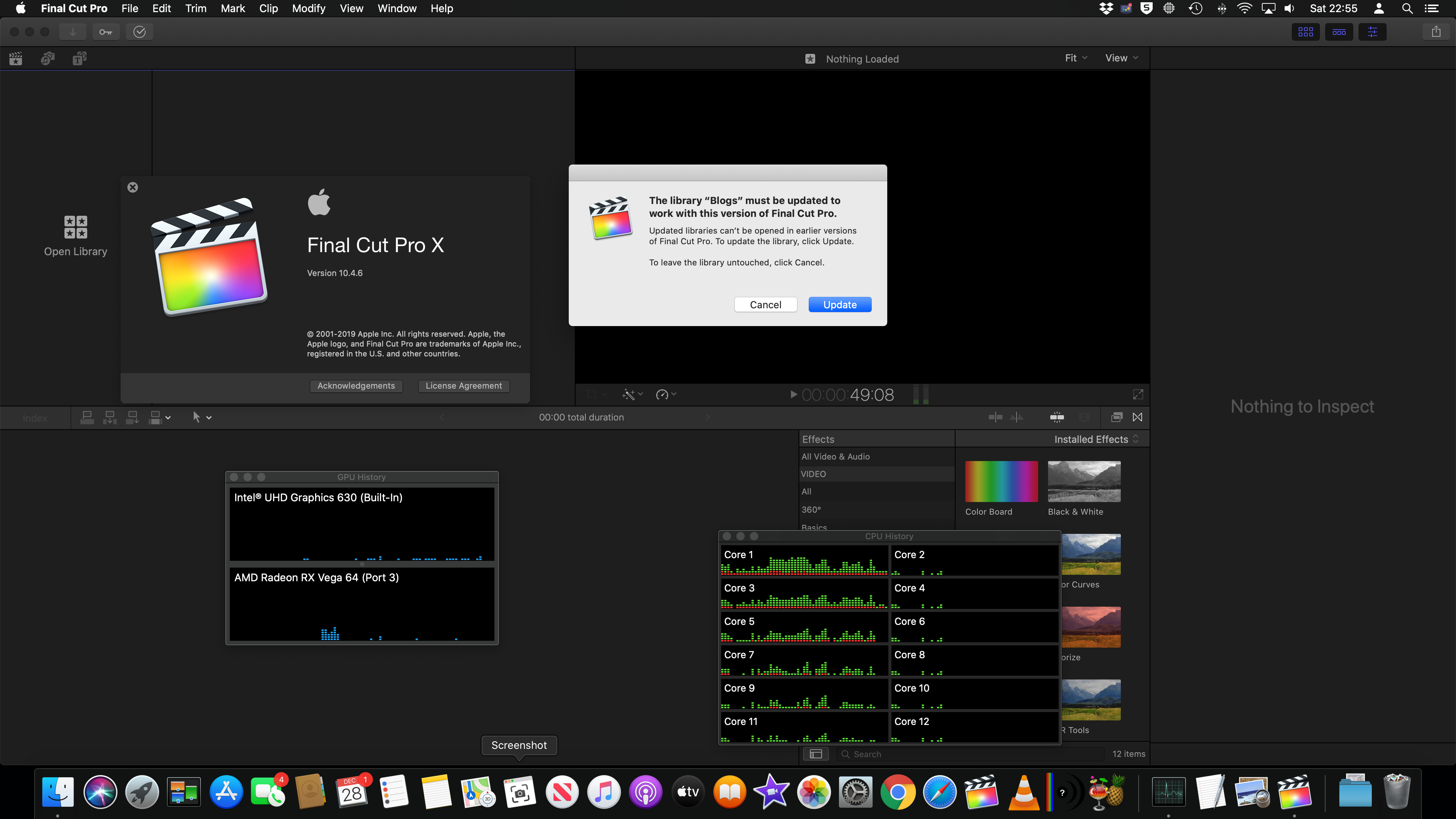
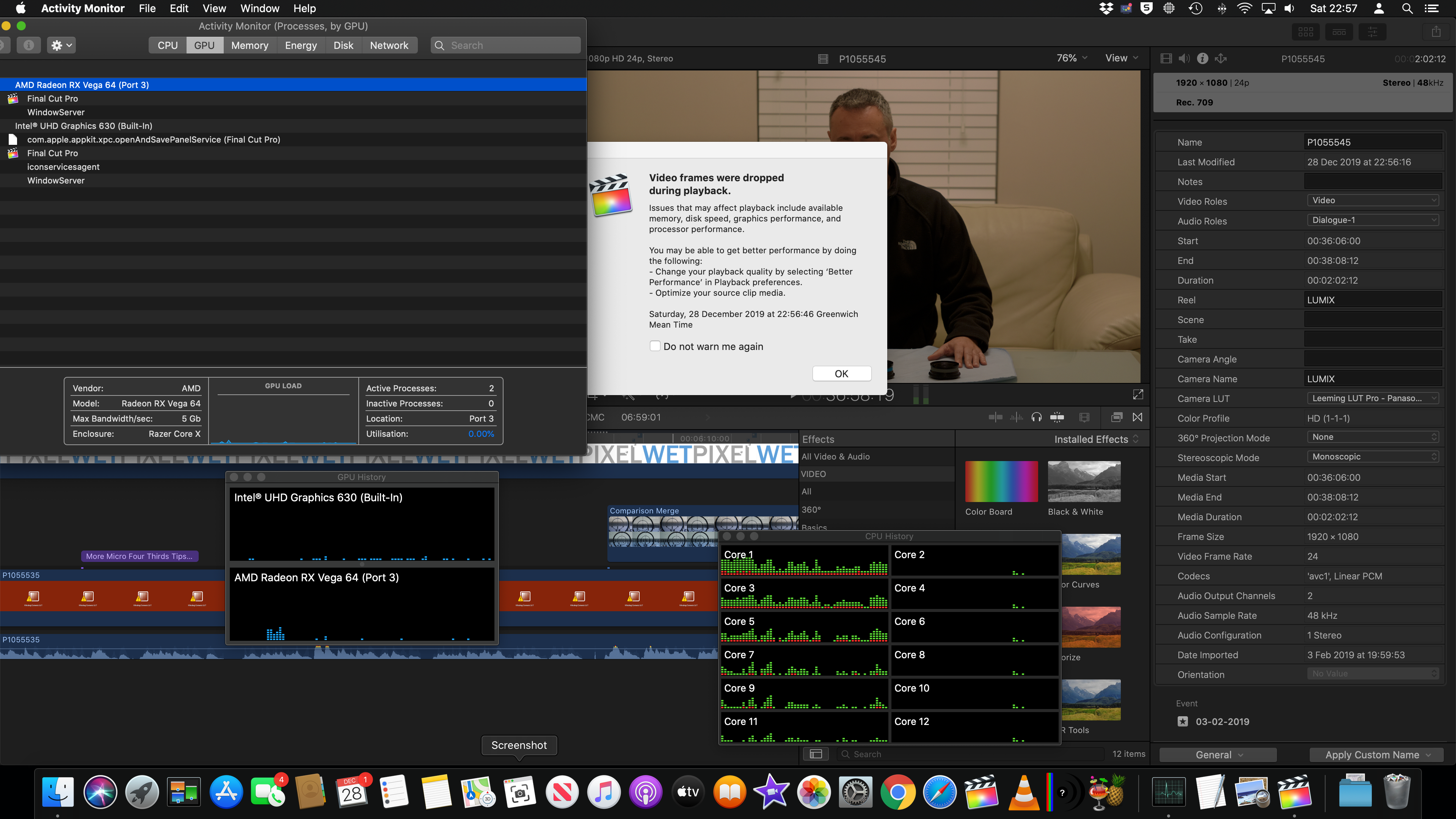

So at this point the claim that the eGPU was accelerating live tasks in the browser was clearly not true and what I have been experiencing for one year confirmed which is the mini can't play decently media not optimised nor timelines fully rendered in prores.


Moving on I updated the library and opened with 10.4.8 and checked the situation with exactly the same source media still with rendering disabled and display connected to the mini not the eGPU screenshot below
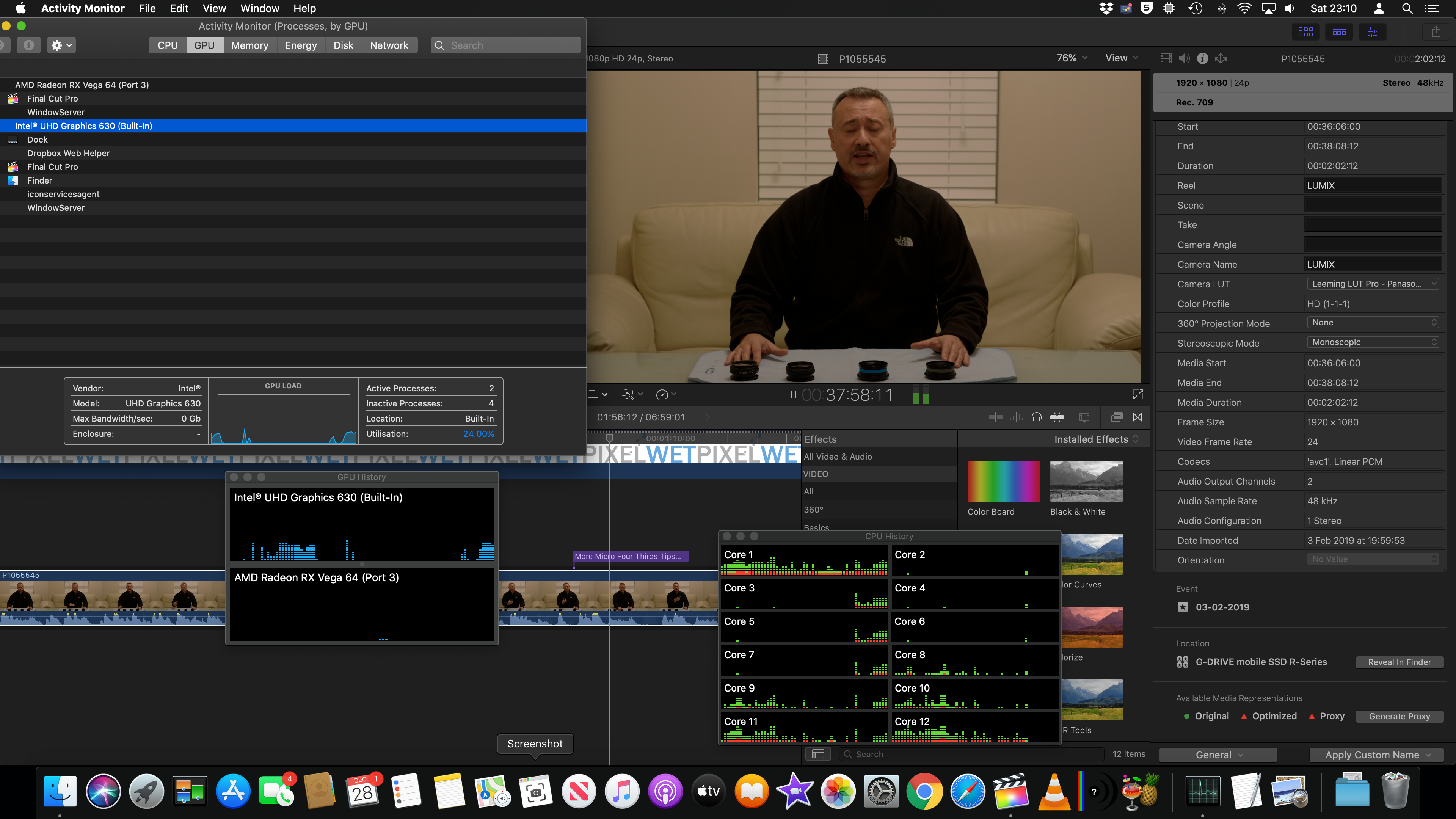


The eGPU remains at zero as before and actually it does not even move a little when it finds a title and the iGPU is now at 24% while in 10.4.6 it was much lower for playback


Conclusion: the performance of 10.4.8 is rubbish in playing my media as it was in 10.4.6 when the display is connected to the mini however now it accomplishes the same poor performance with much higher internal GPU utilization which is rather bizarre. When I use a configuration with the display connected to the eGPU the performance is outstanding in both 10.4.6 and 10.4.8 frankly is so fast I can't even tell if there is a deterioration

In terms of rendering the two version both pass it to the external GPU when the monitor is connected to the mini as this is a background task I don't know if there is a deviation or not in performance


So I think your claim that the eGPU was accelerating the internal display is not founded and consistent to the documentation and other sources eGPU is only used for background tasks so there is nothing that Apple can do as the functionality was never there.

For what concerns rendering in background there appear to be no differences that I can see on my past and new set up between the two versions.

Finally for sharing I am not planning to bother doing any tests because the H264 encoder of final cut is pathetic and although fast has terrible quality and should not be used. Also to clarify encoding is a CPU task as the newer apple hardware have hardware decoding and encoding in the CPU using Intel Quick Sync Video so they don't use the GPU at all. The GPU internal or external is only used if there are parts still left to render and as background rendering should be active on an eGPU set up when you get to that point there should be little left to render anyway


Dec 29, 2019 1:38 AM in response to Interceptor121

I never required an external screen to take advantage of a eGPU on my 2013 13” MBP. Don’t care for an external screen, the MBP’s screen was just fine when I was doing short projects at home. And with the Blackmagic eGPU attached via TB2toTB3 adaptor I was getting great performance while playing back and rendering FCPX 1080p and 4K timelines. (About as fast as my studio 2017 iMac 5K with upgraded Gpu) Ever since this update everything stopped working. Luckily I was able to revert to the previous version of FCPX and I can use the eGPU as before.

Dec 29, 2019 8:09 AM in response to Interceptor121

I suspect what maybe causing you issues is using a Thunderbolt connection on your Mac mini to drive your new display and simultaneously an eGPU connected over Thunderbolt as well. Have you tried connecting the display via HDMI to the Mac mini (even if you don't get full resolution)? This might be more representative of other Mac mini users here. What you have, should work ( the Mac mini has dual Thunderbolt controllers after all ) but there's something about running them both over Thunderbolt that might cause conflict (especially in FCPX acceleration). Or just use any standard 1080p HDMI monitor for testing if you have one.


And to be clear, the GPU (internal or external) does not encode/decode ProRes (or AVC Intra in your case), but it will fire up during playback if any effects, filters or titles are applied (as outlined in my last post). This is significant and at the heart of what many people in this thread are claiming is not happening anymore with 10.4.7/8 (with built-in display).


Also, your Mac mini has the T2 chip (with QuickSync). You can tap into it the H264/265 encoders with the Apple Device presets in Compressor (in FCPX as a destination), with HandBrake using the VideoToolBox encoders (limited options) or ffmpeg with the -c:v hevc_videotoolbox/h264_videotoolbox flags (more complicated). All options limited to 4K resolution. HEVC encoding is wicked fast!


Dec 29, 2019 9:06 AM in response to MZTVPD

Videotoolbox creates artefacts and has poor SNR also using compressor

i managed to get a refund from apple store on that basis

speed is nothing without control and videotoolbox doesn’t have enough logic for what I do to

anticipate scene changes so it creates motion artefacts

do me a favour get a fresh library in 10.4.6 disable background rendering and then import some h264 footage of your choice

playback in the viewer-> near zero GPU usage because as you said quick sync does hardware decoding

then overlay a couple of LUTs and few color wheels and try playing in the timeline look at GPU utilisation best case 5%

i have tried those scenarios in all versions of final cut till 10.4.7 and it never did anything because as explained it can’t

if you dont I will get the macbook out later tonight with no display attached and run some tests for academic purpose

I have been talking to apple and got on all sorts of advice do you think that I would have gone and changed the set up it it could work? And would apple have given me back £650 of hardware and software if it was working?

why do you think apple statement of benefits has changed since last year and now only mentions background tasks in final cut saying that for live acceleration you need to have the display connected to the eGPU?

if It was working they will be advertising the feature while actually they are being very cautious and they (apple) never bothered producing a GPU enclosure. Don’t you think that If there was money to be made they could not make one instead of leaving it to 3rd party?

eGPU for final cut is a small market because except specific constellations like mine or redraw or other type or production all devices work fine without

there was a benchmark on egpu.io where a 2014 iMac with a 4GB video card was beating the crap out of the same set up with an eGPU

Dec 29, 2019 11:44 AM in response to Luis Sequeira1

Yes, this is all with built-in display. Where did Apple explicitly say this is the expected behaviour as of 10.4.7? I don't see that in the release notes. That would be at the core of what people take issue with here. Suddenly FCPX users need to source out an additional display just to get their eGPU working again.


Also want to add that with the above setup, stabilization analysis and proxy generation is also handed off to the eGPU with 10.4.6, but not with 10.4.7/8.


I will be conducting tests with a monitor to see what is still left behind with 10.4.7/8 (I know proxies already are).

Dec 29, 2019 3:07 PM in response to Interceptor121

I just created two libraries in 1046 and 1048 and imported two Sony XAVC S files


I have then run a full analysis on both and a full optimised proxy creation on both (you would not do that with an accelerated display but just for checking)


Analysis: the 1046 uses the eGPU the 1048 uses for most the iGPU in those background tasks

Total run time 1046 29.4 seconds 1048 21 seconds/

Conclusion the use of the internal GPU is faster than the eGPU because is mostly about reads and computing (CPU task) as the iGPU is on the chipset it reads faster than eGPU


Optimisation Proxy: both use mostly the CPU with limited use of anything else

Total run time: 1046 34 seconds 1048 32 seconds


It is worth nothing that at no point in time Apple declared that the eGPU was relevant to neither analysis nor optimisation and as a matter of fact those are for most CPU tasks when there is a case of involving the GPU as there is on board hardware acceleration this works faster on 1048 than 1046


On the basis of this example I can conclude that the eGPU is used more on 1046 but this in practical terms is brining no benefits to those two tasks and actually performance is better on 1048

Am going to run the Bruce test now with the two versions on the identical configuration

Jan 8, 2020 12:33 AM in response to DomTomLondon

Apple developers do not read this forum the posts have been cancelled because there were some inappropriate ones nested with others not being able which one to delete they get all deleted

Going back to your case it is worth testing when you are in 10.4.6 what happens to playback when you disable external eGPU. Playback does not use eGPU when your display is connected as h264 is accelerated at CPU level.

If the GPU was being used prior to that you would never get to CPU at 100% to play effect what is likely to have happened is that the real time engine has dropped in performance and your set up was borderline and now is failing.

This would indicate an issue in FCPX 10.4.7 with the real time and playback but unrelated to eGPU. Finding and corroborating that would be useful as that would be an issue unrelated to eGPU but still relevant for bug fixing as it applies to all final cut users not the small community that has an eGPU

It is also worth considering that plug in are not regression tested by Apple that is not viable. Plug in developers have access to beta code and have the opportunity to optimise their code. If this stops working after a final cut upgrade it is down to the 3rd party provider to fix. So plug ins have to be generally be removed from the equation as they are user specific and can't be brought to apple for potential loss of performance.

Finally if you make professional use of the application it is best practice not to upgrade at any occasion. Final cut pro 10.4.6 can be restored individually from time machine. If you upgrade your set up without any back ups expecting everything will work 100% fine you are just being hopeful this is software and upgrade bring issues as well as opportunities.


Jan 8, 2020 4:06 AM in response to Interceptor121

What you say seems to make a lot of sense but I'm still confused.


1) Why is everyone complaining if this has always been the case?

2) I just did a little test.

a) I cleared all renders and proxy/optimised media and did a render all. Sure enough the eGPU was used to re-render all the material (I'm not using proxy)

b) I again cleared all renders and proxy/optimised media and did an export to Youtube. In this case only the internal GPU was used and the eGPU was left untouched?


Surely in b) it should have used the eGPU to re-render all the material ready for sharing to YT the same as it did when it was told to simply render?


I'm definitely thinking there is more to this as the behaviour is not consistent.


Any thoughts?

Feb 17, 2020 12:00 AM in response to mathieu241

That’s not true

rendering always uses the gpu in Final Cut Pro preferences and compression never uses any GPU only uses the CPU as it uses quicksync

os x does not support GPU encoding on Radeon cards in any version of the OS

if you have a situation where the GPU used is not one in the preferences that would be a bug. To test it disable background rendering delete all project render files and then select render all. The selected GPU must be used. If not there is a bug.

This thread has been closed by the system or the community team. You may vote for any posts you find helpful, or search the Community for additional answers.

FCPX 10.4.7. egpu problem

Welcome to Apple Support Community
A forum where Apple customers help each other with their products. Get started with your Apple Account.
