FCPX 10.4.7. egpu problem

So, i just updated Catalina to my macbook pro and installed FCPX 10.4.7...

Am i missing something or what the heck is going on with the external GPU support here? I'm using Blackmagic eGPU pro btw.

That checkbox is now gone (right click on fcpx program icon) where you could select the use of eGPU on 10.4.6.

FCPX 10.4.7 use now eGPU render/export only. Not for playback what i'm used to. So this 10.4.7 is useless to me right now...

Anyone have same problem?

MacBook Pro with Touch Bar

Posted on Oct 8, 2019 8:08 AM

Reply
Question marked as Top-ranking reply

Posted on Oct 16, 2019 8:51 AM

Let me preface this by saying that this is the fastest FCPX has ever run on any system i have ever had, its amazingly fast - Im super super happy with it.


My setup when i updated to FCPX 10.4.7 & Catalina was as follows:

Late 2014 5K iMac 27inch - 4 GHz Quad-Core Intel Core i7 - 32 GB 1600 MHz DDR3

AMD Radeon R9 M295X 4 GB graphics

MacOS Catalina 10.15

FCPX 10.4.7

Target Display mode with a late 2011 27inch iMac and external 55inch UHD monitor connected to an

Akitio Node Pro - Vega 64 daisy chained to an Akitio SSD bay (4TB Raid0)


The above setup worked very well in FCPX 10.4.6 & Mojave - FCPX would use both internal and external GPU in tandem and never would i experience any lag though i had to open FCPX in low resolution mode for it to work properly. I would force the eGPU & Low Resolution mode from the Finder.
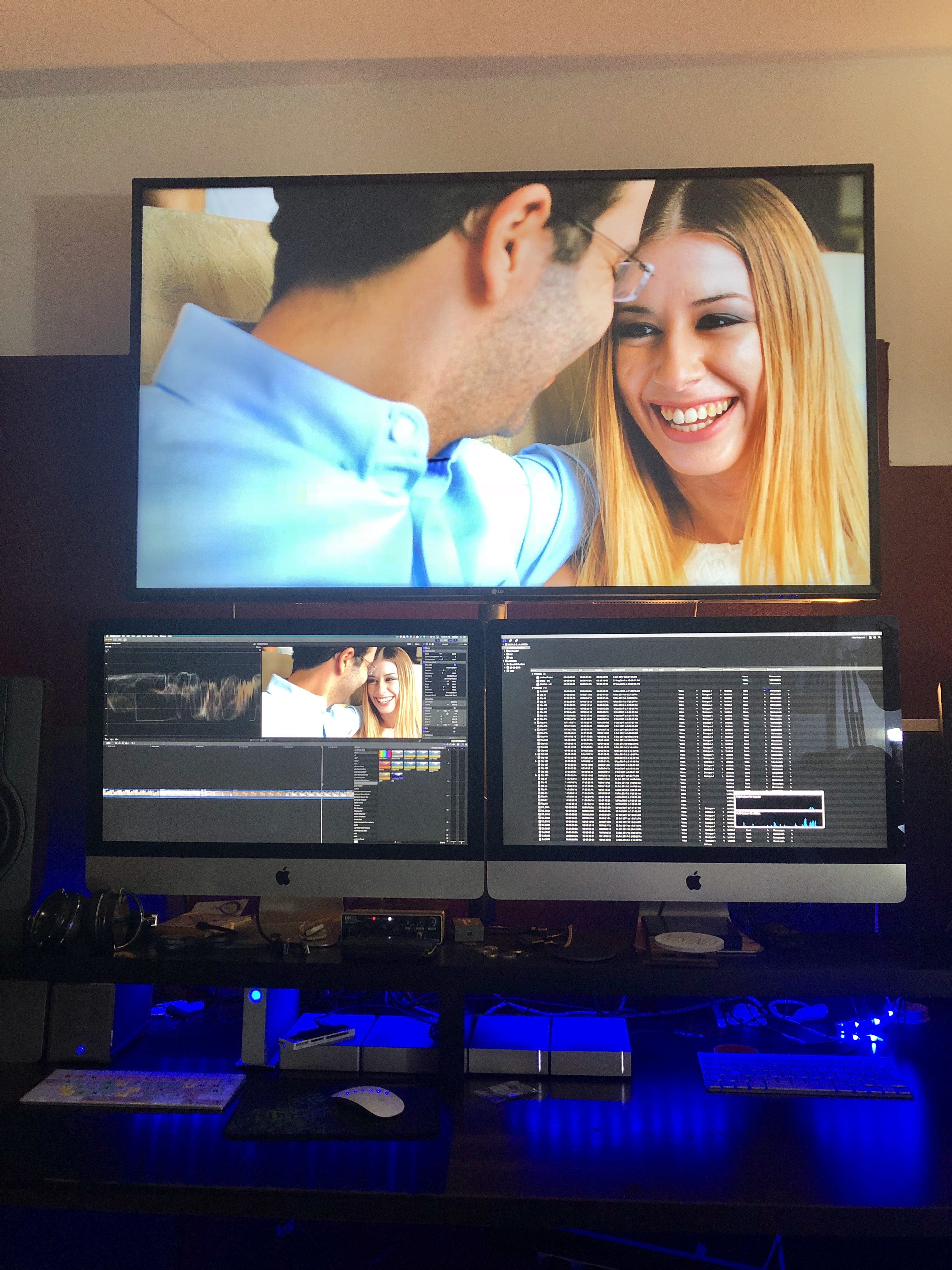

Original Setup with an older iMac as a secondary display.
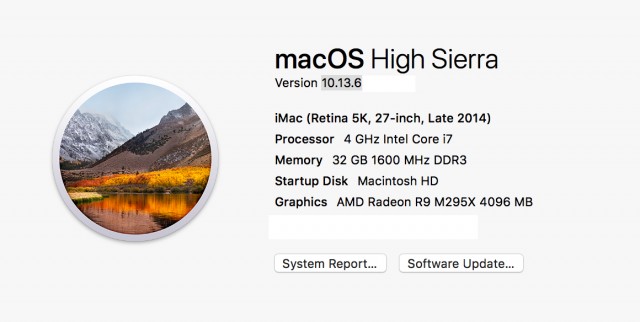
Before the Update - with a Vega64


After the update (to FCPX 10.4.7 & Catalina) only the internal GPU was utilised so i tried testing various setups and options finally concluding to remove the 2nd iMac (Target Display) from the equation and use an external monitor powered from the eGPU directly instead.


From the System Preferences i set one of the external monitors as the main monitor (Dragged the menu bar). Then i opened FCPX and chose through Preferences my external GPU. After that - wow - everything was been running super smooth super fast - with my usual effects maxed out. And the thing is that now the internal GPU is only used for h.264 sharing.
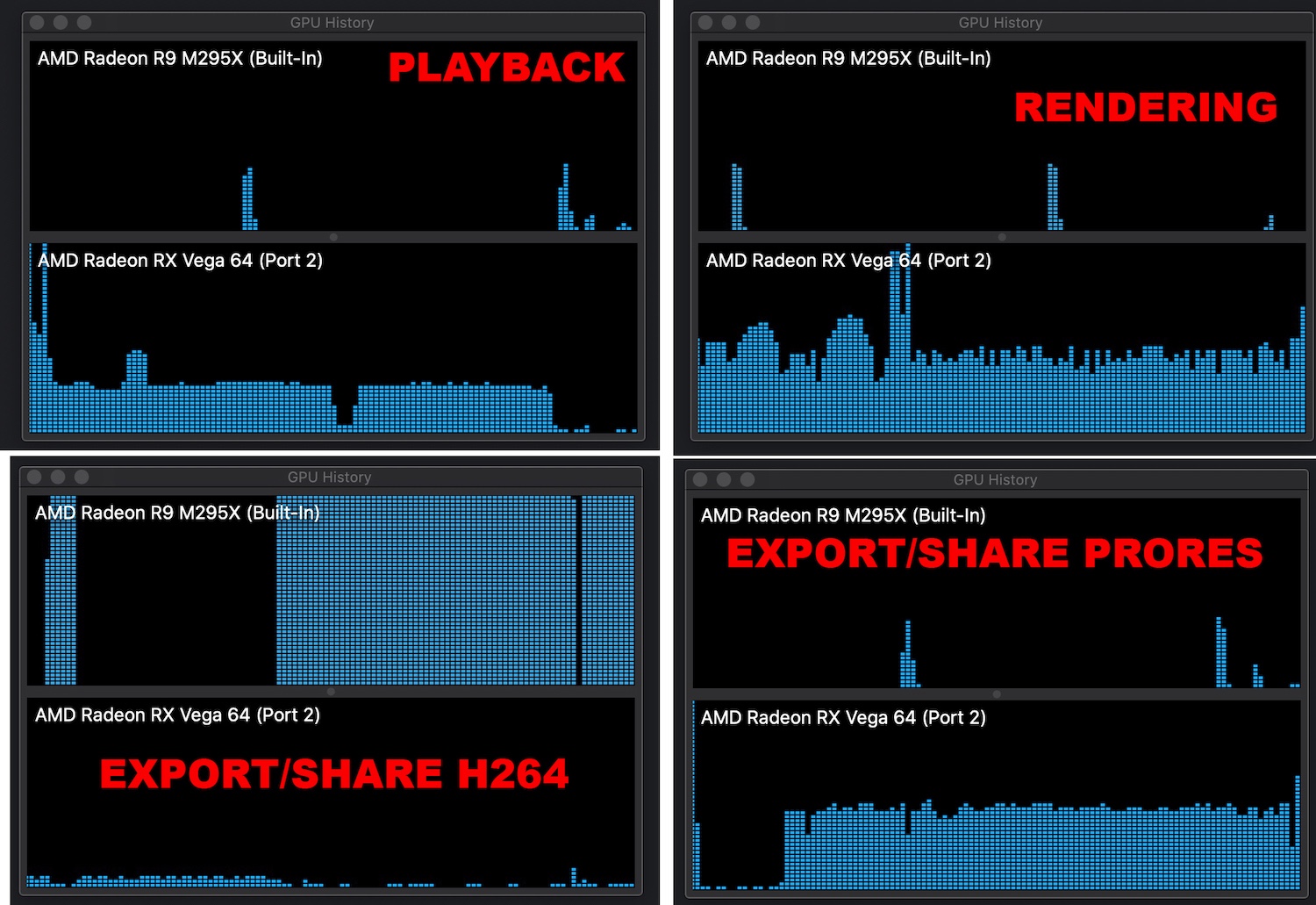

.


Also i have noticed that if you choose an external monitor powered through an eGPU as your main display MacOS will recognise the eGPU as your main graphics card.
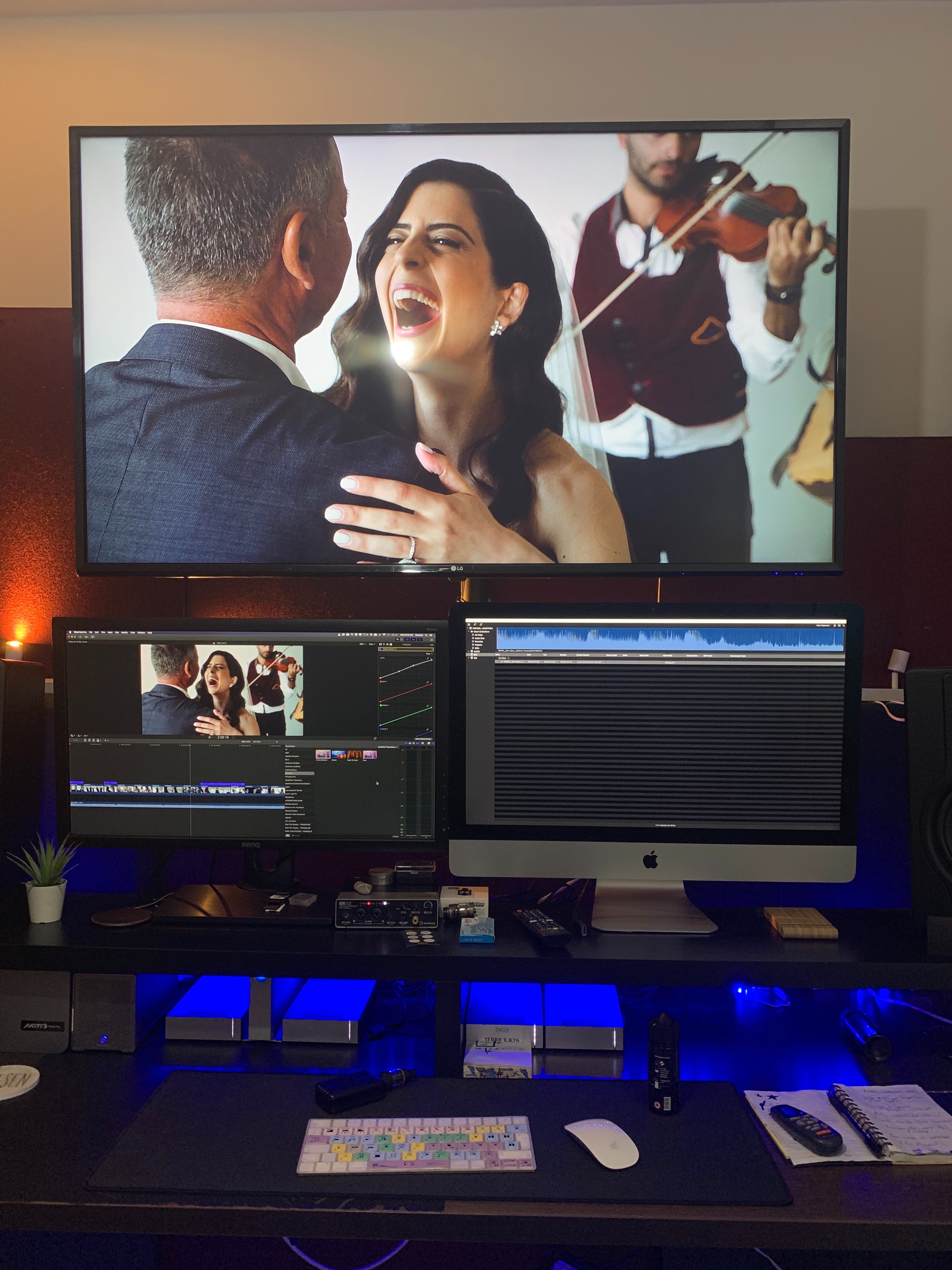
So now my main monitor now is a 27inch BenQ. Doesn't look that nice but if im getting the performance boost who cares.


When external monitor is used as main Display
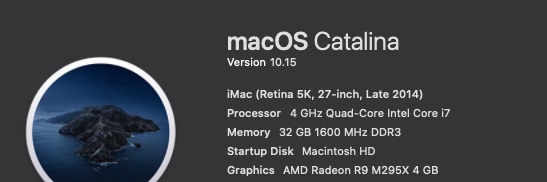

When iMac is used as main Display


Which could essentially mean that we are getting full eGPU support across the board. I don't have the time to test this but im sure someone out there could test it out.

227 replies
Question marked as Top-ranking reply

Oct 16, 2019 8:51 AM in response to andyfromnz

Let me preface this by saying that this is the fastest FCPX has ever run on any system i have ever had, its amazingly fast - Im super super happy with it.


My setup when i updated to FCPX 10.4.7 & Catalina was as follows:

Late 2014 5K iMac 27inch - 4 GHz Quad-Core Intel Core i7 - 32 GB 1600 MHz DDR3

AMD Radeon R9 M295X 4 GB graphics

MacOS Catalina 10.15

FCPX 10.4.7

Target Display mode with a late 2011 27inch iMac and external 55inch UHD monitor connected to an

Akitio Node Pro - Vega 64 daisy chained to an Akitio SSD bay (4TB Raid0)


The above setup worked very well in FCPX 10.4.6 & Mojave - FCPX would use both internal and external GPU in tandem and never would i experience any lag though i had to open FCPX in low resolution mode for it to work properly. I would force the eGPU & Low Resolution mode from the Finder.


Original Setup with an older iMac as a secondary display.

Before the Update - with a Vega64


After the update (to FCPX 10.4.7 & Catalina) only the internal GPU was utilised so i tried testing various setups and options finally concluding to remove the 2nd iMac (Target Display) from the equation and use an external monitor powered from the eGPU directly instead.


From the System Preferences i set one of the external monitors as the main monitor (Dragged the menu bar). Then i opened FCPX and chose through Preferences my external GPU. After that - wow - everything was been running super smooth super fast - with my usual effects maxed out. And the thing is that now the internal GPU is only used for h.264 sharing.


.


Also i have noticed that if you choose an external monitor powered through an eGPU as your main display MacOS will recognise the eGPU as your main graphics card.

So now my main monitor now is a 27inch BenQ. Doesn't look that nice but if im getting the performance boost who cares.


When external monitor is used as main Display


When iMac is used as main Display


Which could essentially mean that we are getting full eGPU support across the board. I don't have the time to test this but im sure someone out there could test it out.

Oct 22, 2019 8:21 AM in response to mathieu241

It is no longer set in Get Info.

In 10.4.7:


Final Cut Pro->Preferences->Playback, select the GPU next to "Render/Share GPU:".


This affects render and sharing - for some share destinations. (It appears that Apple Devices does not follow this setting)


For playback, the GPU associated with the display where FCP X is running will be used.

So for best results one should attach the display to the eGPU.

Dec 27, 2019 4:02 PM in response to dre2k25

If all your displays are all connected to the external GPU the flag on final cut application was irrelevant.

In 10.4.8 this is exactly the set up I run with my mac mini and one display connected to the eGPU and no other displays. All applications flag or not are going through the eGPU and the internal GPU is always at zero.


See following


https://support.apple.com/en-us/HT208544


Set an external eGPU-connected display as the primary display

If you have an external display connected to your eGPU, you can choose it as the primary display for all apps. Since apps default to the GPU associated with the primary display, this option works with a variety of apps:

  1. Quit any open apps that you want the eGPU to accelerate on the primary display.
  2. Choose Apple () menu > System Preferences. Select Displays, then select the Arrangement tab.
  3. Drag the white menu bar to the box that represents the display that's attached to the eGPU. 
  4. Open the apps that you want to use with the eGPU.

If you disconnect the eGPU, your Mac defaults back to the internal graphics processors that drives the built-in display. When the eGPU is re-attached, it automatically sets the external display as the primary display.


The only case in which the internal GPU is used is if in the playback preferences this is set to internal

instead of external

The use of a egpu on an external device with displays connected to it and set as primary is a feature of OSX not final cut.

Final cut only establishes who is doing the background processing of rendering and sharing. This is mostly for set up where you use the internal display and have no others and want to still take some advantage from the egpu


In most cases in sharing eGPU utilisation is around 7-10% if the whole timeline was rendered and the sharing is done with a codec that is inferior to prores 422 for example H264 with project rendering in ProRes 422 will use around 7% GPU and 50% CPU as most of encoding tasks are computational not graphic


I would check your final cut playback preferences as by default they would be set to the first GPU that is the internal

Dec 28, 2019 8:35 AM in response to MZTVPD

I am sorry if you feel the attitude is dismissive anyway to clarify the situation I have been having discussions with Apple Final Cut pro media team on and off for the last year. At the end of the day what matters is what is in the official documentation


https://support.apple.com/en-gb/HT208544


Pro apps and 3D games that accelerate the built-in display of iMac, iMac Pro, MacBook Air, and MacBook Pro (This capability must be enabled by the app's developer.)


https://support.apple.com/en-gb/guide/final-cut-pro/verb8e60ab7/mac


Render/Share GPU

  • Render/Share GPU: Use this pop-up menu to choose which graphics processing unit (GPU) to use in Final Cut Pro when rendering or sharing. This choice affects only rendering and sharing; real-time effects use the default GPU.


https://developer.apple.com/documentation/metal/gpu_selection_in_macos/understanding_multi-gpu_and_multi-display_setups


Built-in GPU with a Built-in Display

Some Macs have only one built-in GPU (integrated or discrete). This GPU always drives the built-in display.


Multiple Built-in GPUs with a Built-in Display

Some Macs have multiple built-in GPUs (integrated, discrete, or both). Any of the built-in GPUs can drive the built-in display.


https://developer.apple.com/documentation/metal/gpu_selection_in_macos/understanding_gpu_bandwidth


Private resources are stored in video memory. Private resources can be accessed only by the GPU. This memory location means that discrete and external GPUs can access a resource directly from within their own video memory. Compared to accessing system memory, accessing video memory is much faster for discrete and external GPUs. Thus, private resources incur the lowest bandwidth and data transfer costs.


What does all of that mean? If you have a game or an application where you can give a specific piece to execute to the eGPU this will be working fine. If you have another piece where both the internal GPU and external GPU can have access the recommendation is that the internal or discrete GPU will access that due to superior bandwidth.


In short this is the reason why in final cut the internal display that can only be controlled by the onboard GPU will not receive acceleration as in FCP the resources are shared. When you have a background rendering task the system passes a piece of data to the egpu and this processes it and returns it back.


If you still have access to your 10.4.6 version disable background rendering all together wait until rendering tasks are complete and then playback a project or grade some footage in the correction panel and check if the eGPU is being used.


if this holds true then we can conclude that Apple deliberately enabled GPU support for some live tasks and then removed it with 10.4.7 this will not mean that the new behaviour is a but because the functionality is actually working as described but indicates that apple themselves were not following their same guidelines.

Nov 29, 2019 4:42 AM in response to janne76

For those looking to downgrade to 10.4.6 ... find a machine with High Sierra (10.13.6), log into you App Store account and download FCPX. It will warn you that the latest version is not supported and offer you the option to download the latest compatible version(10.4.6). Then simply transfer the downloaded app to your actual work machine.


Of course any Libraries you already upgraded will not open but you can export XMLs of Projects/Events in a pinch from 10.4.7 (I have both versions installed, one in its own folder inside Applications).

Dec 27, 2019 11:06 AM in response to jbjoret

That is the expected behaviour. If the display is connected to the mini or a macbook pro the display will always be driven by the integrated GPU in mini case and integrated or discrete GPU for the mbp. This is because the bus transfer speed is much more important than processing for live display tasks. If you used the eGPU you would achieve inferior performance due to the slow thunderbolt bus which is less than 25% the speed of PCI or the integrated GPU sitting on the same chip

In previous releases even if you would see the GPU busy on some tasks the display was always driven by the on board GPU this is by design and cannot be changed. The process windowdisplay which is the display adapter never runs on a eGPU UNLESS the only display you have is connected to it

I am not sure what the complaints are about this behaviour has not changed since the very beginning of eGPU support. Clearly some poor development practice could have transferred data to the GPU and then back but this would not help performance

As of today the units that are meaningful with an eGPU are the mac mini and the macbook pro 13 for full acceleration use a display connected to the eGPU this will always accelerate any display task and the internal GPU will always be idle

Users of iMac or MBP 16" are going to have better performance buying a good graphic adapter and will have limited benefit to a GPU essentially only for super complex background rendering. Encoding remains for most a CPU task and unrelated to eGPU or GPU

Dec 29, 2019 4:03 PM in response to Interceptor121

Bruce 5K tests macbook Pro 13 with eGPU connected and internal display


1046 Render 13 Share 19

1048 Render 10 Share 20

1046 total 32

1048 total 30


So the conclusion is that on mac mini with display on eGPU and macbook pro 13 without external display 1048 is faster on all account except a marginal deterioration on share only


Also just to confirm on sharing the GPU activity on 1048 is zero and on 1046 is 2% so confirming that writing a rendered file is not a GPU task - I knew this already but for the benefit of everyone else. This remains true in any constellation


I also notice that on 1046 windowserver is open on both iGPU and eGPU probably because it needs it to exchange data.


Now considering that those are two units the mini and the mbp with a basic iGPU on board I cannot imagine why units with a discrete eGPU would do worse actually the gap should increase


I also want so say a few other things

  1. analysing a stream for stabilisation and colour is a decoding and computation task is not a GPU task as there is calculation but no rendering or drawables
  2. transcoding media is decoding and encoding again this is for most a CPU task and Apple at no point has said there was an eGPU benefit
  3. Sharing a project is made of two parts rendering that is a GPU task and encoding that is a CPU task. If your project was fully rendered sharing becomes purely a CPU task. Fast CPU with h264 acceleration are preferred in case you want to produce h264 from FCPX (not recommended in my opinion if you do any high quality production) ProRes has no hardware acceleration and needs just CPU power
  4. The whole idea of an eGPU is to work together with the onboard GPU in cases where you use the internal display not to replace it and as the internal or discrete gpu controls the screen the eGPU has to focus on background units of work
  5. As the PCI bus is much faster than thunderbolt unless you have some really complex timelines the benefit of an eGPU on a system with a strong discrete graphic card is limited. On those with a really crappy graphic card that cannot be upgraded for some reason an eGPU that focusses on background render relieves the pressure on the on board GPU however in this set up as the on board GPU is weak is likely you will need to use optimised media as the system can't keep up and the eGPU can't drive live tasks
  6. If like me you process high bitrate 10 bit material it is possible that on a unit with an integrated GPU your system can't keep up on real time rendering and unless you want to optimise the only solution is to use a display connected to the eGPU and close the lid / eliminate displays connected to the unit. This has a disadvantage as now background rendering will pause any time the GPU is put to do something else but if you have something really powerful like my Vega 64 this is not an issue


There also seems to be some confusion on live tasks and background

The background tasks are those listed under Command + 9


Of those eGPU are relevant to rendering and sharing the rest is CPU and disk

The live tasks include:

Playback of a clip in the media browser

Playback of part of the timeline

Adding effects

Playing effects

And anything involving a key stroke that are in the foreground have an output on the display. For those the eGPU does nothing unless it drives the display directly connected to it


I think I have gone as far as humanly possible in my education efforts but am sure am going to get some abuse. I am sorry if someone out there has bought some hardware on expectations that have not been met I was one of your last year

There is still value in an eGPU but one needs to understand what is the value and what are the situation where there is a benefit at least for final cut pro. For example 360 VR editor takes great benefit from an eGPU as you can connect visors directly and this would not be possible otherwise

Also from what I can see there is no performance drop from 10.4.6 to 10.4.8 so maybe is a case of understanding how final cut really works and making sure you are following best practices that you can find plenty on this forum


Feb 16, 2020 8:25 AM in response to Andrew Alderete

Unfortunately the only option is to wait for the next point release and hope some of the existing eGPU acceleration is restored (not sure if this is technically possible with Metal).


Remember, the biggest variable here is whether you connect your external display to the eGPU or not, with it most significantly impacting whether a unrendered timeline is accelerated by the eGPU or not. This is fact, don't let anyone tell you otherwise.


If you only use a built-in screen on a laptop or iMac, your only solution is to use an external monitor connected to the eGPU as a primary display. Or just stick with FCPX 10.4.6.

Dec 27, 2019 4:48 PM in response to Interceptor121

The eGPU used to work in FCPX to the full extent of what is capable over TB3. Starting in 10.4.7 it stopped. Apple Pro Apps team has an internal document they’ve started to correct this bug that has been referenced by multiple people in the thread who have actually talked to Apple. No currently available preference or setting or cable adjustment will fix this. It was broken when they added multiple-GPU support for the new Mac Pro in the updated Metal engine and will hopefully be fixed in an upcoming update.


In the meantime, no amount of pretending that the people affected by this issue aren’t actually affected or that their workflows aren’t valid or that the eGPU is somehow actually intended to use 0% power during export and default to a CPU render in software that brags about their GPU accelerated renders will change that. You’re wrong, Apple is hopefully working on a fix, and the people affected deserve to know that this isn’t as good as FCPX can be, because every other pro video editing software currently can use proper eGPU acceleration, which is the only reason many of us bought eGPUs in the first place.

Dec 28, 2019 12:38 PM in response to MZTVPD

I think the issue is that if you send to Apple some data to demonstrate that 10.4.7 or 10.4.8 are doing something without giving them the evidence that there has been a change they will just come back to you and tell you things work as expected.

I have used an eGPU with my mini and macbook pro now for 13 months and I can confirm that the eGPU never accelerates live tasks this is because the process windowserver that is what drives the display runs on the gpu where the display is physically connected this is a physical limitation and cannot be overcome

In terms of 10.4.7 or 10.4.8 not using the GPU the behaviour has to be as set in the preferences. This lets you choose any GPU you have if you set to GPUx and quit final cut then reopen and launch a render task this GPU must be working, in this example I have set the internal first changed quit final cut and then set external and you can see GPU utilisation moving during render

If for some reason this is not working this is a bug to be corrected

The live tasks in final cut pro like playback are executed where the process windowserver runs this is where the display is attached. There is no instance possible where windowserver runs on a GPU not attached to the display. If you have any screenshot where this is demonstrated with system report and activity report showing 10.4.6 running windowserver on the eGPU on a mini or macbook without a display attached to it this is what need to be sent to apple


Finally it is possible that performance in a user set up deteriorates after an upgrade final cut pro is very much dependend on user configuration this is a performance issue and not a bug but can be reported


So it would be useful to show


  1. FCPX using a GPU different to what is set in the preference after restart
  2. A version of 10.4.6 where windowserver runs on the eGPU on a macbook or imac with no external display
  3. Some performance report with exactly the same file and doing the same task of the two versions


I have yet to see any of the above on this thread except the first original poster, do you have any of this available if not nobody is going to do anything final cut has more than 2 million users worldwide several forums user groups facebook groups and a small minority runs eGPU and there are right now only complaints about Catalina that are systematic but nothing on fcps


I look forward to some real data to look at

This thread has been closed by the system or the community team. You may vote for any posts you find helpful, or search the Community for additional answers.

FCPX 10.4.7. egpu problem

Welcome to Apple Support Community
A forum where Apple customers help each other with their products. Get started with your Apple Account.