I can see the videos in the photos app but I need to copy the actual file so I can upload it to another website but I can't find them.
If you want to access the original file, use the "File > Export" menu as Mark recommended. You need the option "File > Export > Export unmodified original" to get original file. if you just use "File > Export > Export ... video", you will get a downsized preview of the video.
In Photos 5.0 the layout of the Photos library has been changed considerably. The folder "Masters" has been replaced by "Originals". And the Originals folder is no longer neatly gouped into years, months, days of import. It is nearly impossible for the users to find the originals in the library package, because Photos is changing the filenames, when it imports the files. Photos does no longer respect the original filenames as previously when importing items to the library.
For example, I imported a video file called "P1280684StabilizedHEVC". In Photos in the Info the videos is displayed with the filename all in upper case letters and hard to read.
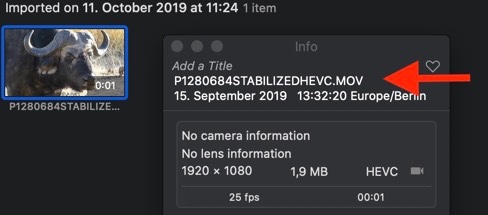
The imported file in the library package has a name with random letters:
In the Photos Library package the original file name has been changed to 9642E249-3C66-4B23-8D00-F83485103AA1.mov. No wonder, you could not find it.
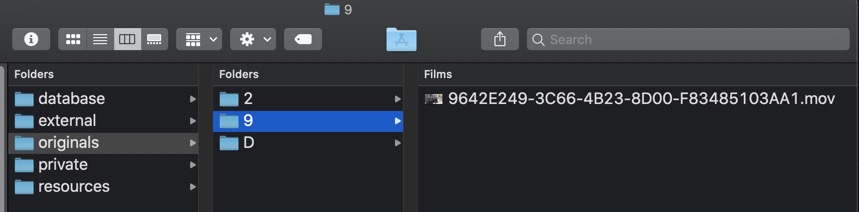
It is usually a bad idea to access the files directly in the in the library package, so it should not matter that Photos is renaming the files and we cannot track them down in the package. But this will a disaster, if the library gets corrupted and Photos cannot repair it. It is no longer possible to recover our originals from the library package to rebuild the library. The information from the filenames is lost. The custom exif tags I added before importing the file are also missing from the file in "Originals", no GPS, no titles.
If you want to be able to access your originals exactly as you imported them, make backup copies of all your originals before you import them to Photos. It has always been a good practice to backup the originals before importing them to any photo library, and with Photos 5.0 it will be essential to keep a rigid backup scheme for the originals in place, because the unmodified originals cannot be recovered from the Photos Library any longer, if Photos should fail and cannot repair the Photos Library.


