Catalina Migration Assistant

Has anyone had the experience of using Migration Assistant to move a Mojave installation to a new machine with Catalina installed? What I’m getting at is whether Catalina’s Migration Assistant is smart enough to leave 32 bit apps behind and only move 64 bit apps to the new machine. Maybe thats too much to ask.

Posted on Oct 25, 2019 12:55 PM

Reply
Question marked as Top-ranking reply

Posted on Oct 25, 2019 3:01 PM

HI lkrupp,


My understanding is that Migration Assistant would transfer all applications over but will alert the user what applications would be incompatible either after the migration is complete. Also, when a 32 bit application is opened, it will notify the user to contact the developer or find the 64 bit version that is compatible.


I hope this helps.


7 replies
Question marked as Top-ranking reply

Oct 25, 2019 3:01 PM in response to lkrupp

HI lkrupp,


My understanding is that Migration Assistant would transfer all applications over but will alert the user what applications would be incompatible either after the migration is complete. Also, when a 32 bit application is opened, it will notify the user to contact the developer or find the 64 bit version that is compatible.


I hope this helps.


Nov 16, 2019 8:48 PM in response to unkleE

Hi unkleE,


First, congratulations on the purchase of your new Mac Mini! They are great machines.


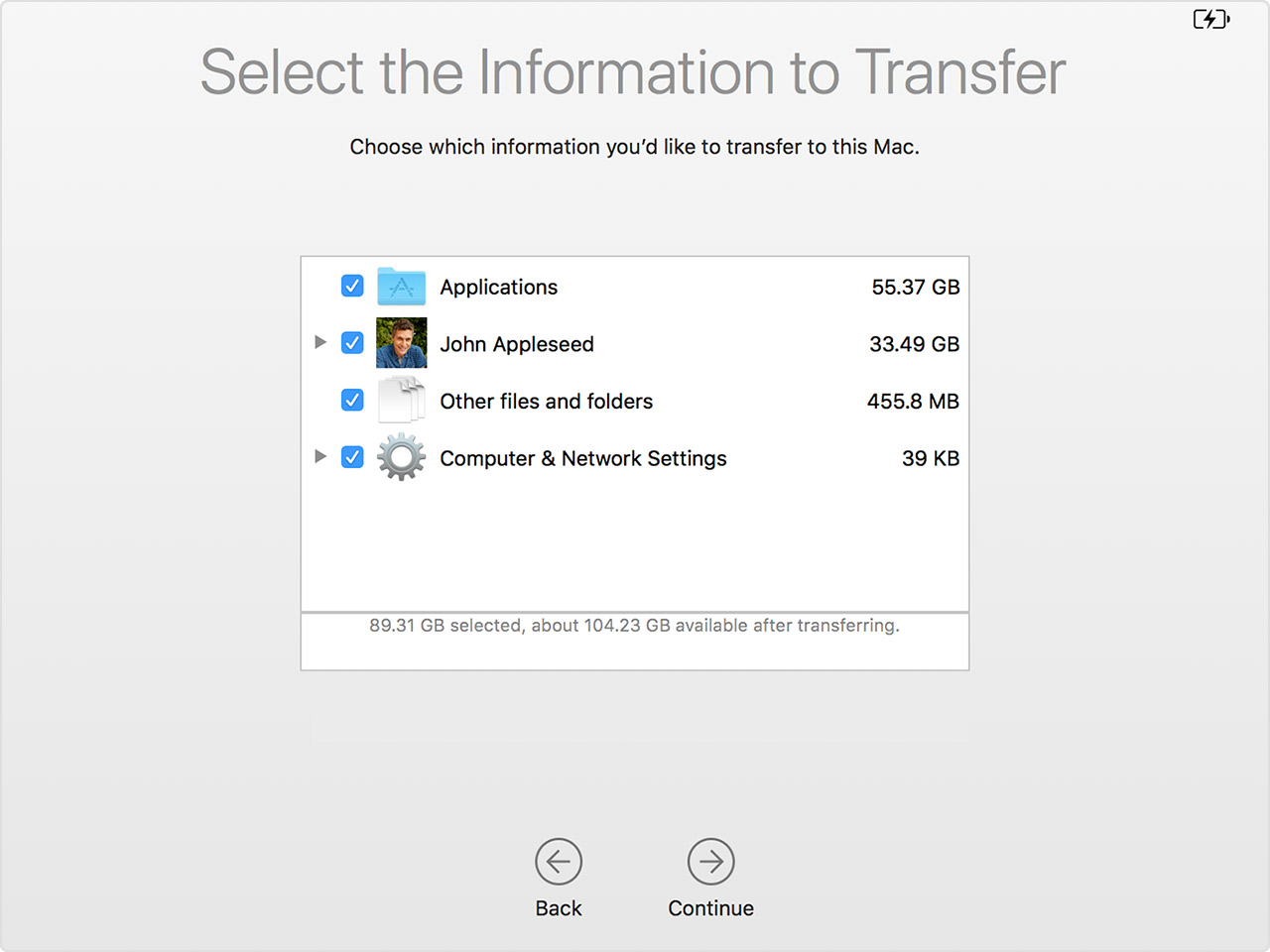
To answer your question about transferring selected applications via MigrationsAssistant, it looks like it's all or nothing I'm afraid. This is according to the article how to move content to a new Mac. Also I attached a photo as well. I'm not aware off the top of my head of a third party migration assistant utility to transfer selected applications but others might be able to help on this.


This photo as you can see, there is a little triangle next to the user account and computer and network settings but not applications.


One third party application that can help determine what applications you have that are 64 bit as Catalina drops support for 32 bit applications is called Go64. It will list all your applications and provide upgrade paths for those applications that are 32 bit. It also has the ability to delete applications that you no longer use as well.


I hope this helps.

Nov 16, 2019 3:24 PM in response to lkrupp

I've just purchased a new Mac Mini and want to transfer files across from my old Macbook using Time machine. I'm not very happy with the options here so far.


I don't want to delete the apps from the Macbook, which still works and which I'll still occasionally use) or from Time Machine. And there are a few other apps I don't want to transfer over too.


I haven't started the process yet (I'm trying to make sure I'm well prepared) but I would have expected Migration Assistant to have an option to select apps to load onto the new Mac - after all, they are all listed in the Applications folder, so its not too many to go through and tick boxes, surely? But do I gather that this option isn't available? is there a third party app that does this?

Nov 16, 2019 9:10 PM in response to Soren Pearson

Thanks, that at least confirms what I was suspecting. Maybe I can transfer all my User files, and then transfer the applications by hand?


I have a list of the 32 bit applications I need to drop, and most of them I don't use any more anyway. So that aspect is fine. I am just concerned that transferring the applications from Time Machine by hand may lead to some not being properly installed.

Nov 16, 2019 9:17 PM in response to unkleE

This may not be the place to discuss this, but I'm having problems even starting the new Mac Mini up. (I'm told it's running Catalina, but I haven't verified that yet.)


With just a keyboard and screen plugged in, when I start up I see the apple graphic and the line bar showing how far the startup has progressed. Halfway through it goes blank and a voice asks me to press the return button for English language. Then a few more instructions which are hard to catch and then nothing. When I turn off and restart I don't even get the voice, just half the startup bar. It's a little disturbing and disappointing. Perhaps I should start a separate discussion?

This thread has been closed by the system or the community team. You may vote for any posts you find helpful, or search the Community for additional answers.

Catalina Migration Assistant

Welcome to Apple Support Community
A forum where Apple customers help each other with their products. Get started with your Apple Account.
