Writing the current date by a keyboard shortcut

I'd like to write the current date with a keyboard shortcut.


The date must be in this format "[2019-10-28]"

I have to add in a text editor while I'm writing the note of the day. Many times a day!!


Can anyone help me?

Regards

MacBook Air 13", macOS 10.13

Posted on Oct 28, 2019 12:50 AM

Reply
Question marked as Top-ranking reply

Posted on Oct 28, 2019 4:15 AM

You could create a Automator Service/Quick Action, where the workflow looks like this:
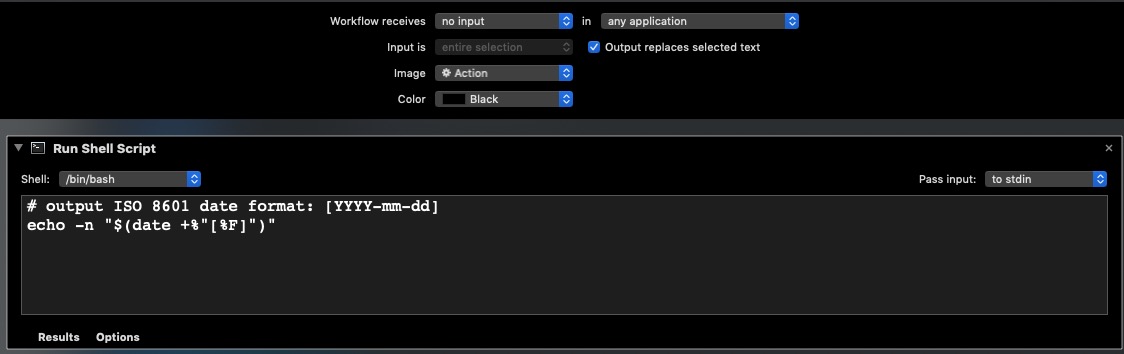

Once this is saved (e.g. ISO8601_Date), visit System Preferences : Keyboard : Shortcuts : Services. It will likely be found in the Services Text section under the name that you gave it. Services without an assigned keyboard shortcut will show a none in their right column. Click the word none. This will change to Add Shortcut. When you click it again, you can enter your unique shortcut. I gave mine control-D:


If you assign a shortcut already used by the operating system, your choice will be ignored. Same drill for the application that you use it in. The first time that you want to use the Service, look in your application's Service menu for it, and invoke it from there. Afterwards, the keystroke should work.


Here is the output of this Quick Action (shown in white text) in Mojave 10.14.6 as shown in the Terminal:

8 replies
Question marked as Top-ranking reply

Oct 28, 2019 4:15 AM in response to Steberni69

You could create a Automator Service/Quick Action, where the workflow looks like this:


Once this is saved (e.g. ISO8601_Date), visit System Preferences : Keyboard : Shortcuts : Services. It will likely be found in the Services Text section under the name that you gave it. Services without an assigned keyboard shortcut will show a none in their right column. Click the word none. This will change to Add Shortcut. When you click it again, you can enter your unique shortcut. I gave mine control-D:


If you assign a shortcut already used by the operating system, your choice will be ignored. Same drill for the application that you use it in. The first time that you want to use the Service, look in your application's Service menu for it, and invoke it from there. Afterwards, the keystroke should work.


Here is the output of this Quick Action (shown in white text) in Mojave 10.14.6 as shown in the Terminal:

Oct 28, 2019 12:42 PM in response to Steberni69

For Word®...


If you are insistent on using a keyboard shortcut, you will need to use Shift+Alt+D to insert the date, press the left arrow key until you are in the middle of the inserted date, and then press Shift+Ctrl+F9 to unlink the field.


https://word.tips.net/T003418_Different_Ways_of_Inserting_Dates.html


https://support.office.com/en-us/article/insert-today-s-date-in-a-word-document-fe7c08fe-7192-44a5-ac0a-88ccd51532ab

This thread has been closed by the system or the community team. You may vote for any posts you find helpful, or search the Community for additional answers.

Writing the current date by a keyboard shortcut

Welcome to Apple Support Community
A forum where Apple customers help each other with their products. Get started with your Apple Account.
