There is, but it would require you typing into a specific cell to be read by a formula in another specific cell, from which you could copy the result and use Edit > Past Formula results to convert the formula result to a fixed value in the cell where you want it.
(Note that the 'copy>Paste formula result' sequence is also true of all dates generated by the TODAY function. TODAY, like other functions, updates as new entries are made in the table containing it.
Here's a general example of the method.
Cells in column A are the cells into which "2 weeks" would be typed. A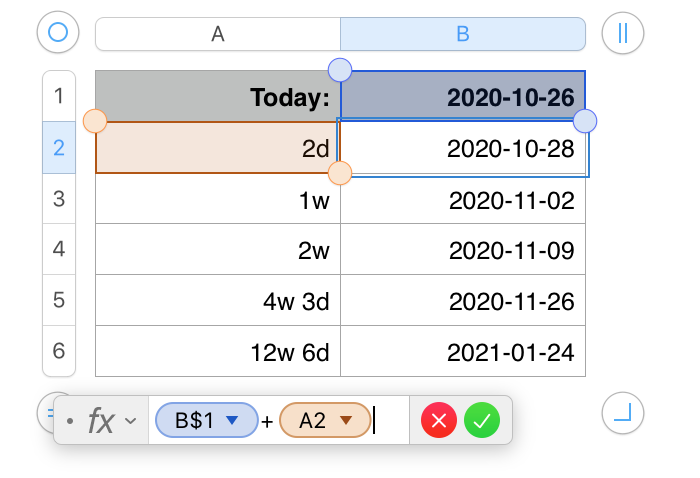 ll cells in column B contain the same formula as shown under the table, with the "An" cell reference changed to reference the column A cell on the same row as the formula in column B.
B1 contains the TODAY function, which returned the current date (October 26, 2020 when this was written).
e
The first three entries column A were entered as shown.
A5 was entered as 31d and was automatically reformatted as shown by Numbers.
A6 is similar, entered as 90d, reformatted as 12w 6d.
Including the unit notation (w, d, h, m, s, or ms ensures that Numbers will recognize the value as a duration.
Regards,
Barry


