Additional, and optional to MrHoffman's post, you may find that the Zsh colors module has washed out colors, and you may prefer a more vibrant prompt. Here is what I did in my ~/.zprofile and ~/.zshrc files:
TPUT="/usr/bin/tput"
GREEN="$(${TPUT} bold; ${TPUT} setaf 42)"
WHITE="$(${TPUT} bold; ${TPUT} setaf 15)"
# don't let VPN DNS servers change prompt hostname
MyHost="$(networksetup -getcomputername)"
PS1="${GREEN}${MyHost}: %~ %% ${White}"
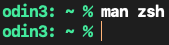
This gives an all green Zsh prompt with white command text in a black Terminal window.
Without installing the Python script at the following link, you can see all of the 256 decimal and hexadecimal color values in tables presented on the website, if you want to experiment with different prompt colors.


