
Voicemail
Can I determine which phone number my voice messages are associated to? (business or primary)
Can I determine which phone number my voice messages are associated to? (business or primary)
Hi LBApplequestions,
Welcome to Apple Support Communities. It sounds like you're using Dual SIM with eSIM on your device and you'd like to know how to tell which line was called when you see a voicemail has been left. I can understand wanting to know which line was called; I can help. First, you'll want to use the steps below to label your plans:
"

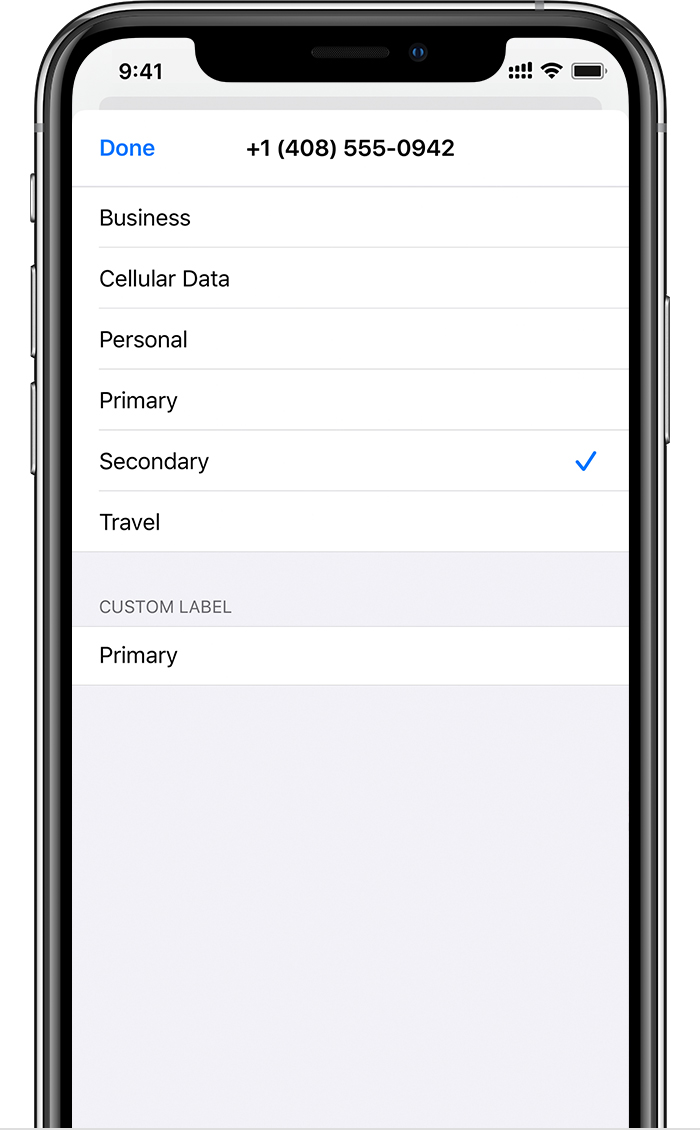
Label your plans
After your second plan is activated, label your plans. For example, you can label one plan Business and the other plan Personal.
You'll use these labels when you choose which phone number to use for making or receiving calls and messages, to designate a number for cellular data, and to assign a number to your contacts so you know which number you will use.
If you change your mind later, you can change your labels by going to Settings, tapping either Cellular or Mobile Data, and then tapping the number whose label you want to change. Then tap Cellular Plan Label and select a new label or enter a custom label."
After you've labeled your plans, you should see the letter that corresponds with the label under the contact name when looking at the Voicemail screen. For example, if you've labeled your lines "Personal" and "Business" you would see a "P" under the contact name that called your personal number and a "B" under the contact name that dialed your Business line.
I hope this helps!
Best Regards.
Hi LBApplequestions,
Welcome to Apple Support Communities. It sounds like you're using Dual SIM with eSIM on your device and you'd like to know how to tell which line was called when you see a voicemail has been left. I can understand wanting to know which line was called; I can help. First, you'll want to use the steps below to label your plans:
"
Label your plans
After your second plan is activated, label your plans. For example, you can label one plan Business and the other plan Personal.
You'll use these labels when you choose which phone number to use for making or receiving calls and messages, to designate a number for cellular data, and to assign a number to your contacts so you know which number you will use.
If you change your mind later, you can change your labels by going to Settings, tapping either Cellular or Mobile Data, and then tapping the number whose label you want to change. Then tap Cellular Plan Label and select a new label or enter a custom label."
After you've labeled your plans, you should see the letter that corresponds with the label under the contact name when looking at the Voicemail screen. For example, if you've labeled your lines "Personal" and "Business" you would see a "P" under the contact name that called your personal number and a "B" under the contact name that dialed your Business line.
I hope this helps!
Best Regards.
Voicemail

