MacBook 16-inch Fan Noise

We are testing two new 16-inch MacBook's before doing a rollout across our organization. Under low loads (25% cpu utilization), fan noise will get annoyingly loud. We're not doing any GPU related and more routine work such as: using web applications, debugging web pages, Microsoft Teams conferencing (audio/video) with a handful of people, Photos downloading from iCloud, Mac Mail downloading a new mailbox from Exchange.


We DID NOT notice this on our 2015 MacBooks and this might prevent us from continuing the 16-inch MacBook rollout in our organization.


Interested to hear others experiences.


Tim

MacBook Pro 16", macOS 10.15

Posted on Nov 21, 2019 11:34 AM

Reply
Question marked as Top-ranking reply

Posted on Dec 23, 2019 9:27 AM

All,


We are kind of wrapping up all our testing and working with the Apple Business Team to figure out how we move forward.


This thread is getting a little side tracked with monitors and so I wanted to point out that these issues discussed are completely unrelated to brand/model of monitors being used. That said, it IS related to having monitors connected and the internal GPU within the MacBook, along with the CPU and the overall heat that both generate.


In our final testings, we did clean installs with 10.15.2 and primarily tested an eGPU using a Razor Core and a Radeon RX Vega 64 so we could eliminate the internal GPU in the MBP.


It became really clear the combined heat from the internal Radeon Pro 5500m GPU and the i9-9880G CPU is too much for the current thermal management system, especially when using all USB-C ports. (I.e., for power, USB-C hub, USB-C to Display Port video cables).  From all the testing and heat generated by the unit, it looks like our Radeon Pro 5500m GPU is fried because we are seeing artifacts on text (laptop display and external monitors) but not when we use the eGPU.


Just so you understand our configuration with the eGPU:  We have one USB-C Hub connected to the MBP and one USB-C cable connected to the eGPU.  The one USB-C cable to the eGPU is powering the MBP but also the eGPU has the two Display Port cable to the monitors.  Now the MBP has two free USB-C ports.  This was producing about 38 degrees less heat in Airflow on the MBP.


When the eGPU is connected, we can push the MBP to about 60% CPU for sustained periods before hearing the fans at about 4500 RPM. But as many of us have noticed, when we don’t have an eGPU, we’re seeing this at 5% to 10% CPU.


We have installed Parallels and ran Windows 10 on three monitors on separate space and have done Geekbench tests and a variety of stress tests with the eGPU and its operating normally.  


Bottom line, the combination of using the GPU and CPU is pushing the MBP into heat conditions causing the FAN issues and in our case, possibly damage to the GPU.  


Apple had a similar issue with the 2018 MacBook Pro and people were starting to stick their machines inside a Freezer to see if they could avoid the CPU’s from stepping down prematurely.


Hopefully Apple can find a solution because these new 16 inch MBP could be incredible.


Please start a support case with Apple so we can get this resolved sooner than later and it will also protect you a bit more if you need to return your units beyond the return policy. Moving forward, its all on Apple!


Tim

4,224 replies
Question marked as Top-ranking reply

Dec 23, 2019 9:27 AM in response to cappuccinodrinker

All,


We are kind of wrapping up all our testing and working with the Apple Business Team to figure out how we move forward.


This thread is getting a little side tracked with monitors and so I wanted to point out that these issues discussed are completely unrelated to brand/model of monitors being used. That said, it IS related to having monitors connected and the internal GPU within the MacBook, along with the CPU and the overall heat that both generate.


In our final testings, we did clean installs with 10.15.2 and primarily tested an eGPU using a Razor Core and a Radeon RX Vega 64 so we could eliminate the internal GPU in the MBP.


It became really clear the combined heat from the internal Radeon Pro 5500m GPU and the i9-9880G CPU is too much for the current thermal management system, especially when using all USB-C ports. (I.e., for power, USB-C hub, USB-C to Display Port video cables).  From all the testing and heat generated by the unit, it looks like our Radeon Pro 5500m GPU is fried because we are seeing artifacts on text (laptop display and external monitors) but not when we use the eGPU.


Just so you understand our configuration with the eGPU:  We have one USB-C Hub connected to the MBP and one USB-C cable connected to the eGPU.  The one USB-C cable to the eGPU is powering the MBP but also the eGPU has the two Display Port cable to the monitors.  Now the MBP has two free USB-C ports.  This was producing about 38 degrees less heat in Airflow on the MBP.


When the eGPU is connected, we can push the MBP to about 60% CPU for sustained periods before hearing the fans at about 4500 RPM. But as many of us have noticed, when we don’t have an eGPU, we’re seeing this at 5% to 10% CPU.


We have installed Parallels and ran Windows 10 on three monitors on separate space and have done Geekbench tests and a variety of stress tests with the eGPU and its operating normally.  


Bottom line, the combination of using the GPU and CPU is pushing the MBP into heat conditions causing the FAN issues and in our case, possibly damage to the GPU.  


Apple had a similar issue with the 2018 MacBook Pro and people were starting to stick their machines inside a Freezer to see if they could avoid the CPU’s from stepping down prematurely.


Hopefully Apple can find a solution because these new 16 inch MBP could be incredible.


Please start a support case with Apple so we can get this resolved sooner than later and it will also protect you a bit more if you need to return your units beyond the return policy. Moving forward, its all on Apple!


Tim

Dec 19, 2019 10:48 AM in response to TimUzzanti

YMMV, but I have now been running a couple of days with the lid closed and no application running in full-screen mode. Using two external 4K monitors hooked up (one USB-C and one Moshi DisplayPort adapter). The system has behaved much better! Fans are silently running at around 1400 rpm and temperatures have dropped at least 15°C across the system.

WindowServer process is no longer running GPU time like crazy.


Happy camper for the moment, but keeping fingers crossed.

Dec 20, 2019 8:07 AM in response to Grant Bennet-Alder

My new 16 inch MacBook Pro is attached to a NEC PA272w monitor via a HyperDrive dock using a mini-DisplayPort cable. Upon startup, I was getting five or six minutes of fan noise. The fan noise persisted when I tried a CableMatters USB-C to mini-DisplayPort cable. When I detached the external monitor completely, the noise was less, but still present.


I installed Temperature Gauge Pro and looked at it and Activity Monitor at startup. I was surprised to see just how many items loaded at startup—Spotlight was still indexing; DropBox, Microsoft OneDrive, Creative Cloud, BackBlaze, and a couple of other programs that I didn’t recognize all started up; the computer started syncing with the many gigs of files that I have in iCloud. While this was occurring, the CPU temps were in the red and the fans hit 5000 rpm. The CPU temps became normal again after a few minutes, but it took the fans several more minutes to decrease and become inaudible.


In particular, I found that loading OneDrive really caused the CPU temps and fans to spike. 


I changed permissions so that as little as possible loads at startup. I then measured everything again with no iCloud sync or Spotlight indexing going on. The fan noise was negligible, and the fan rpm measurements did not exceed 3500 and was that high only briefly. When I detached the external monitor, I couldn’t hear the fans at all.


I know everyone’s situation is different, but in my case, I’ve seen dramatic improvement and it may be worth a try for you.

Dec 28, 2019 11:57 PM in response to TimUzzanti

I have had the same problem when I first received my top spec MacBook Pro 16", so I called Apple Support and they suggested that it be fixed through the reset of the SMC through the suggested process here: https://support.apple.com/en-au/HT201295. It worked and now my MacBook has been working perfectly, silently and extremely quickly.


Just shut down the laptop, then hold the power/TouchID button for 10 seconds, the logo will appear after about seven, then disappear with a "woosh" sound. Wait another 10 seconds then start up the MacBook like normal, all should be fixed.


I hope this helped, also my spec is:


2.4 GHz 8-Core Intel Core i9

64 GB 2667 MHz DDR4

AMD Radeon Pro 5500M 8 GB

Intel UHD Graphics 630 1536 MB

Jan 10, 2020 7:08 AM in response to TimUzzanti

RESOLVED: For those of you using a second monitor.


My 16 was plugged into the Usb c HDMI cable, AND plugged into the Macbook charging cable, thus "double charging" my laptop which would cause the fans to ramp up and my computer would over heat. As soon as I removed the Macbook charger the fans returned to normal. I didn't realize the newer Usb C HDMI cables would also charge the device from my computer monitor.


Hope this helps!

Jan 19, 2020 10:40 AM in response to miketamb

Close dropbox, box, adobe Cloud,... any Aps that synchronizes in the background

Reset the SMC here is the procedure (I was holding for 20 seconds not 7 as they suggest):

  1. Shut down your Mac.
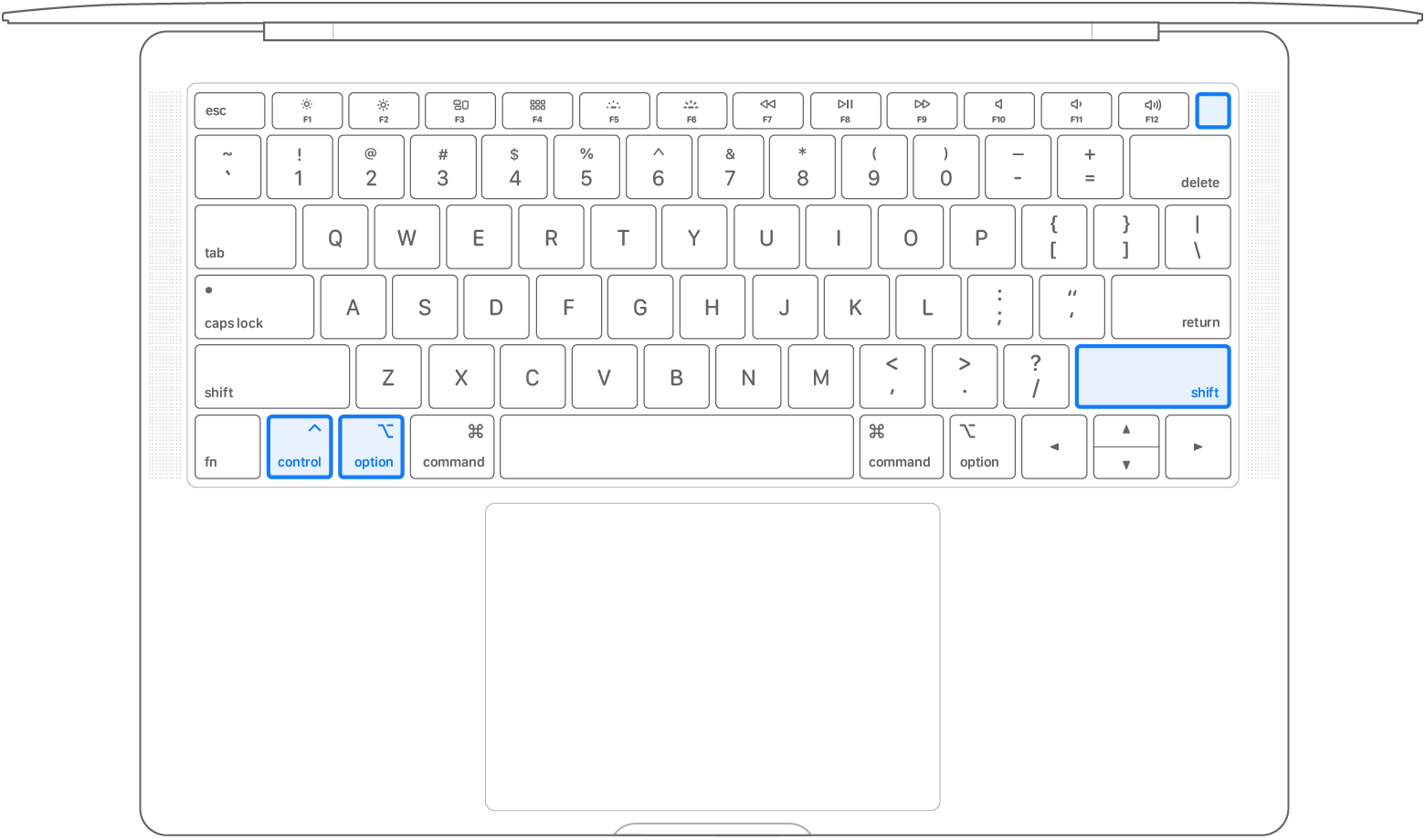
  2. On your built-in keyboard, press and hold all of the following keys. Your Mac might turn on.
    • Control  on the left side of your keyboard
    • Option (Alt)  on the left side of your keyboard
    • Shift  on the right side of your keyboard

Keep holding all three keys for 7 seconds, then press and hold the power button as well. If your Mac is on, it will turn off as you hold the keys.


Keep holding all four keys for another 7 seconds, then release them.

Wait a few seconds, then press the power button to turn on your Mac.


If you do this and don't notice any significant improvement then get your laptop replaced


as you see on my previous post apps are behaving weirdly on Catalina using unnecessary CPU power, especially Mail, probably Safari as well.


Hope this helps.


Jan 30, 2020 1:28 AM in response to aguilartec

So I have made some further testing:


  • With another external display (HP Z32) connected through usb-c cable with laptop lid opened: 20W radeon power consumption, fans ~3000 RPM, 65-70C CPU and GPU temp, fans audible
  • With HP Z32 connected AND laptop lid closed: 5-8W radeon power consumption, fans ~1800 RPM, 50-55C CPU and GPU temp, fans inaudible - BUT sometimes I have to disconnect the usb-c cable and reconnect again, because Radeon gets stuck at 20W and would not drop to 5W
  • With no external display connected: Radeon 0-3W, fans ~1800 RPM, 45-50C CPU and GPU temp, fans inaudible...


All tests were made during regular work (web browsing, coding) with ~10% CPU usage.


I was not able to get to less than 20W before on a different usb-c 4K display with lid closed so I am wondering if this was fixed by recent update to 10.15.3 or it depends on a display. Will test more when I get back to my other LG 4K display where Radeon was constantly drawing 20W even with lid closed.


The downside of using laptop in clamshell mode is that I cannot use fingerprint reader to unlock password manager etc - so back to good old password typing like on my previous 2013 15" MBP... At least I don't constantly smell the burning metal from heatsinks being cooked at 70-90C for whole working day...

Feb 2, 2020 1:15 PM in response to TailsDog

TailsDog wrote:

Why would it produce extra heat, more than before doing normal things?

6 years ago I could plug a macbook pro in to an external monitor, watch some video and do some normal tasks and there was no issues


Extra Heat:

These are not the same processor used before. These utilize a separate massively fast-and-hot Memory/IO-controller part that is required to decode memory addresses larger than 16GB, the previous MacBook Pro limit. This heat is generated at all times, even when idle. And More RAM memory than ever before generates more heat as well, even when idle.


The other issue is that Apple Engineers have boldly removed Thermal Throttling. Any background task that worked too hard doing un-needed things (like anti-Virus scanners or DropBox file syncing USED to get throttled by having its priority lowered. Without throttling, that does not happen any more, so "ordinary" background things that used to be "no worries" now are free to go crazy, and crank up the fans. These sorts of processes are slightly throttled by their need to do I/O, but the SSD drives are faster than ever as well.


suggested experiments: run a plain vanilla MacOS image with no third-party add-ons, or run in Safe Mode, so that only Apple processes (and few of them)are launched automatically. ¿Fans still too loud?


6 years ago external displays:

At that time it was impossible to run a display as large as the 4K displays we now take for granted. Each doubling of the screen size quadruples the number of pixels required. If you are also using "32-bit color", the number of bits for each pixel pixels grows from 8-8-8 to 10-10-1, a six bits per pixel increase times the number of pixels on the screen.


If you use "legacy" interfaces like HDMI, the entire screen is refreshed every 60th or 30th second, generating still more heat, because it all has to be fetched and rasterized again for each interval.


suggested experiments: set the resolution of your external display to HD 1920 by 1080, and be certain that you are using only 24-bit color and DisplayPort family connections. ¿Fans still too loud?

Feb 13, 2020 7:13 AM in response to TimUzzanti

I just want to summarize so far what I am seeing:


Symptoms:

When using an external monitor and no major processes causing load


  • Big power increase for dGPU - runs around 20w
  • Big temperature increase 30c+, fans spin up, area above touch bar very hot to touch
  • Occasional temperature spikes to 90c+ for no apparent reason (activity monitor shows no high load processes)
  • Activity monitor sometimes shows very high GPU time for WindowServer
  • iStat shows dGPU memory filling up, sometimes 10 minutes after power up also shows spikes to 100% for dGPU processor
  • When running processes that do push the system GPU and CPU things can be unstable, graphical glitches and sometimes crashes.
  • Touchbar can hang when very hot
  • dGPU causes blue effect on dark or light lines when True Tone or Night Shift is active (this maybe unrelated but it does not happen with the integrated graphics)
  • Reports that using windows on bootcamp also causing high temps


What I've tried:


  • Deactivating background processes, syncing, indexing etc
  • Safe mode
  • Different cables
  • Turbo Boost Switcher
  • Less apps running, less browser tabs not playing video
  • Different resolutions
  • Frequent reboots


What seems to work:


  • Not using an external monitor
  • Using an iPad with sidecar for an extra display
  • Using an eGPU
  • Clamshell mode, lid shut connected to keyboard and monitor(s)


Apr 5, 2020 5:32 PM in response to iTech23

As I am now using my MBP16 connected to a 4k monitor daily working from home, I've found Turbo Boost Switcher Pro is essential to keep things tolerable.


When connected to the monitor, I turn turbo boost off. It's enough to keep fan speeds at ~2800 RPM while just using office apps, and ~3200 RPM while running conferencing apps (Zoom, Webex, Teams etc). The fans are audible at both speeds, but tolerable.


If I don't turn turbo boost off, conferencing apps send the fans speeds into the 4000s and beyond, which is completely unworkable for video conferencing. It only takes brief background activity to cause the CPU to spike in frequency, which sends the thermals (and fan speeds) up, which takes ages to recover from. Preventing turbo boost prevents a spike in thermals when background activities run.


It's a stupid workaround, but it's just enough to keep the badly compromised thermal budget in check. I couldn't use the machine all day, every day without it. And I am soon reminded if I have forgotten to turn off turbo boost - the fans are shouting at me within 15 minutes.


I am fortunate that my job only requires office apps and video conferencing. It's not ideal, but the setup works. It would be much more difficult if I was a coder or was working with media.


In my spare time, I use my MPB for photography, but I always do that without an external monitor - everything works fine then.

Jul 1, 2020 4:54 AM in response to Habiton

All,


We finalized our testing of 13inch MBP’s and they will be our new standard internally and will be what we propose to most of our customers when they need / want Mac’s.


We have packaged (in some cases re-packaged) up all our 16inch MBP’s and will be returning them when Apple Stores open again in AZ. 


The Apple Business Team has been very helpful throughout the process.  They were on our most recent calls with the Enterprise Team and Senior Engineers.  As mentioned previously, Apple has officially classified the fan noise on 16inch MBP’s as a “low impact” problem.  This issue affects all 16inch MBP’s, so please ignore those that say they aren’t having issues.


Throughout our six months of testing 16inch MBP’s, we also experienced screen corruption issues, text artifacts on laptop and external displays,  frequent SMC resets to bring back machines that wouldn’t boot, and most recently and most concerning has been the rapid decline of battery health with very low cycles.  


I have expressed numerous times the number of laptops we have tested throughout this process with EVERY unit having the same issues no matter the configuration, monitor or cable.  


We have been pleasantly surprised with the 13inch MBP’s (10th generation Intel and Iris Plus Graphics).


The 13inch MBP’s run really well and operate like every other laptop you have owned.


As expected, under high CPU / GPU loads the laptop will get loud.  The 13inch MBP has smaller fans and will exceed 7500+ rpms at times but at the right times.  


With external monitors and 25% CPU the fans will run about 3500 rpm which is nearly silent.


The Iris Plus Graphics provide an overall snappier MacOS than the 16inch MBP dGPU configurations.   We were extremely surprised by this and it was so significant that everyone who has tested both 16inch MBP’s and 13inch MBP’s noticed. None of these employees do video editing or rendering so we don’t have any results with that and I’m sure the 16inch MBP would perform much better.  The employees who care about gaming noticed better results in almost all games tested (Starcraft, WOW, Apple Arcade Games etc).


Lastly, we have not seen any screen corruption issues,  have not seen any text artifacts on the laptop display or external monitors, have not had to SMC reset, and batteries have been stable.


The difference in these models are astonishing.


Wishing everyone luck.

Mar 14, 2021 10:22 AM in response to adewinne

One fix suggested many times on this thread is to use a third-party Utility to disable the processor TurboBoost feature.


Turbo Boost allows, when lightly loaded, one processor to run 'stupidly fast' and only slow down when it is so HOT it will start to cause damage. It is total specsmanship, and not of any real discernible value except when doing completely single-threaded operations like compiling (in which case it can be momentarily re-enabled).

Mar 27, 2021 8:14 AM in response to LeMatrix01

This computer was built with a ninth generation 14nm processor. The only way to meet the target performance was to make it a six or eight core processor. This processor generates an enormous burst of heat when it does Turbo Boost, and there is only one cooling rail shared by both the CPU and GPU. So getting Either side too hot ramps up the fans.


This processor was supposed to be an eleventh-generation 7nm processor, but intel is three years late, and is only starting to ship its tenth generation 10nm processors now.


Apple DID redesign the cooling system for this specific Mac. A new, high-efficiency fan is used. But for some uses, that still does not make the system quiet enough.


Some of the best advice is to install Turbo Boost Switcher and turn off CPU Turbo Boost. This reduces the huge sudden overheating brought on by Turbo Boost, that simply does not translate into real-world performance gains.


Apr 20, 2021 9:18 AM in response to markr010001

This computer was built with a ninth generation 14nm processor. The only way to meet the target performance was to make it a six or eight core processor. This processor generates an enormous burst of heat when it does Turbo Boost, and there is only one cooling rail shared by both the CPU and GPU. So getting Either side too hot ramps up the fans.


This processor was supposed to be an eleventh-generation 7nm processor, but intel is three years late, and is only starting to ship its tenth generation 10nm processors now.


Apple DID redesign the cooling system for this specific Mac. New, high-efficiency fans are used. But for some uses, that is still not enough.


Some of the best advice is to install Turbo Boost Switcher and turn off CPU Turbo Boost. This reduces the huge sudden overheating brought on by Turbo Boost, that simply does not translate into real-world performance gains.


Changing away from HDMI to DisplayPort family (or to ThunderBolt-display or USB-C display) will reduce the Voltages and slightly reduce the heat generated. It is a good thing to do, but it may not be enough to solve this issue by itself.


Jun 26, 2021 6:50 AM in response to v-s

This computer was built with a ninth generation 14nm Intel processor. The only way to meet the target performance was to make it a six or eight core processor. This processor generates an enormous burst of heat when it does Turbo Boost, and there is only one cooling rail shared by both the CPU and GPU. So getting Either side too hot ramps up the fans.


This processor was supposed to be an eleventh-generation 7nm processor, but intel is three years late, and is only starting to ship its tenth generation 10nm processors now.


Apple DID redesign the cooling system for this specific Mac. New, high-efficiency fans are used. But for some uses, that is still not enough.


Some of the best advice is to install Turbo Boost Switcher and turn off CPU Turbo Boost. This reduces the huge sudden overheating brought on by Turbo Boost, that simply does not translate into real-world performance gains.


For external displays, changing away from HDMI to DisplayPort family (or to DisplayPort over ThunderBolt or USB-C) will reduce the Voltages and slightly reduce the heat generated. It is a good thing to do, but it may not be enough to solve this issue by itself.


How to fix your 16-in MacBook Pro (Don’t return it!)

https://www.youtube.com/watch?v=EkmdHVfk4XE


This thread has been closed by the system or the community team. You may vote for any posts you find helpful, or search the Community for additional answers.

MacBook 16-inch Fan Noise

Welcome to Apple Support Community
A forum where Apple customers help each other with their products. Get started with your Apple Account.