PDF printing Problem

Using a HP Laserjet Pro 400 Printer I can't print PDFs using my MacBook Pro (Catalina operating system).

I have no other problems printing.

The only way I can print PDFs is to AirDrop them to my iPhone & then AirPrint!

I never experienced the same problems using Windows 10!

MacBook Pro 13", macOS 10.15

Posted on Nov 24, 2019 12:39 PM

Reply
Question marked as Top-ranking reply

Posted on Nov 26, 2019 11:49 AM

HP doesn't sell Macs, they sell Windows hardware with Windows 10 installed, and guess where their first loyalty lies, with support for their printer/scanner family on Windows 10. HP can continue to ship 32-bit printer drivers and applications on Windows 10, but they can't pull that off with Catalina which now requires all 64-bit applications, printer, and scanner drivers.


If your LJ Pro 400 is a 401DN model, download and install HP's Easy Start v2.9.0.189 from Nov 19, and see if that can get your driver situation squared away on Catalina. You will have to Reset your Print System afterward, so that it will pick up the new drivers (if compatible). If that still does not work the following printers are supported by Apple's AirPrint, which will allow you to print wired/wireless to a networked printer without any HP drivers necessary. You would have to Reset the Print system again, and instead of the HP drivers, select AirPrint.
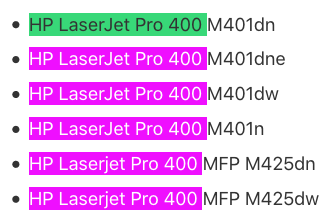


If you can no longer scan on Catalina, check the paid, non-subscription, 64-bit VueScan site for supported HP scanners. If your device is supported, VueScan will tell you if it requires HP drivers, or none, and whether it supports flatbed and document feeds depending on your model. Between AirPrint and VueScan, you would never need to use HP software or drivers again.


I have used VueScan Professional since 2010 with a antiquated Canon scanner. I have never paid any money since for regular VueScan updates, and do not receive any vendor benefits from mentioning the product here.



10 replies
Question marked as Top-ranking reply

Nov 26, 2019 11:49 AM in response to richard007654

HP doesn't sell Macs, they sell Windows hardware with Windows 10 installed, and guess where their first loyalty lies, with support for their printer/scanner family on Windows 10. HP can continue to ship 32-bit printer drivers and applications on Windows 10, but they can't pull that off with Catalina which now requires all 64-bit applications, printer, and scanner drivers.


If your LJ Pro 400 is a 401DN model, download and install HP's Easy Start v2.9.0.189 from Nov 19, and see if that can get your driver situation squared away on Catalina. You will have to Reset your Print System afterward, so that it will pick up the new drivers (if compatible). If that still does not work the following printers are supported by Apple's AirPrint, which will allow you to print wired/wireless to a networked printer without any HP drivers necessary. You would have to Reset the Print system again, and instead of the HP drivers, select AirPrint.


If you can no longer scan on Catalina, check the paid, non-subscription, 64-bit VueScan site for supported HP scanners. If your device is supported, VueScan will tell you if it requires HP drivers, or none, and whether it supports flatbed and document feeds depending on your model. Between AirPrint and VueScan, you would never need to use HP software or drivers again.


I have used VueScan Professional since 2010 with a antiquated Canon scanner. I have never paid any money since for regular VueScan updates, and do not receive any vendor benefits from mentioning the product here.


Nov 25, 2019 11:29 AM in response to richard007654

Don't worry about the rant - it's understandable your frustrated. I'm not sure why it first decided to not work with your Mac then decide not to work with the other Apple products it was just working with a short while ago. Perhaps you should reset your printing system and try adding the printer back. Go to:

System Preferences -> Printers & Scanners -> Right click the printer on the left hand box and click 'Reset Printing System.' Maybe removing it and re-adding it will work?


Also, just to confirm, you only can't print PDF's in particular - but you can print other documents, yes? If so it may be an issue with the application you use to read pdf's and print from. (Adobe Acrobat, Preview, others etc.).

Nov 25, 2019 2:25 AM in response to archieny

Many thanks for your reply & apologies for my delay.


Yesterday when I tried to print a PDF all I could manage was for the instruction to be sent to the printer. I could tell that the printer had picked up the message because I could hear the preamble before printing. Then the printer froze & there as an error message on the printer control menu screen. Then, alongside the printer details in the printer box, when selecting the printer the next time I tried to scan, there was a warning triangle in front of the name of the printer. The 'Print' was in the 'Printer Queue' unsent.


Ironically, today I can print a PDF but only page by page. Despite there being an option of printing a range, it is only possible to print page by page.


I am also finding that to utilise the functions of my HP Laserjet Pro 400 I am having to use Apple's Printing & scanning App in System Preferences which is not the most user friendly system. I cannot use HP's Scanning App because it will only allow scanning from the Document Feeder, not the flatbed screen.


I have been using this printer for several years in a Windows operating environment without any of the hassles I have experienced using MacOS (Catalina). I just wonder whether HP concentrates on Windows & that MacOs is an afterthought which explains why their Apps do not not properly work on my Mac?


Apologies for my litany of woes!


Nov 25, 2019 7:24 AM in response to richard007654

Hi PDF problems have started again.


I've come to the conclusion it must be an HP problem because I'm now having problems printing PDF's with my iPhone 6s.


I receive the following Error message on my HP printer menu '79 Service Error' when printing PDF's. When I Google search for help I receive the suggestions of (1) Turning Off & On the printer & (2) Re-installing the Printer Drivers. Both of these suggestions I have tried without success.


I'm beginning to think I may have to purchase a non HP printer/scanner which is compatible with MacOS (Catalina).


I would welcome any suggestion to avoid having to do this!


Nov 25, 2019 9:12 AM in response to archieny

Thanks for your feedback.


The printer/scanner is working absolutley perfectly using my wife's Windows 10 PC.


I have used this printer/scanner for years in the Windows environment without any problems.


I am not clear who is responsible for the compatibility issue. Is it Apple or HP or is it a case of both of them blaming each other?


I am losing confidence in using MacOS because of the compatibility issues. Beginning to wonder if I should have stuck with Windows PCs.


Apologies for my rant because I realise you're trying to help & it's not your fault.


Thanks again

This thread has been closed by the system or the community team. You may vote for any posts you find helpful, or search the Community for additional answers.

PDF printing Problem

Welcome to Apple Support Community
A forum where Apple customers help each other with their products. Get started with your Apple Account.