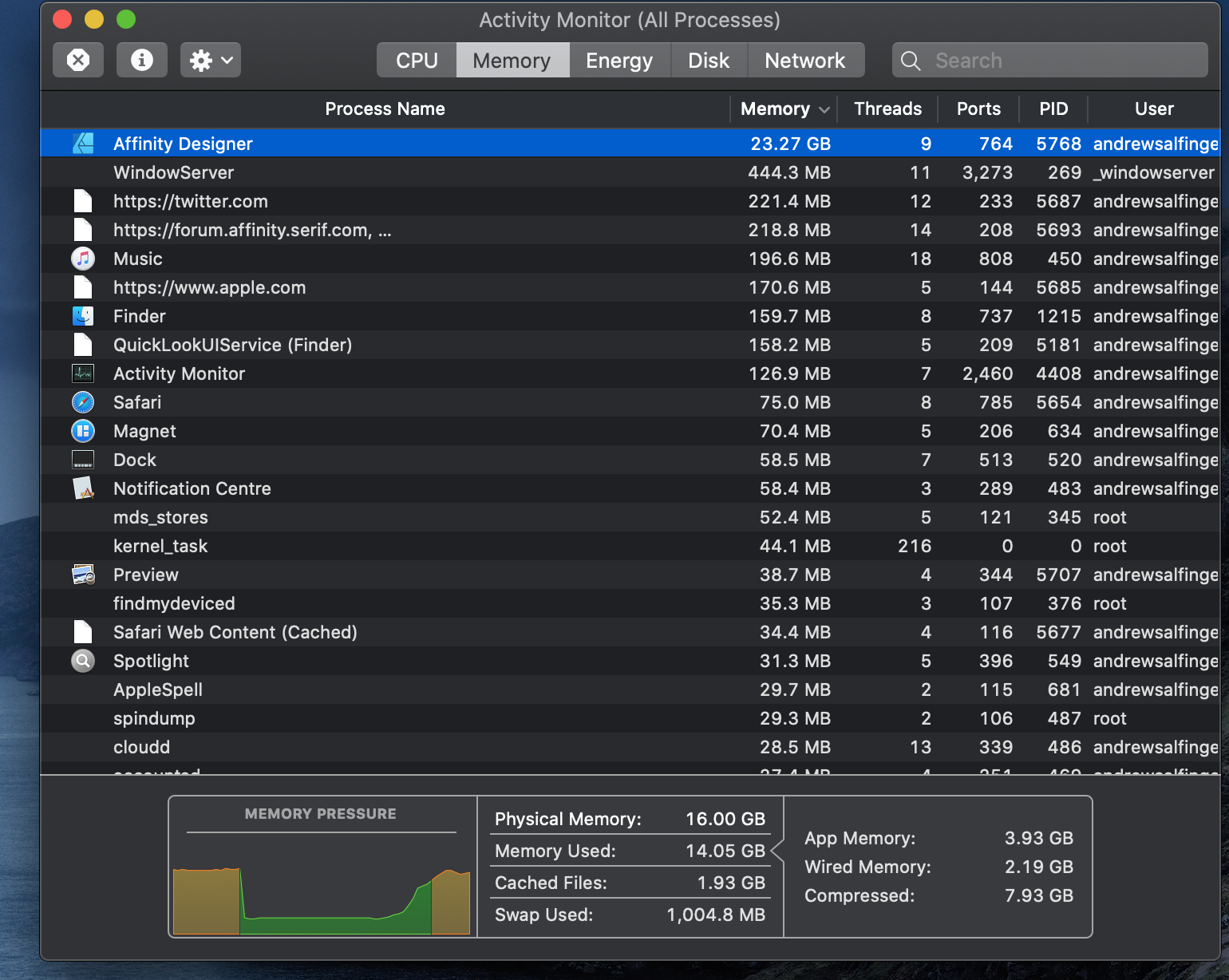
Affinity Designer trying to use 20GB of ram when I only have 16?

Hello, 

I've noticed when working on large projects with Affinity Designer / Photo they its sing a lot of memory/ram for example in one project, "Activity Monitor" on the Mac is saying Affinity Designer is using 20.43GB of memory when I only have 16GB?


I've attached a image below:
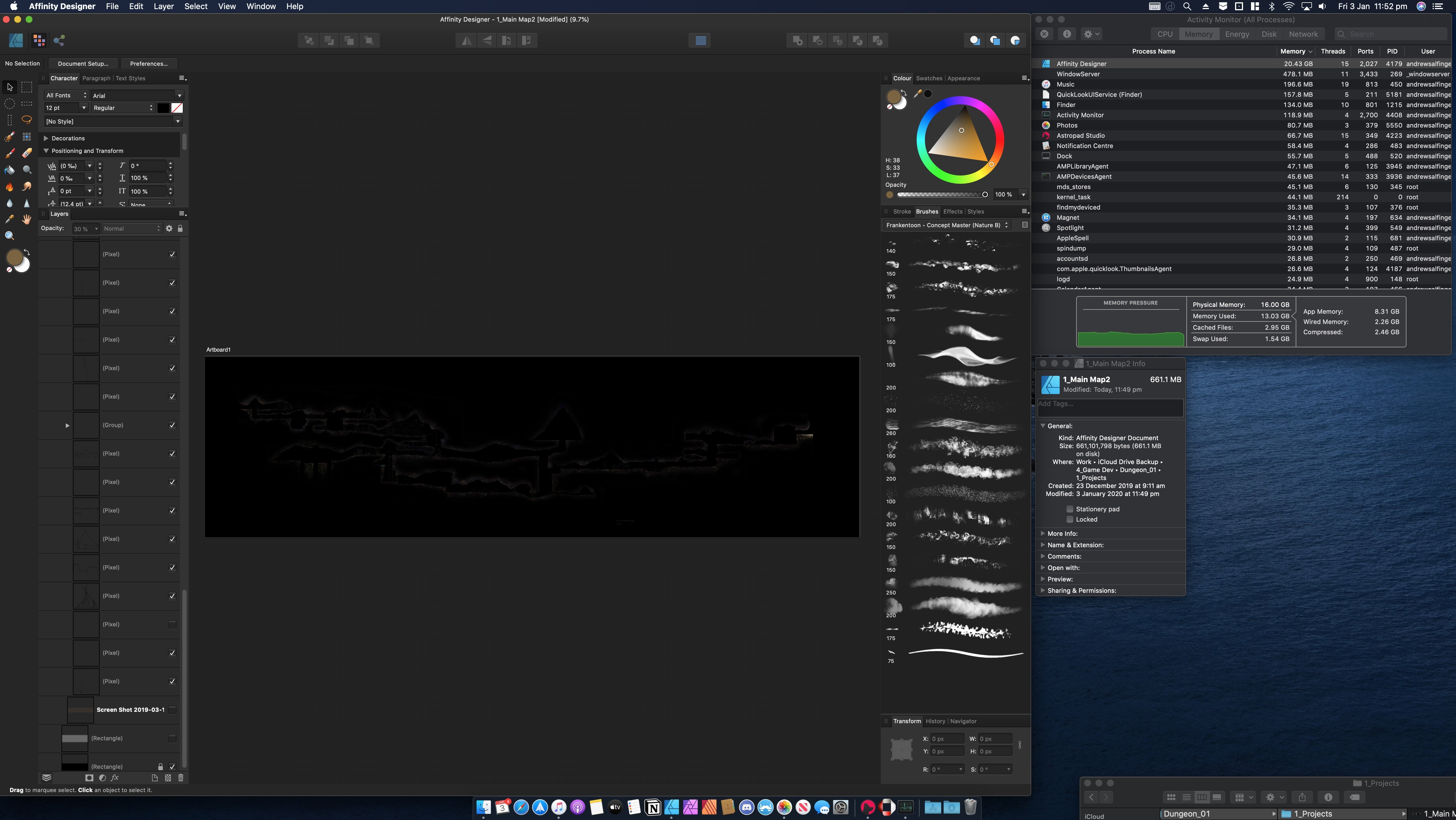


For this project:


the file size is 663.9 MB with a artboard size of 23822.2 px X 6585.3 px and 300 DPI


As for the Mac its:


iMac (Retina 5K, 27-inch, Late 2014), with a 3.5 GHz Quad-Core Intel Core i5, 16 GB 1333 MHz DDR3 and AMD Radeon R9 M290X 2 GB


Could it be Designer is leaking memory or is it saying to be able to run this project smoothly I need around 20GB of ram?


Here are some more images from "Activity Monitor"


Thank you for your time,

Andrew.

iMac 27", macOS 10.12

Posted on Jan 3, 2020 8:16 AM

Reply
Question marked as Top-ranking reply

Posted on Jan 3, 2020 11:41 PM

"Swap Used:" is the memory usage beyond your actual RAM where the computer is using free space on the hard drive, which reading and writing is much slower than actual physical RAM but necessary in order to meet the memory demands of the apps you are running. This is also called virtual memory. If you have an SSD or very fast hard drive, there is nothing wrong with using swap. In fact, some apps allow you to select a location for where a scratch file can be written, like on a different drive than your boot drive, to share the read/write operations over two drives simultaneously during typical computer operations. This was useful back in the day when RAM maxed out at only a few GB. Today, RAM is relatively cheap. You can try to split up image files into smaller patches to work on bits of it at a time, or upgrade your RAM to meet the demands of your app so that you don't have to spill over into the swap space on the hard drive. Ideally the Swap would go down to zero if you have added enough RAM.


PS - leaking memory is a term used to refer to an app that does not release memory that it no longer needs, and can basically block other apps from using that memory, usually due to a defect in the software. Your software seems to be running normally, just your particular project is a very large amount of data. No memory "leak" is observed here.

12 replies
Question marked as Top-ranking reply

Jan 3, 2020 11:41 PM in response to SpiralProduction

"Swap Used:" is the memory usage beyond your actual RAM where the computer is using free space on the hard drive, which reading and writing is much slower than actual physical RAM but necessary in order to meet the memory demands of the apps you are running. This is also called virtual memory. If you have an SSD or very fast hard drive, there is nothing wrong with using swap. In fact, some apps allow you to select a location for where a scratch file can be written, like on a different drive than your boot drive, to share the read/write operations over two drives simultaneously during typical computer operations. This was useful back in the day when RAM maxed out at only a few GB. Today, RAM is relatively cheap. You can try to split up image files into smaller patches to work on bits of it at a time, or upgrade your RAM to meet the demands of your app so that you don't have to spill over into the swap space on the hard drive. Ideally the Swap would go down to zero if you have added enough RAM.


PS - leaking memory is a term used to refer to an app that does not release memory that it no longer needs, and can basically block other apps from using that memory, usually due to a defect in the software. Your software seems to be running normally, just your particular project is a very large amount of data. No memory "leak" is observed here.

Jan 3, 2020 9:49 AM in response to SpiralProduction

Working with such large pics you should really have 32 GB of RAM!

https://eshop.macsales.com/upgrades/imac-retina-5k-27-inch-late-2014-3.5-ghz/memory


It's using Virtual Memory on the Drive which really slows things down.


To tell more...


EtreCheck is a simple little app to display the important details of your system configuration and allow you to copy that information to the Clipboard. It is meant to be used with Apple Support Communities to help people help you with your Mac.

http://www.etresoft.com/etrecheck


Pastebin is a good place to paste the whole report...

https://pastebin.com/


Workable but harder for me to work with...the Note tool on the bottom of this editor's toolbar, as shown in the image, to copy and paste the output from EtreCheck.

Jan 3, 2020 4:21 PM in response to BDAqua

Hello and thank you for the replay.


I was unsure witch test to do with EtreCheck, so I selected the "Computer is slow" one. Here is the report: https://pastebin.com/aYWNQnLN


If you would like to do one of the other tests I am happy to do so, do I also need to be running the software (Affinity Designer) at the time of the test.


Thank you for your time,

Andrew.

Jan 3, 2020 11:04 PM in response to BDAqua


I've deleted the file and restarted the Mac along with running the test from before again and here is the results: https://pastebin.com/wC4ikPcQ


Along with a screenshot of the Activity monitor with Affinity Designer running.


The ram usage dose seem lower compared to before but still maxing out the system, so upgrading ram seems to be the way to go?

Jan 3, 2020 5:55 PM in response to SpiralProduction

Andrew, all the tests are the same, those headers are just to make it easier to start off listing your concern3


You need to do a Time Machine backup or Clone asap.


This points to the reason, but not the actual cause...

  1. Virtual Memory Information:
  2.  Physical RAM: 16 GB
  3.  Free RAM: 25 MB
  4.  Used RAM: 12.63 GB


Trash this file, Restart, see if the above or speed improves

This thread has been closed by the system or the community team. You may vote for any posts you find helpful, or search the Community for additional answers.

Affinity Designer trying to use 20GB of ram when I only have 16?

Welcome to Apple Support Community
A forum where Apple customers help each other with their products. Get started with your Apple Account.