Hello, dong70!
Thank you for using the Apple Support Communities!
I see from your post that you're not able to see OneDrive listed as a location in the Files app on your iPhone.
Take a look at this article called Use the Files app on your iPhone, iPad, and iPod touch and follow these steps:
"Use third-party apps in Files
The Files app lets you add your third-party cloud services — like Box, Dropbox, OneDrive, Adobe Creative Cloud, Google Drive, and more — so that you can access all of your files on all of your devices. The files you keep in iCloud Drive automatically appear in the Files app, but you need to set up your other cloud services to access them in the Files app too.
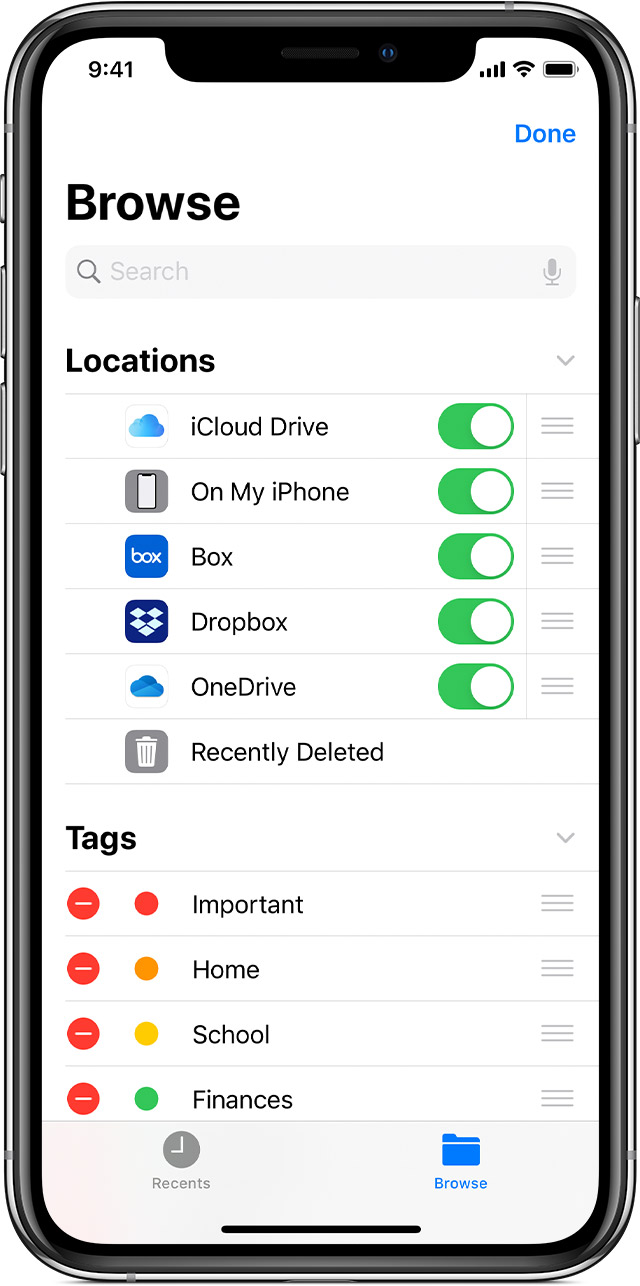
Add third-party apps
- Download and set up the third-party cloud app.
- Open the Files app.
- Tap the Browse tab.
- Tap More
 > Edit.
 - Turn on the third-party apps that you want to use in the Files app.
- Tap Done.
On iOS 12 or earlier, open the Files app then tap Locations > Edit to add third-party apps.
If you don't see one of your third-party cloud services in the Files app, check with your cloud provider."
I hope this information helps you!
Cheers.


