Connecting Mid 2009 Macbook Pro to projector with sound.

I have tried thunderbolt/monitor to VGA, with audio cable in the earphone ports. Thunderbolt to HDMI with and without audio cables. I have those adapters. I cannot get the projector which supposedly has good speakers to play. The sound remains coming from the Laptop. I have a presentation next week and I need to get this working.

Posted on Jan 19, 2020 12:12 PM

Reply
2 replies

Jan 22, 2020 7:10 AM in response to 794

Hi there, 794!


Thanks for reaching out to the Apple Support Communities! It sounds like you're connecting your MacBook Pro to an external projector but the sound is not coming from the projector. I recommend starting with this article to Connect to HDMI from your Mac. Specifically:


"If your HDMI device isn't receiving audio from your Mac:

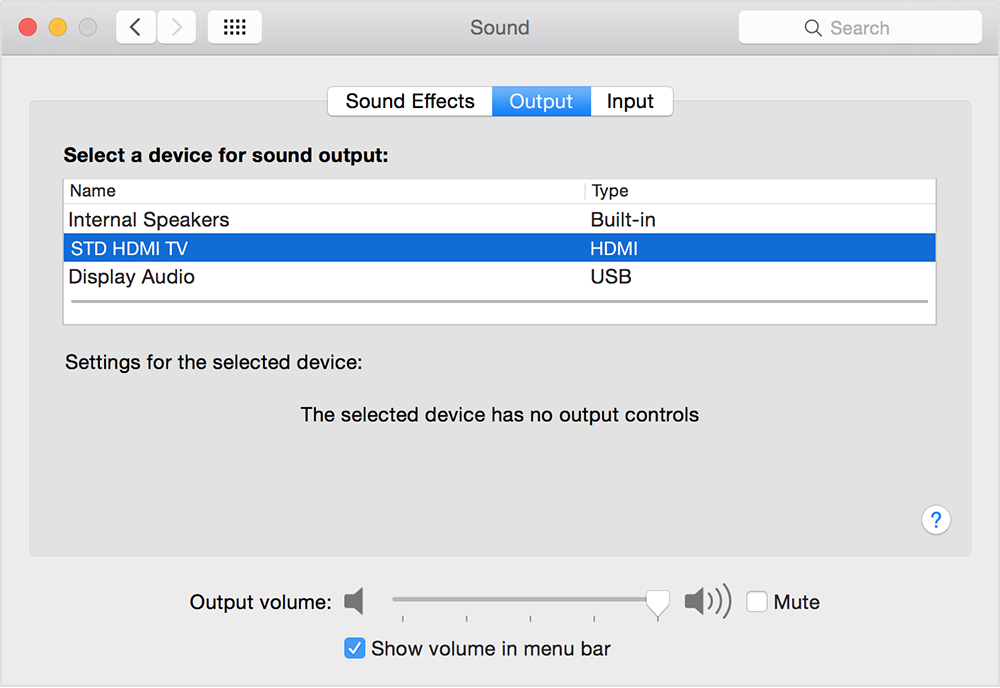
  • Choose Apple menu > System Preferences, then click Sound. In the Output pane, make sure that your HDMI device is selected.
  • If you're connecting using a Mini DisplayPort adapter, make sure that your Mac can send audio over Mini DisplayPort.
  • If you're connecting from a Mac mini, unplug any audio device that is plugged into your computer's Audio-Out port.

"


Let me know the results and have a great day!

This thread has been closed by the system or the community team. You may vote for any posts you find helpful, or search the Community for additional answers.

Connecting Mid 2009 Macbook Pro to projector with sound.

Welcome to Apple Support Community
A forum where Apple customers help each other with their products. Get started with your Apple Account.