Because you are establishing a new network connection for the Time Capsule, you must first perform a Hard Reset on the Time Capsule to delete the current network settings so that new settings can be applied to connect to the Google network. The reset will not affect any of the data that might already be stored on the Time Capsule hard drive.
To perform a Hard Reset........
Power up the Time Capsule (if it is not already on) and let it run for a minute or two
Hold in the reset button on the back of the Time Capsule for 7-8 seconds and release
Allow a full minute for the Time Capsule to restart to a slow, blinking amber light status
If you have the "tall" or "tower" shaped version of the Time Capsule, the reset button is located just to the right of the AC power cord socket. If you have an older "flat" or "square" version of the Time Capsule.....that looks like a small white pizza box.....the reset button is located on the right side of the back panel next to the security slot.
Connect an Ethernet cable from one of the Ethernet ports on the back of the Google router to the WAN "O" port on the back of the Time Capsule. This connection must remain permanent at all times.
On your Mac......
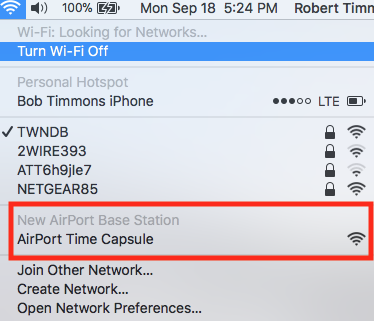
Click on the WiFi menu at the top of the screen
Look for a listing of New AirPort Base Station
Just under that listing, click directly on AirPort Time Capsule.....or....it might just say Time Capsule
When you click on Time Capsule, that will start up the AirPort Utility setup "wizard". The wizard will take a few seconds to analyze the network and then display a screen that look will look similar to the example below, except that you will see a Time Capsule pictured.

Network Name.......Type in a name for the Time Capsule wireless. Later, you can turn this off if you do not need another network
Base Station Name.....Type in a device name that you want to call the Time Capsule
Password......Type in a password for the Time Capsule
Verify......Type in the same password to confirm
Click Next.....the setup wizard will configure the Time Capsule with the correct settings. When you see the message of Setup Complete, click Done.
Make sure that your Mac is now connected to the Google Wi-Fi network.
Check to see if the Mac will now back up to the Time Capsule. It may....and it may not.....if more settings will need to be changed. Report on your results.
If you do not need the WiFi service from the Time Capsule, we can turn that function off as well. Let us know what you want to do.


