Mobile Data Update Failed on my iPhone

I got an error message on my iPhone -> http://joxi.ru/LmGMJ1lfJDRwOA It says I need to update my iOS version. I did it several times! Now I have the latest one. I also changed my SIM card. But nothing helps. There’s ‘No service’ instead of mobile operator’s name at the top and iPhone is in the endless searching of connection -> http://joxi.ru/vAWnba5tqlkqq2

iPhone 7

Posted on Feb 13, 2020 1:46 AM

Reply
Question marked as Top-ranking reply

Posted on Feb 13, 2020 1:54 AM

There are two major Updates in an iPhone / iPad:

  1. iOS Update (Recommended): Released by Apple Inc basically for improvements, security and bug fixes. My 10 years of experience says, it has no affect on Data, Calls & SMSs if not updated
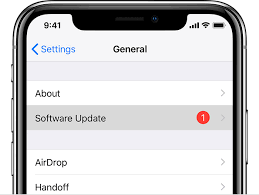
  2. Carrier Update (Required): Released by your Cellular Service provider (Carrier Update), affects your Outgoing / Incoming calls, SMS, Data etc..
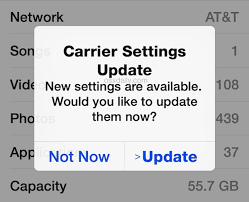


How to Update Carrier Settings

You can manually check for and install a carrier settings update with these steps: Make sure your device is connected to a Wi-Fi or cellular network. Tap Settings > General > About. If an update is available, you'll see an option to update your carrier settings.

Update your carrier settings on your iPhone or iPad - Apple Support


How to update iOS

Go to Settings > General > Software Update > Automatic Updates, then turn off AutomaticUpdates. At any time, you can check for and install software updates. Go to Settings > General > Software Update. The screen shows the currently installed version of iOS and whether an update is available.

Update iOS software on iPhone - Apple Support

2 replies
Question marked as Top-ranking reply

Feb 13, 2020 1:54 AM in response to nura_gritsenko

There are two major Updates in an iPhone / iPad:

  1. iOS Update (Recommended): Released by Apple Inc basically for improvements, security and bug fixes. My 10 years of experience says, it has no affect on Data, Calls & SMSs if not updated
  2. Carrier Update (Required): Released by your Cellular Service provider (Carrier Update), affects your Outgoing / Incoming calls, SMS, Data etc..


How to Update Carrier Settings

You can manually check for and install a carrier settings update with these steps: Make sure your device is connected to a Wi-Fi or cellular network. Tap Settings > General > About. If an update is available, you'll see an option to update your carrier settings.

Update your carrier settings on your iPhone or iPad - Apple Support


How to update iOS

Go to Settings > General > Software Update > Automatic Updates, then turn off AutomaticUpdates. At any time, you can check for and install software updates. Go to Settings > General > Software Update. The screen shows the currently installed version of iOS and whether an update is available.

Update iOS software on iPhone - Apple Support

This thread has been closed by the system or the community team. You may vote for any posts you find helpful, or search the Community for additional answers.

Mobile Data Update Failed on my iPhone

Welcome to Apple Support Community
A forum where Apple customers help each other with their products. Get started with your Apple Account.
