Creating an A6 booklet

Hi,


Just trying to create a simple 10 page A6 booklet.


I'm going to staple the pages. Therefore I assume the first page in the document would be shown alongside the last page, second page with second to last and so on, so it works as a book when stapled together.


How would I go about creating a layout for this?


Thanks

MacBook Pro 13", OS X 10.11

Posted on Feb 21, 2020 9:42 AM

Reply

Similar questions

1 reply

Feb 21, 2020 10:54 PM in response to MrZanarkand

Hi Mr.Z'


The sticking point here is a process called imposition—placing the pages in the right order and correct orientation to be arranged logically in the final product.


Your description implies that the booklet will use A6 paper, and will be folded to produce a booklet with A7 size pages, 4 on each sheet.


Three sheets will then provide space for 12 pages of content—a cover page, 10 pages of content, and a back cover, laid out four pages to a two-sided sheet in this order:
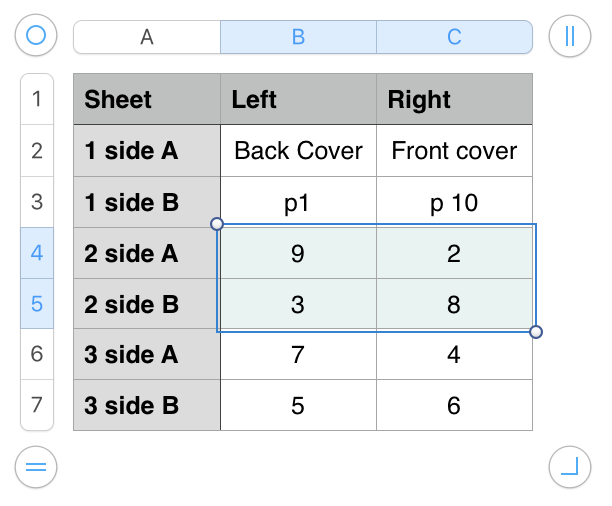

While there is no imposition software, to my knowlege, written for direct use with Pages, there are several applications that work with a pdf file to reorder the pages of that file to correctly appear on a multi page booklet. You'll find them at the App store.


Regards,

Barry

This thread has been closed by the system or the community team. You may vote for any posts you find helpful, or search the Community for additional answers.

Creating an A6 booklet

Welcome to Apple Support Community
A forum where Apple customers help each other with their products. Get started with your Apple Account.