I don't intend to detract from the others' replies to your three questions, but since you asked I'll augment them.
- Not only is adware easily recognized and avoided, should you nevertheless be deceived into installing it, it's easily removed without having to download or install anything more. The essential steps involve examining the contents of three folders that contain files that are loaded whenever you start or log in to your Mac. I have had complete and total success with that method despite the limitations of using this site with its inherent back-and-forth questions and answers, even with neophyte users. If they follow along, more experienced users will easily catch on and do it themselves without even having to ask for help.
- Yes, EtreCheck is capable of identifying a wide variety of malware, in addition to performing many other useful tasks. In the past helpers would need to ask a dozen or more questions that EtreCheck answers already. In my dreams it would be a prerequisite for posting questions on this site, but it's not reasonable to expect people in need of help would even know about it. It's a simple tool that does what it needs to do, makes a few suggestions, and then gets out of the way. If I could do a better job I would. In fact I was already working on something like it, but EtreCheck's author released his program before I finished mine, saving me a lot of work. I love when that happens 😀
- Most emphatically NO. Websites in and of themselves can certainly result in Safari misbehaving, such as spawning multiple windows or tabs as though it's out of control, but the fix is simple even if you have to force Safari to quit and clear recent browsing history. Those functions, in addition to identifying known fraudulent websites and warning you about them before you load a page (among other functions) are built into it. Some websites go so far as to automatically initiate a download that gets deposited in your Downloads folder, but once again that downloaded file can do exactly nothing until you deliberately open and attempt to install it, at which point macOS's own built-in protections intervene and inform you of what you're asking it to do. Known malware is automatically blocked. Software downloaded from untrusted sources is identified as exactly that, offering you the opportunity to open the website from which it arose, so that you can make an informed decision regarding whether or not you are willing to proceed with its installation. Even then, macOS doesn't stop there—it simply will not allow itself to become maliciously altered, and known malicious software that somehow manages to get past that roadblock is automatically removed. Apple periodically issues security updates that incorporate those definitions as they are identified, which is another reason you should keep your Mac up to date.
- No. Same principles apply. However, please allow me to expand upon an exploit that is disturbingly common, successful, and growing in popularity: Apple ID theft. It has been successfully leveraged to lock hapless victims out of their Macs. Fortunately Apple offers a simple and highly effective defense against that threat, which I'll describe later.
By far the most prevalent threat you must protect yourself against is phishing. It can take a variety of forms but its purpose is to deceive you into voluntarily disclosing your Apple ID credentials. Those credentials are the keys to your digital kingdom and need to be safeguarded just as you would a wallet or purse or anything else of value. Read Security and your Apple ID - Apple Support. Apple doesn't take a heavy hand with their Support documents in that they don't highlight important concepts with a lot of bold face text or other garishness, but perhaps they should. Every word of that document is important. Read it and appreciate the importance of keeping your Apple ID credentials secure.
Here is an example of a phishing attempt I received just last week:
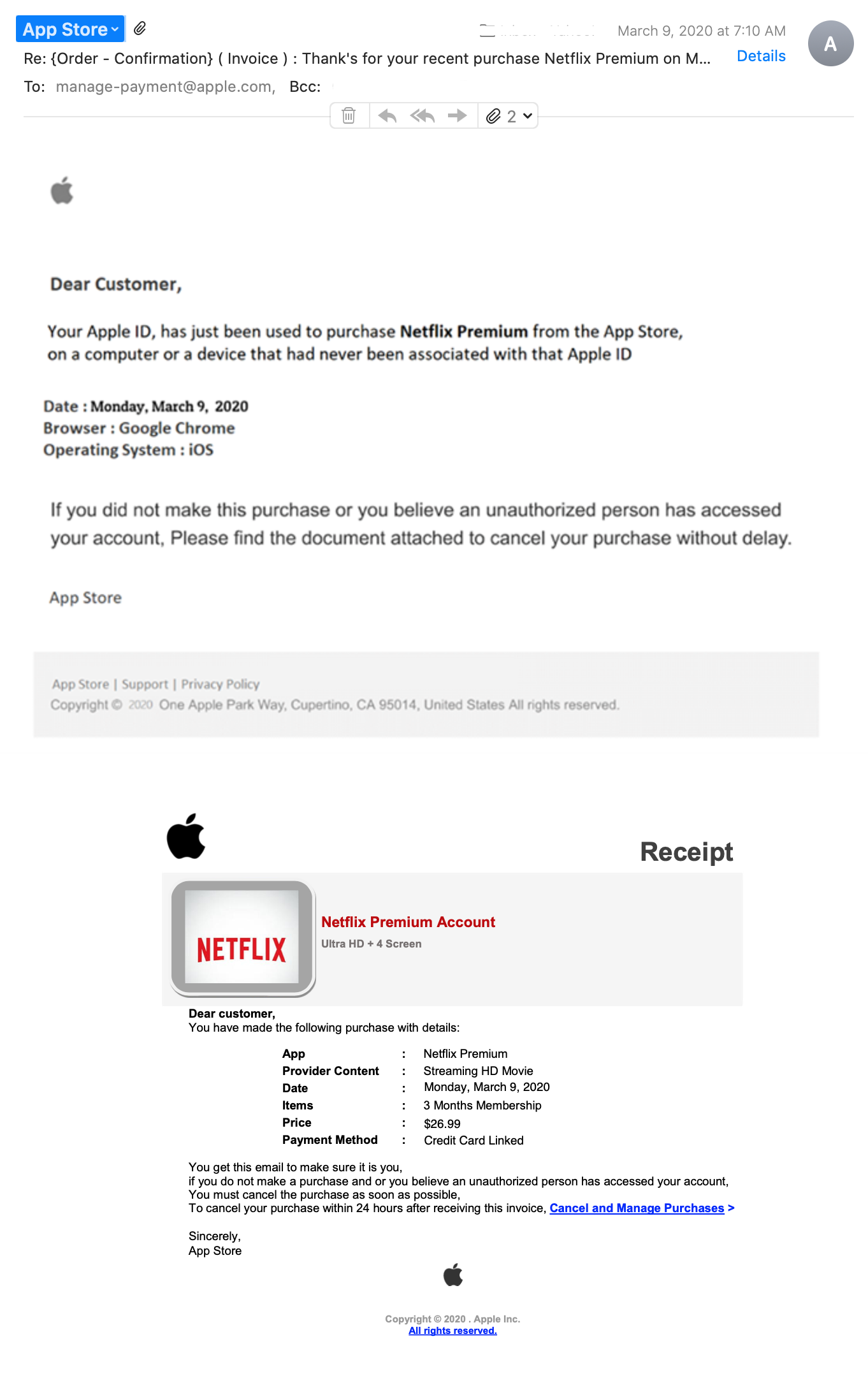
I'm pretty sure I didn't purchase anything from Netflix, and certainly don't use Google Chrome. It must be a mistake, right? So my first reaction is that I should click the "Cancel and Manage Purchases" link. Isn't that what anyone would do? Of course.
Let's go ahead and click that link. What happens then is that Safari opens with a one hundred percent perfect rendition of Apple's "Manage your Apple ID" webpage. It's beautiful. A work of art. Its Apple ID and password fields are right there ready to be filled in.
Except that it's not from Apple.
If I supplied my real Apple ID and password to that website its job is done—your credentials are already halfway around the globe, being sold to the highest bidder on the dark web. Mission accomplished.
But wait, it gets better! The webpage that appears next wants even more personal information, to be continued in the next post.





