port forwarding troubleshooting

I'm trying to open a specific port for UDP networking and have followed all the instructions online that I see to set it up on my airport time capsule (ATC), but it's not working. I've also checked with my ISP who said they aren't blocking anything and I made sure I don't have the firewall on. I'm on a macbook pro on Mojave. Attached are some screenshots of the settings in the airport utility. Can anyone please suggest a way to troubleshoot this or point out what I'm doing wrong? Many thanks!


Posted on Mar 15, 2020 8:16 PM

Reply
Question marked as Top-ranking reply

Posted on Mar 16, 2020 6:27 AM

I recall when I started that it was in DHCP and NAT, and I left it there because that was what I saw in several instructions I found online. I assume if I put it in Bridge mode, my ATC won't work as a router anymore, so the wifi network will no longer be active - is that correct?


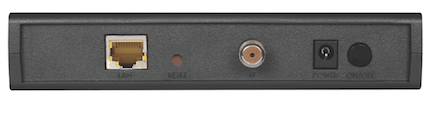
DHCP and NAT would be the correct setting......IF.....you have a simple modem......one with only one Ethernet port. Example:


Off (Bridge Mode) would the correct setting.......IF.....you have a modem/router......which will almost always have at least 4 Ethernet ports. Example:



So.......DHCP and NAT would not be the correct setting to use if you have a modem/router.


I assume if I put it in Bridge mode, my ATC won't work as a router anymore, so the wifi network will no longer be active - is that correct?


If you put the Router Mode in Off (Bridge Mode), the Time Capsule will not act as a router. But....it can still provide a wireless network signal when it is in Bridge.


Here's the bottom line........


If you have a simple modem, the correct setting for the Time Capsule is DHCP and NAT

If you have a modem/router, the correct setting for the Time Capsule is Bridge Mode


We asked for the make and model of your "modem" to learn more about what kind of device that you actually have. A lot of folks call a modem/router a "modem", so If you do have a modem/router, Port Mapping will not work correctly on the Time Capsule.......because you will have in effect two routers on your network. You only want one device acting as a router on the network.


We also asked you to check and see whether "Status" appeared on an AirPort Utility check, and if it did, whether or not a Double NAT message appeared, but did not get an answer from you on that as well. A Double NAT situation will not allow Port Mapping to function correctly on the Time Capsule.





Similar questions

18 replies
Question marked as Top-ranking reply

Mar 16, 2020 6:27 AM in response to mjd67

I recall when I started that it was in DHCP and NAT, and I left it there because that was what I saw in several instructions I found online. I assume if I put it in Bridge mode, my ATC won't work as a router anymore, so the wifi network will no longer be active - is that correct?


DHCP and NAT would be the correct setting......IF.....you have a simple modem......one with only one Ethernet port. Example:


Off (Bridge Mode) would the correct setting.......IF.....you have a modem/router......which will almost always have at least 4 Ethernet ports. Example:


So.......DHCP and NAT would not be the correct setting to use if you have a modem/router.


I assume if I put it in Bridge mode, my ATC won't work as a router anymore, so the wifi network will no longer be active - is that correct?


If you put the Router Mode in Off (Bridge Mode), the Time Capsule will not act as a router. But....it can still provide a wireless network signal when it is in Bridge.


Here's the bottom line........


If you have a simple modem, the correct setting for the Time Capsule is DHCP and NAT

If you have a modem/router, the correct setting for the Time Capsule is Bridge Mode


We asked for the make and model of your "modem" to learn more about what kind of device that you actually have. A lot of folks call a modem/router a "modem", so If you do have a modem/router, Port Mapping will not work correctly on the Time Capsule.......because you will have in effect two routers on your network. You only want one device acting as a router on the network.


We also asked you to check and see whether "Status" appeared on an AirPort Utility check, and if it did, whether or not a Double NAT message appeared, but did not get an answer from you on that as well. A Double NAT situation will not allow Port Mapping to function correctly on the Time Capsule.


Mar 15, 2020 9:42 PM in response to mjd67

Sure looks like the Cox device is a router......not a simple modem.......since the IP address of the "modem" in the second line is 10.x.x.x. As Tesserax already noted above in his response.......it should NOT be anything that begins with 10., 172. or 192. Yours begins with 10.


Open AirPort Utility and click on the picture of the Time Capsule and a smaller window will appear. Look to see if you can find a listing for "status". If it is there, is there a "Double NAT" notification?


Would also help if you could provide the make and model number of your "modem". Cox does not make a modem, so your "modem" is made by some other manufacturer.


Does your "modem" have only one Ethernet port on the back, or does it have multiple Ethernet ports?


Is it possible that your Time Capsule was originally set up in Off (Bridge Mode)......and you changed the Router Mode setting to DHCP and NAT?

Mar 16, 2020 12:45 PM in response to mjd67

FYI ... the DPQ3212 is a Cisco modem-only device. It does not provide any routing functionality, but does support digital voice services. It is also, by default, in bridge mode. That would mean that your Time Capsule (TC) should be configured as a router (DHCP and NAT) enabled ... which it should be by default.


According to your AirPort Utility screenshot, your ISP (Cox) is providing you with a dynamic public IP address (68.x.x.x) and the TC is providing the default (& proper) private IP address of 10.0.1.1. The Mac in this case is getting its private IP address in the correct range from the DHCP service on the TC. So everything looks good as far as the setup.


When you create a port mapping, you are telling the TC that you want to open a port on its NAT "firewall" to allow an inbound communication on that port to reach a device on your local network. In turn, that device would be running an app that would be "listening" on that port for that specific communication. Thus why you stipulate both a public and private port numbers when you set up a port mapping. Note that you also need to identify the IP address of the local device that will be listening. If that is the device with IP address 10.0.1.14, as in the image you provided, then this would be that listening device. It would also be the device where you are running an app that requires that communication.


However, there can be a number of reasons why this may not work:

  • Since your ISP is providing you with a dynamic public IP address, if you try to access the TC from a remote location you will always need to verify the actual public IP address that is assigned to it. That is where having a static public IP address has its advantage. Most business-grade Internet service are provided these. For most of use with consumer-grade service, we get around this by using DDNS.
  • Your Mac also has a "software" firewall. Actually, two of them. By default, neither are enabled ... but if either or both are, you would need to create firewall rules to allow this communication to get through what would be a second firewall. Also, if you use something like Little Snitch, you are using a third-party software firewall ... so keep that in mind.
  • Lastly, the port you use UDP 4464 may be required for another process. You can check by using the following Wikipedia reference: https://en.wikipedia.org/wiki/List_of_TCP_and_UDP_port_numbers (FYI, I just did, and it doesn't.)


Mar 15, 2020 8:27 PM in response to mjd67

It appears that you have properly configured a port to allow UDP traffic inbound on port 4464 on your base station to port 4464 on a device on your local network located at IP address: 10.0.1.201.


I am assuming that this device is "listening" for UDP traffic coming inbound on this port ... correct? If so, is your base station the "main" Internet router for your network? That is, does it connect directly to a simple modem and not to another router or gateway device? Does your ISP provide you with a static or dynamic public IP address? That is an address that does not start with either 192 or 172, or 10?

Mar 16, 2020 12:51 PM in response to mjd67

I'm still not understanding how you will attempt reach the device from a remote location. Is there an application that you will be using for this......or......will you be using the Connect to Server Command under the Finder's Go menu on the Mac?


If you are using the Finder option, then the Connect to Server box would look something like:


smb://Time Capsule IP address:4464

So, if the Time Capsule was still receiving an IP address of 10.75.151.1 from the modem, the entry would look like this:

smb://10.75.151.1:4464


The instructions for your device might advise to use another prefix other than smb

Mar 16, 2020 12:14 PM in response to Bob Timmons

Thank you so much, Bob and everyone! I'll try to answer the remaining questions and summarize my remaining question, and I'll also provide some info on what I'm actually doing at the end:


Brand/Type of modem:

As I wrote earlier the model number is "DPQ3212 DOCSIS 3.0 2-PORT Voice Modem" but now that I got into the cabinet in the wall where Cox had hidden it, I see that the brand is Cisco. I'll attach a picture of the front and back of the modem. From Bob's helpful explanation it looks to me like a "simple modem" with only one ethernet port, but with 2 voice/telephone ports as well (because we get a landline service from Cox as well as internet). So thank you for confirming that given this, the correct setting for the Time Capsule is DHCP and NAT.


Status:

As I wrote before the Status does not appear on an AirPort Utility check and I don't see a Double NAT message.


So as I understand it after all this great help from you all:

  • The ATC port forwarding settings I posted earlier should work as long as the IP listed in that window matches the IP of the machine that I'm using to "listen" on that port
  • The fact that a port check website isn't showing the port I have opened to be open isn't very definitive and shouldn't worry me, so I should test what I'm trying to do (audio networking via UDP, more details below) and see if it works


But if the second point is true, then I'd also love to know which tools you recommend for checking ports more accurately, if there is a way? I have tried iperf in the past but am also wondering if it's possible to simply check with the port scan tab in Network Utility? I ran that and don't see any helpful message (see attached screenshot) - does that mean that those ports (I'm trying for 4464) are not open?


Here is more about what I'm doing in case that helps or you're interested:

I did have some trouble yesterday with the audio networking software so my best guess is that I have not solved this port problem (because it worked when I was a client but not a server), but I'm going to try again later today with someone. FYI, the software I'm using, both open source programs, are JACK audio server along with Jacktrip, a command line program for sending multichannel audio via UDP ports among machines running JACK. I have a lot of experience with this software/networking, but I've always done it on university networks where the process of opening the UDP ports is just by request to my sysadmin person, not something I have to manually configure. I'm eager to learn more now about the nuts and bolts of networking and really appreciate all this great help from you all, thank you all!


Mar 15, 2020 8:39 PM in response to Tesserax

Thank you so much for the quick and helpful reply, Tesserax!


I now see that the IP 10.0.1.201 is not the one that is listed under Network settings for my laptop (connected to the ATC via an ethernet cable), which is 10.0.1.14. I will try it again, getting the IP to match the machine I need to listen to those ports on. However, a previous time I did this, I had noticed that IP field and did match it to the machine's IP, and I believe it didn't work that time either.


To answer your questions:

If so, is your base station the "main" Internet router for your network?

Yes.


That is, does it connect directly to a simple modem and not to another

router or gateway device?

Yes. I can access the modem via a browser but do not have privileges to login (it's from Cox).


Does your ISP provide you with a static or dynamic public IP address? That is an address that does not start with

either 192 or 172, or 10?

They do not provide a static IP so I assume it's dynamic/DHCP, if I understand the concept correctly. I do work at a university and in that context I can request static IPs for this work (audio networking) and open up the ports on those IPs, so I'm familiar with that process, but at home I do not have a static IP.


I will try re-doing the settings and matching the IP in that field to the local IP on my laptop, but if you see anything else I should try please let me know. Thank you!


Mar 15, 2020 9:21 PM in response to LaPastenague

Thanks. Here are the results:


traceroute to 8.8.8.8 (8.8.8.8), 64 hops max, 52 byte packets

1 10.0.1.1 (10.0.1.1) 1.850 ms 1.280 ms 1.259 ms

2 10.75.151.1 (10.75.151.1) 8.427 ms 8.777 ms 7.685 ms

3 ip68-4-12-140.oc.oc.cox.net (68.4.12.140) 10.468 ms 8.709 ms 9.081 ms

4 100.120.104.0 (100.120.104.0) 9.182 ms 28.457 ms 10.460 ms

5 langbprj01-ae1.rd.la.cox.net (68.1.1.13) 11.806 ms 11.395 ms 11.747 ms

6 72.14.196.240 (72.14.196.240) 11.832 ms

74.125.51.136 (74.125.51.136) 19.209 ms

72.14.242.92 (72.14.242.92) 12.786 ms

7 * * *

8 dns.google (8.8.8.8) 12.861 ms 14.069 ms 22.322 ms

Mar 15, 2020 9:38 PM in response to mjd67

Am I understanding correctly that the first 2 lines of those results mean that:


10.0.1.1 is my Apple Time Capsule

10.75.151.1 is my Cox modem/router (which I believe is a box they installed and do not allow me to access, and which I connect the ATC to through an active ethernet port on the wall)


When I spoke to Cox they told me they don't block the port I'm trying to open (4464).


If this is all correct, then -


Does this mean that I should enter 10.75.151.1 as the "Private IP" in the port forwarding settings? Or something else?


Thank you both for the help, I'm very grateful!

Mar 15, 2020 9:45 PM in response to Bob Timmons

Thank you! I'm attaching a screenshot of what I see in that small window (No status listing)


When I login to the modem (somehow I found the IP by trying several online based on brand names I saw in the Cox support pages) it says this along the top:

DPQ3212 DOCSIS 3.0 2-PORT Voice Modem


I will also attach a screenshot of what I see there. I don't have the login.


I will try to locate the modem which I think is pretty hidden - they wired it into the house ethernet and activated a port on a wall which I plug the ATC into.


Mar 15, 2020 10:26 PM in response to Bob Timmons

Sorry, I forgot to answer this:

"Is it possible that your Time Capsule was originally set up in Off

(Bridge Mode)......and you changed the Router Mode setting to DHCP and

NAT?"


I recall when I started that it was in DHCP and NAT, and I left it there because that was what I saw in several instructions I found online. I assume if I put it in Bridge mode, my ATC won't work as a router anymore, so the wifi network will no longer be active - is that correct?


Thanks!

Mar 16, 2020 1:22 PM in response to Bob Timmons

Thank you Tesserax, Bob and everyone, this has been incredibly educational for me! My problem is now solved and I've learned a lot from these posts and also reading up online more about NAT. Here's a summary:


I think the reason it didn't work at first was that the IP that I'd set in the port forwarding didn't match the one on the machine I needed to use for the networking.


Once I fixed that (and added a DHCP reservation for the USBC-ethernet adapter I'm using, so it won't happen again), I got it to work.


The reason I know is that I'm using the audio networking software that I mentioned earlier, and was able to a computer in my university office that I can login to remotely (vnc, via connect to server). I login to it and can run the networking software there as well as on my local machine, and I was able to connect both ways, i.e. both as server and client. (My understanding is that if my UDP port at home is not open then I could only send audio to the other machine but not receive from it, but because I was able to establish successful connections both ways and route audio both ways, I know the UDP port at home is open.).


So thank you all for this great help! I really appreciate it.

This thread has been closed by the system or the community team. You may vote for any posts you find helpful, or search the Community for additional answers.

port forwarding troubleshooting

Welcome to Apple Support Community
A forum where Apple customers help each other with their products. Get started with your Apple Account.