I recall when I started that it was in DHCP and NAT, and I left it there because that was what I saw in several instructions I found online. I assume if I put it in Bridge mode, my ATC won't work as a router anymore, so the wifi network will no longer be active - is that correct?
DHCP and NAT would be the correct setting......IF.....you have a simple modem......one with only one Ethernet port. Example:
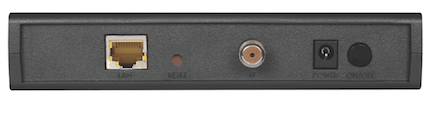
Off (Bridge Mode) would the correct setting.......IF.....you have a modem/router......which will almost always have at least 4 Ethernet ports. Example:

So.......DHCP and NAT would not be the correct setting to use if you have a modem/router.
I assume if I put it in Bridge mode, my ATC won't work as a router anymore, so the wifi network will no longer be active - is that correct?
If you put the Router Mode in Off (Bridge Mode), the Time Capsule will not act as a router. But....it can still provide a wireless network signal when it is in Bridge.
Here's the bottom line........
If you have a simple modem, the correct setting for the Time Capsule is DHCP and NAT
If you have a modem/router, the correct setting for the Time Capsule is Bridge Mode
We asked for the make and model of your "modem" to learn more about what kind of device that you actually have. A lot of folks call a modem/router a "modem", so If you do have a modem/router, Port Mapping will not work correctly on the Time Capsule.......because you will have in effect two routers on your network. You only want one device acting as a router on the network.
We also asked you to check and see whether "Status" appeared on an AirPort Utility check, and if it did, whether or not a Double NAT message appeared, but did not get an answer from you on that as well. A Double NAT situation will not allow Port Mapping to function correctly on the Time Capsule.


