ipad2

Hallo, ik hoop dat ik gewoon in het nederlands kan typen.

Wij hebben twee oudere versies van Ipad, namelijk de Ipad 2.

In principe werkt het prima, maar bij een van de Ipad vraagt hij bij sommige games om een nieuwere versie IOS namelijk 10.0. De versie die er nu op zit is 9.3.5.

Maar als ik dan naar instellingen> algemeen en dan software update, staat er niets en kan ik dus geen nieuwere versie updaten.


Ook bij andere games, loopt het spel vast en gooit hij je uit het spel.

We hebben meerdere pogingen gedaan om het spel te verwijderen en opnieuw te downloaden, dit werkt niet.


Ik hoop dat u mij kan helpen


Groet Gemma Ariessen

iPad 2, iOS 9

Posted on Mar 31, 2020 8:28 AM

Reply
Question marked as Top-ranking reply

Posted on Mar 31, 2020 8:33 AM

Your iPad2 cannot be updated beyond iOS 9.3.5 (WiFi Only models) or iOS 9.3.6 (WiFi & Cellular models) - this being the last supported iOS version for your iPad.


Further update to iOS 10 or later is not possible - as its hardware does not meet minimum requirments.

Similar questions

7 replies

Mar 31, 2020 10:34 AM in response to Ariessen

You’ll not be able to install Internet Explorer - as it isn’t available for Apple devices.


If your other iPad2 devices have an “old” version of Apps installed, but a compatible version for iPad2 has since been withdrawn from the Apple App Store (which is very likely), then you’ll not be able to download a fresh copy of the “old” App - or be able to download the “current” version as it won’t be compatible with your installed version of iOS.


iPad2 formally reached end-of-support 16 September 2016. It is obsolete.

Mar 31, 2020 8:58 AM in response to Ariessen

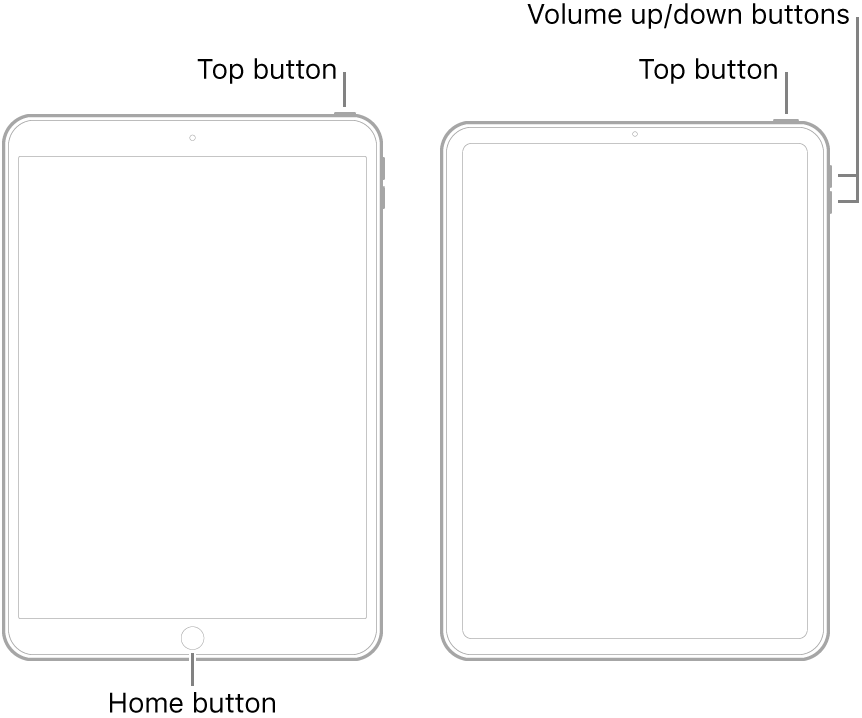
You could try a forced-restart:


  • On an iPad with a Home button: Press and hold the top button and the Home button at the same time. When the Apple logo appears, release both buttons.
  • On an iPad with Face ID: Press and quickly release the volume up button, press and quickly release the volume down button, then press and hold the top button. When the Apple logo appears, release the button.


Here is the full factory reset procedure:

https://support.apple.com/en-gb/HT201252

This thread has been closed by the system or the community team. You may vote for any posts you find helpful, or search the Community for additional answers.

ipad2

Welcome to Apple Support Community
A forum where Apple customers help each other with their products. Get started with your Apple Account.