Transfer non purchased music from iTunes to Iphone Pro 11 Max, along with having apple music subscription

Hello Apple wizards,

I am currently an apple music subscriber. On my pc computer I have a bunch of "live" non commercial music that I have collected and currently lives in iTunes on my computer desktop. These albums all transfer over and play fine on my older ipod.

Now, with of course every device and speaker being bluetooth, I wanted to get these live albums over to my Iphone 11 so I can have access to them.

Is there a way to transfer these albums into my itunes on my phone, add them to my library(on my phone), along with having Apple music? Seems like now that I am on apple music, I can't manually add music to my device? Or do I need to purchase a separate iPod that has Bluetooth capability for just these albums?


If there is a step by step how to get your own music on this device or on the cloud that my device can access that would be great. Hope I am making sense.

Much appreciated,

DW

Posted on Apr 3, 2020 9:11 PM

Reply
Question marked as Top-ranking reply

Posted on Apr 8, 2020 5:23 PM

Thanks for the info. It's working now. Took a while for it to update and show up on my iphone.


These are the settings I have so maybe it will help others:

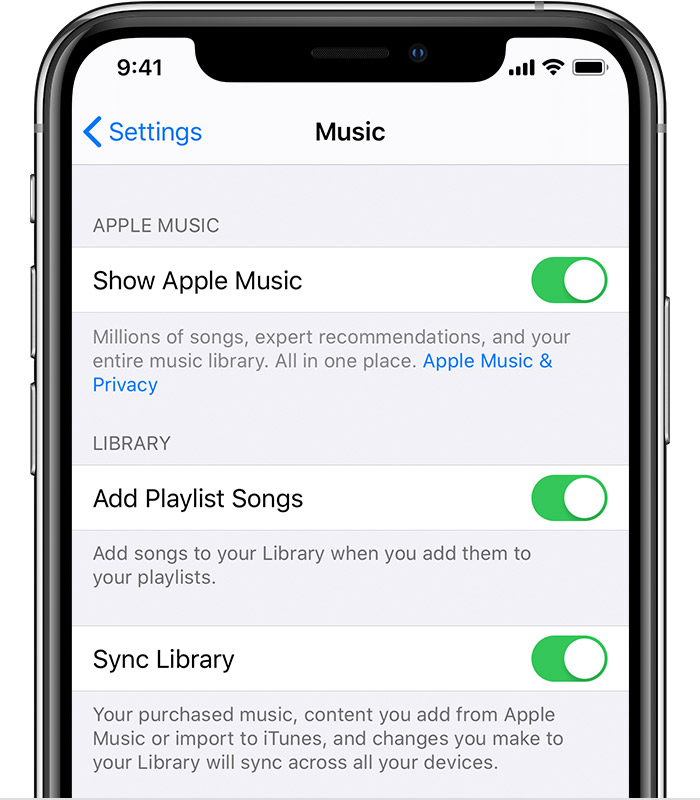
On my iphone: Music: Sync Library : On

Itunes on my PC: Prefs: General: iCloud Music - checked

Itunes on my PC: Iphone device tab: Options area: Sync with this iPhone over Wi-Fi - checked


Thanks

DW


3 replies
Question marked as Top-ranking reply

Apr 8, 2020 5:23 PM in response to Deadweather

Thanks for the info. It's working now. Took a while for it to update and show up on my iphone.


These are the settings I have so maybe it will help others:

On my iphone: Music: Sync Library : On

Itunes on my PC: Prefs: General: iCloud Music - checked

Itunes on my PC: Iphone device tab: Options area: Sync with this iPhone over Wi-Fi - checked


Thanks

DW


Apr 4, 2020 12:59 AM in response to Deadweather

Turn OFF Sync Library

With the latest version of iOS, iPadOS, and macOS, Sync Library is turned on by default. If you turned off Sync Library, you can turn it back off. Just follow the steps below for your device.


On your iPhone, iPad, or iPod touch

  1. Go to Settings > Music.
  2. Turn off Sync Library. If Sync Library is updating or turned off, you'll see a message at the top of the Library tab in the Apple Music app.

This thread has been closed by the system or the community team. You may vote for any posts you find helpful, or search the Community for additional answers.

Transfer non purchased music from iTunes to Iphone Pro 11 Max, along with having apple music subscription

Welcome to Apple Support Community
A forum where Apple customers help each other with their products. Get started with your Apple Account.