Set your bearing
To set your bearing, press firmly on the watch face. Then use the Digital Crown to make adjustments.
Allow Compass to access your location
When you open Compass for the first time, it requests permission to access your location. Tap While Using the App to grant permission.
If Compass doesn't see your location, check its settings:
- Open the Settings app on your Apple Watch.
- Tap Privacy > Location Services > Compass.
- Tap While Using the App.
The presence of magnets can affect the accuracy of any compass sensor. Apple's Leather Loop, Milanese Loop, and earlier Sport Loop watch bands use magnets or magnetic material that might interfere with the Apple Watch compass. The compass isn't affected by Sport Loop bands introduced in September 2019, or any version of the Sport Band.
version of the Sport Band.
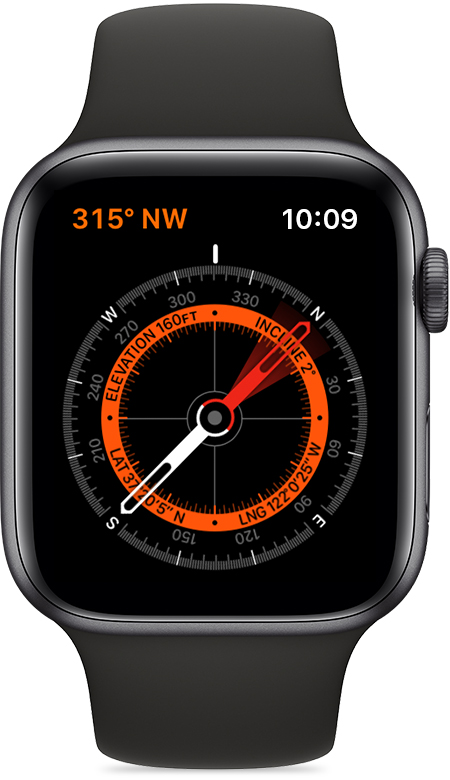
How to use the Apple Watch compass
Open the Compass app on your Apple Watch. The app shows you the direction that the top of your watch is pointing, and your bearing appears in the top-left corner.
The compass uses magnetic north by default. To change it to true north, open the Settings app on your Apple Watch, tap Compass, then turn on Use True North.
The compass works in different positions. For the most accurate reading, hold your watch flat to align the crosshairs at the center of the compass. As you move, the red cone that surrounds the compass needle shows you the accuracy of the heading. A narrow cone indicates better accuracy than a wider cone.
Rotate the Digital Crown up to see your elevation, incline, and coordinates.
To see your direction at a glance and open the Compass app with a tap, add the Compass complication to your watch face.

