Why ios 13.4 does not support the touch screen bluetooth? Why did Apple take this opportunity away? Please return the function back!

Why ios 13.4 does not support the touch screen bluetooth? Why did Apple take this opportunity away? Please return the function back!

iPhone XS, iOS 13

Posted on Apr 9, 2020 6:33 AM

Reply
Question marked as Top-ranking reply

Posted on Apr 9, 2020 7:45 AM

Are you attempting to access Bluetooth by hard pressing the Settings icon on the screen to access it from the quick menu? If you try, does it crash? If that is the case, that was a bug that was discovered and fixed with the release of iOS 13.4.1. Update your iPad.

153 replies

Jul 28, 2020 5:10 AM in response to Boots010

Yes. The Problem here is not devices. If you connect your device (Gamesir, Ipega or Any other) You will see it is connected well So where is the problem ? It is the app we use, FpsDock for Most Gamesir users, Shooting Plus V3 etc etc. So They need to update the app because Apple updated the APIs now because they have added massive support for Mouse, Keyboards and Gamepads. So they had to get rid of the Old API and now we have a new updated Api. So App developers needs to fix that Asap!

Aug 23, 2020 10:10 AM in response to Alisdnu1

Simply report it on apples feedback ,
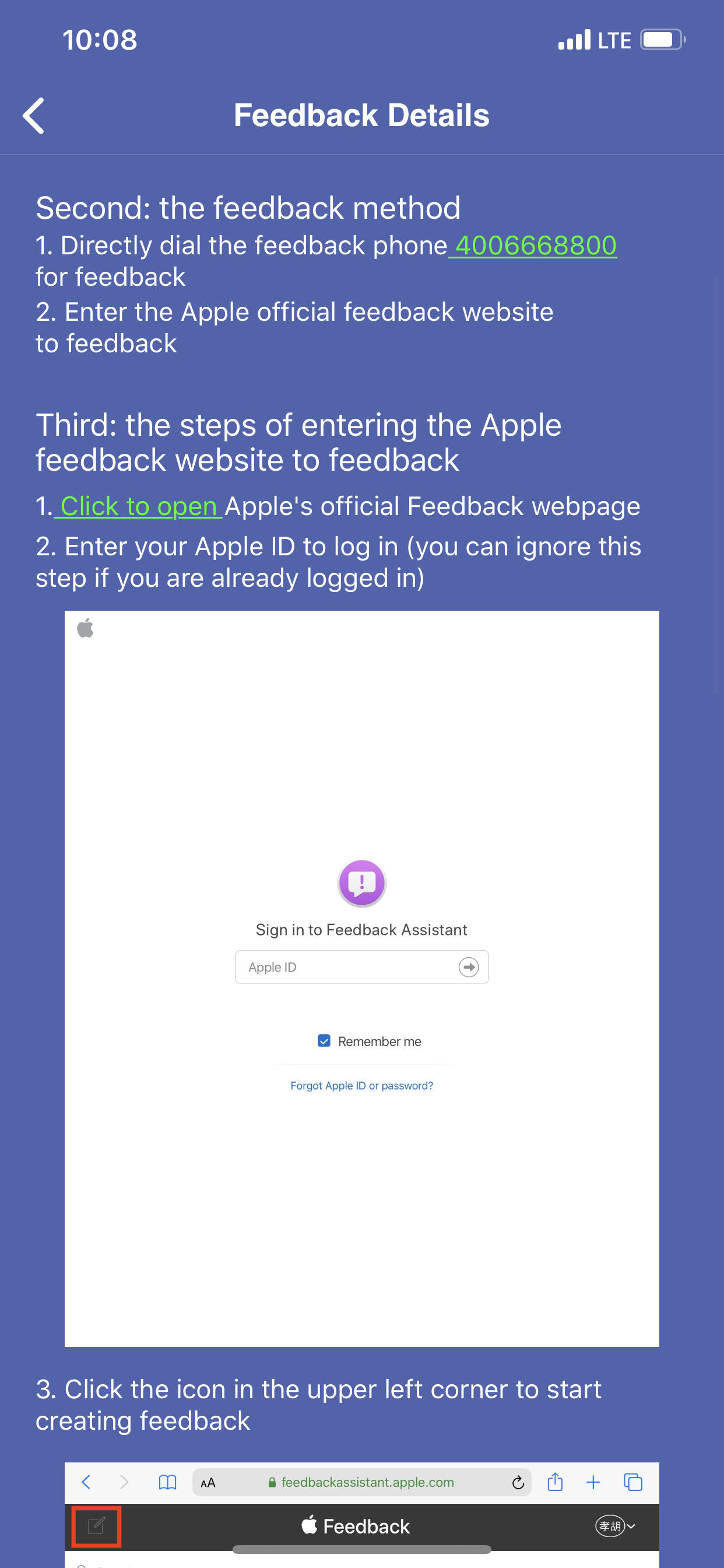
Bluetooth low energy(BLE) HID device is invalid on iOS 13.4 or iOS 13.5, details:Now we find The BLE HID device controller can't work on iOS 13.4 or iOS 13.5, but it's ok on iOS 13.3.1 and below. The HID device controller is a bluetooth low energy(BLE) HID device. It is work well on windows 10 and Android system and iOS 13.3.1 and below, but all are no function on iOS 13.4 or iOS 13.5, please fix it, Thank you!


Please open the URL: https://file.qixiongfiles.cn/videodemo.mp4, to watch the video


The stylus device BLE HID report descriptor:

0x05, 0x0d, // USAGE_PAGE (Digitizers)

0x09, 0x01, // USAGE (Digitizer)

0xa1, 0x01, // COLLECTION (Application)

0x85, 0x01, // REPORT_ID (Touch)

0x05, 0x0d, // USAGE_PAGE (Digitizers)

0x09, 0x20, // USAGE (stylus)

0xa1, 0x02, // COLLECTION (Logical)

0x09, 0x42, // USAGE (Tip Switch)

0x15, 0x00, // LOGICAL_MINIMUM (0)

0x25, 0x01, // LOGICAL_MAXIMUM (1)

0x75, 0x01, // REPORT_SIZE (1)

0x95, 0x01, // REPORT_COUNT (1)

0x81, 0x02, // INPUT (Data,Var,Abs)

0x09, 0x32, // USAGE (In Range)

0x81, 0x02, // INPUT (Data,Var,Abs)

0x95, 0x02, // REPORT_COUNT (2)

0x81, 0x01, // INPUT (Cnst,Ary,Abs)

0x75, 0x04, // REPORT_SIZE (4)

0x09, 0x51, // USAGE ( Contact Identifier)

0x25, 0x0f, // LOGICAL_MAXIMUM (255)

0x95, 0x01, // REPORT_COUNT (1)

0x81, 0x02, // INPUT (Data,Var,Abs)

0x05, 0x01, // USAGE_PAGE (Generic Desk)

0x16, 0x00,0x00, //HID_LogicalMinS (0)

0x26, (0xcA8&0xff), (0xcA8>>8), // LOGICAL_MAXIMUM

0x75, 16, // REPORT_SIZE (16)

0x55, 0x00, // UNIT_EXPONENT (0)

0x65, 0x00, // UNIT (00)

0x09, 0x30, // USAGE (X)

0x36, 0x00,0x00, // PHYSICAL_MINIMUM (0)

0x46, (0xcA8&0xff), (0xcA8>>8), // PHYSICAL_MAXIMUM

0x95, 0x01, // REPORT_COUNT (1)

0x81, 0x02, // INPUT (Data,Var,Abs)

0x26, (0x1680&0xff), (0x1680>>8), // LOGICAL_MAXIMUM

0x46, (0x1680&0xff), (0x1680>>8), // PHYSICAL_MAXIMUM

0x09, 0x31, // USAGE (Y)

0x81, 0x02, // INPUT (Data,Var,Abs)

0xc0, // END_COLLECTION

0x85, 0x02, // REPORT_ID (Feature)

0x75, 0x08, // REPORT_SIZE (8)

0x95, 0x01, // REPORT_COUNT (1)

0x15, 0x01, // LOGICAL_MINIMUM (1)

0x25, 0x08, // LOGICAL_MAXIMUM (8)

0x09, 0x55, // USAGE(Maximum Count)

0xB1, 0x02, // FEATURE (Data,Var,Abs)

0xc0, // END_COLLECTION


Aug 23, 2020 10:09 AM in response to rolls224

Bluetooth low energy(BLE) HID device is invalid on iOS 13.4 or iOS 13.5, details:Now we find The BLE HID device controller can't work on iOS 13.4 or iOS 13.5, but it's ok on iOS 13.3.1 and below. The HID device controller is a bluetooth low energy(BLE) HID device. It is work well on windows 10 and Android system and iOS 13.3.1 and below, but all are no function on iOS 13.4 or iOS 13.5, please fix it, Thank you!


Please open the URL: https://file.qixiongfiles.cn/videodemo.mp4, to watch the video


The stylus device BLE HID report descriptor:

0x05, 0x0d, // USAGE_PAGE (Digitizers)

0x09, 0x01, // USAGE (Digitizer)

0xa1, 0x01, // COLLECTION (Application)

0x85, 0x01, // REPORT_ID (Touch)

0x05, 0x0d, // USAGE_PAGE (Digitizers)

0x09, 0x20, // USAGE (stylus)

0xa1, 0x02, // COLLECTION (Logical)

0x09, 0x42, // USAGE (Tip Switch)

0x15, 0x00, // LOGICAL_MINIMUM (0)

0x25, 0x01, // LOGICAL_MAXIMUM (1)

0x75, 0x01, // REPORT_SIZE (1)

0x95, 0x01, // REPORT_COUNT (1)

0x81, 0x02, // INPUT (Data,Var,Abs)

0x09, 0x32, // USAGE (In Range)

0x81, 0x02, // INPUT (Data,Var,Abs)

0x95, 0x02, // REPORT_COUNT (2)

0x81, 0x01, // INPUT (Cnst,Ary,Abs)

0x75, 0x04, // REPORT_SIZE (4)

0x09, 0x51, // USAGE ( Contact Identifier)

0x25, 0x0f, // LOGICAL_MAXIMUM (255)

0x95, 0x01, // REPORT_COUNT (1)

0x81, 0x02, // INPUT (Data,Var,Abs)

0x05, 0x01, // USAGE_PAGE (Generic Desk)

0x16, 0x00,0x00, //HID_LogicalMinS (0)

0x26, (0xcA8&0xff), (0xcA8>>8), // LOGICAL_MAXIMUM

0x75, 16, // REPORT_SIZE (16)

0x55, 0x00, // UNIT_EXPONENT (0)

0x65, 0x00, // UNIT (00)

0x09, 0x30, // USAGE (X)

0x36, 0x00,0x00, // PHYSICAL_MINIMUM (0)

0x46, (0xcA8&0xff), (0xcA8>>8), // PHYSICAL_MAXIMUM

0x95, 0x01, // REPORT_COUNT (1)

0x81, 0x02, // INPUT (Data,Var,Abs)

0x26, (0x1680&0xff), (0x1680>>8), // LOGICAL_MAXIMUM

0x46, (0x1680&0xff), (0x1680>>8), // PHYSICAL_MAXIMUM

0x09, 0x31, // USAGE (Y)

0x81, 0x02, // INPUT (Data,Var,Abs)

0xc0, // END_COLLECTION

0x85, 0x02, // REPORT_ID (Feature)

0x75, 0x08, // REPORT_SIZE (8)

0x95, 0x01, // REPORT_COUNT (1)

0x15, 0x01, // LOGICAL_MINIMUM (1)

0x25, 0x08, // LOGICAL_MAXIMUM (8)

0x09, 0x55, // USAGE(Maximum Count)

0xB1, 0x02, // FEATURE (Data,Var,Abs)

0xc0, // END_COLLECTION


Apr 17, 2020 8:50 AM in response to fazi82

fazi82 wrote:

Same for me TJSSum1 I have a ipega 9023s for my iPhone 7 Plus but it lets me map controls on shootingplus v3 but doesn’t let me play the game with the controller I want them to fix it so bad

It is the app developer's responsibility to update their app for new iOS versions. Not Apple's responsibility to maintain backwards compatibility.


Contact the developer.

May 1, 2020 2:04 AM in response to rolls224

This is a problem that cannot be solved in the entire industry at present. The main reason is that Apple has also closed the touch screen interface while optimizing CarPlay for iOS 13.4. This directly leads to the inability to use the touch screen mapping function when the Bluetooth is connected. In other words, the function of G-touch cannot be used normally on iOS 13.4 system.

May 15, 2020 1:09 PM in response to LACAllen

Actually Apple have locked this feature, in there update, so there’s nothing any developer can do. So really Apple aren’t being consumer friendly


from developers website


“This is a problem that cannot be solved in the entire industry at present. The main reason is that Apple has also closed the touch screen interface while optimizing CarPlay for iOS 13.4. This directly leads to the inability to use the touch screen mapping function when the Bluetooth is connected. In other words, the function of G-touch cannot be used normally on iOS 13.4 system.”

Nov 1, 2020 11:40 AM in response to rolls224

So i have been emailing back and forth with Shootingplus V3.


This is the answer i got when i asked if they were EVER going to fix this issue:

YES, but only gamepad has been solved , but the keyboard and mouse can not work temporarily,We are looking for a solution


Than i asked which gamepads had been solved, and which were compatible with iOS 13.4 and higher, this is the answer:

For the time being, we have solved the compatibility of gamepads on iOS13.4 or iOS13.5 or iOS13.6 or iOS14 and above. These gamepads include: PG-9167, PG-9120, PG-9120F, PG-9121, PG-9121A, PG-9083S, PG-9087S, BSP-D1 (G7), M200, STK-7008F1, mingpin-G5, etc. We will support more controllers in the future.


I don't know if anyone here uses one of the game controllers mentioned above?

I am using the Beboncool (Saitake) STK-7007 which is not listed above so I asked if that one was also going to be compatible soon but i didn't get a response yet so i am hoping they will fix ALL the controllers very soon.

This thread has been closed by the system or the community team. You may vote for any posts you find helpful, or search the Community for additional answers.

Why ios 13.4 does not support the touch screen bluetooth? Why did Apple take this opportunity away? Please return the function back!

Welcome to Apple Support Community
A forum where Apple customers help each other with their products. Get started with your Apple Account.




