How to prevent downloaded PDFs from automatically being "Locked."

I never need a PDF to be locked when I download them. This is very annoying when I want to quickly annotate them.


Is there any way to change this default in macOS? I am on Catalina.

MacBook Pro with Touch Bar

Posted on Apr 10, 2020 11:06 AM

Reply
21 replies

Apr 12, 2020 12:37 PM in response to Old Toad

Using "Export as PDF..." does indeed prevent the problem. I will use that as a workaround, thank you.


For the record, y steps to reproduce the problem require that you click the button at hover menu at the bottom of the Safari screen to open the pdf in Preview. That does make the document locked when you move it somewhere on disc or at least when you move it and then rename it.

Apr 10, 2020 2:41 PM in response to patrickkidd

Bring up the info pane for a pdf document and make a screenshot of the ownership and permissions section and post.


Where are the pdf files located when you try to open? Do you have an external HD (not a Time Machine) drive) that you can copy one to and try to open there?


What I'm getting at is the situation described in this Apple document: Resolve issues caused by changing the permissions of items in your home folder - Apple Support

Apr 10, 2020 4:57 PM in response to patrickkidd

patrickkidd Said:

"How to prevent downloaded PDFs from automatically being 'Locked.' I never need a PDF to be locked when I download them. This is very annoying when I want to quickly annotate them. Is there any way to change this default in macOS? I am on Catalina."

-------


Try a New Administrator:

Create a new Administrator user (Go to: System Preferences > Users & Groups). Log into that user, and see if this occurs in that account. If not, then there is something misconfigured in your current user. So, transfer everything over to the new user, and then trash this user. You should be good from there.

Apr 10, 2020 2:56 PM in response to Old Toad

I think I am describing a different situation than you are. This happens for all pdfs on a few OS installs now over the last few years.


Here are the steps to reproduce what I am talking about:


1) Click on any link to view a pdf in the Safari browser window.

2) In the menu that appears when you hover your mouse over the bottom of the browser window, click the button to open the pdf in Preview.app.

3) Click the document title at the top of Preview.app to change the location of the pdf from the download cache folder to any folder on your computer.

4) Notice that the pdf is now automatically "Locked."


Here is the info pane for a pdf I just downloaded from the IRS, after following my steps to reproduce the behavior:
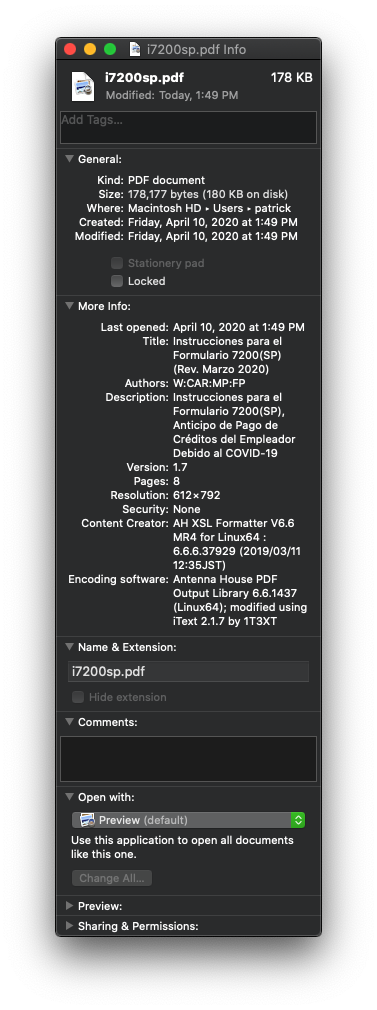

Apr 12, 2020 3:30 PM in response to Old Toad

OK, good. The full steps to reproduce the problem is to click that open in preview button, and then move it to a folder on your hard drive using the dialog at the top of the Preview.app window, and then rename the file in that folder using the dialog at the top of the Preview.app window. Sometimes the file is automatically locked when I move it, and sometimes it doesn't happen until I also rename the file after moving it.

This thread has been closed by the system or the community team. You may vote for any posts you find helpful, or search the Community for additional answers.

How to prevent downloaded PDFs from automatically being "Locked."

Welcome to Apple Support Community
A forum where Apple customers help each other with their products. Get started with your Apple Account.

