Front Camera not working after ios 13.4.1 update

I'm using an iphone 7 and after i updated the os to 13.4.1 my front camera works perfectly fine on the app but on 3rd party apps (facebook,messenger,insta,snapchat, etc.) rear camera works but when I flip it to front the app would freeze. I did the restart, relaunch, reset settings, reinstall apps, but none of it fixed the problem.

iPhone 7, iOS 13

Posted on Apr 17, 2020 12:30 AM

Reply
Question marked as Top-ranking reply

Posted on Sep 30, 2020 7:27 AM

For disabled people I paste the solution post from page 14:


I've finally solved the problem!


I restored the iPhone 7 Plus with all available iOS versions (13.5, 13.5.1, 14beta1, 14beta2) and no version helped. It was just a waste of time! Apple will probably never fix this problem! Accept that a software update will not help.

I found a way to solve this problem.


First of all, I checked with 3uTools that I had the front camera replaced with a Chinese non-original camera! Apple has killed Chinese replacements parts and to solve the problem you need to replace your front camera with the original part from disassembly!


Step by step list of how to deal with the problem:


1. Install 3uTools (Windows only).

2. Connect iPhone to the computer via cable.

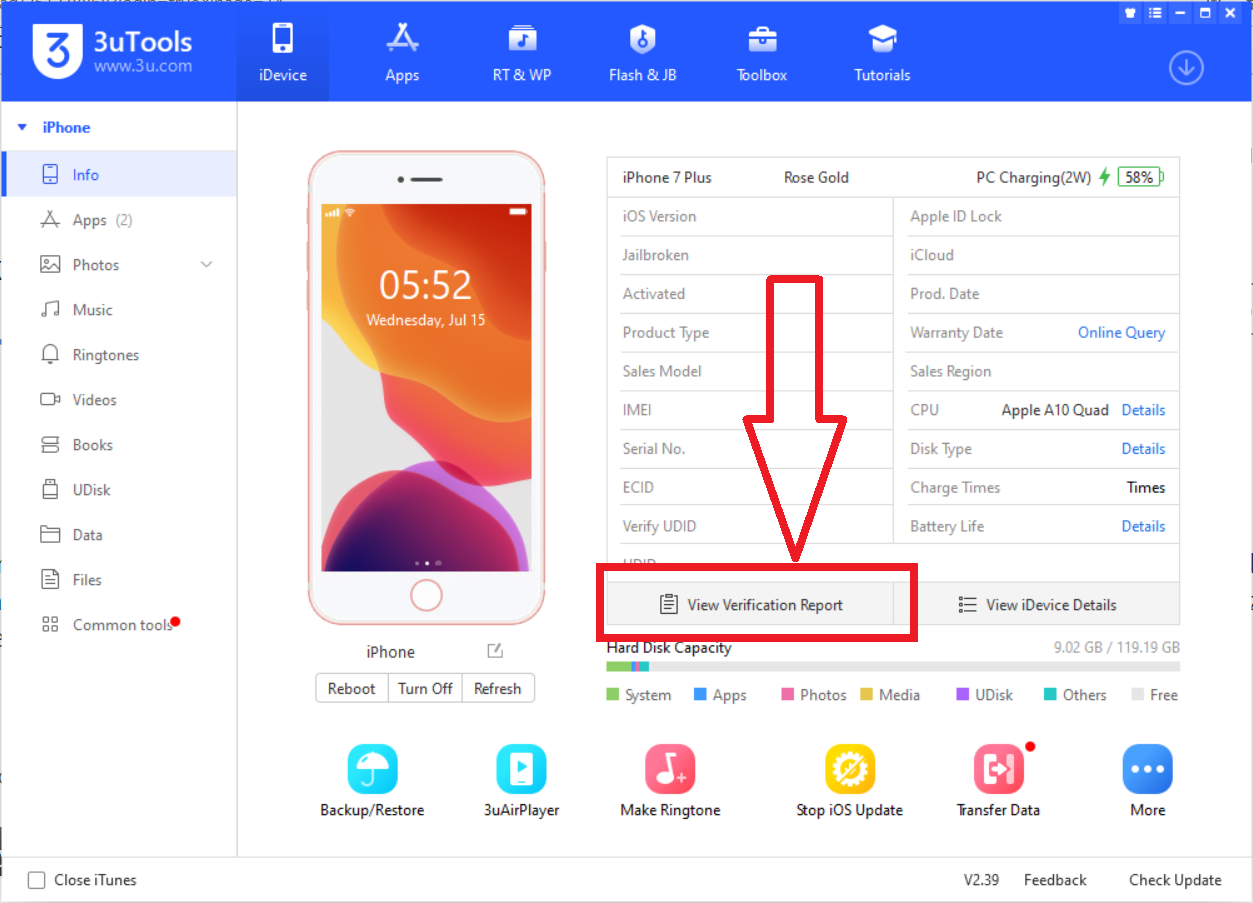
3. On the "iDevice" tab, click "View Verification Report".

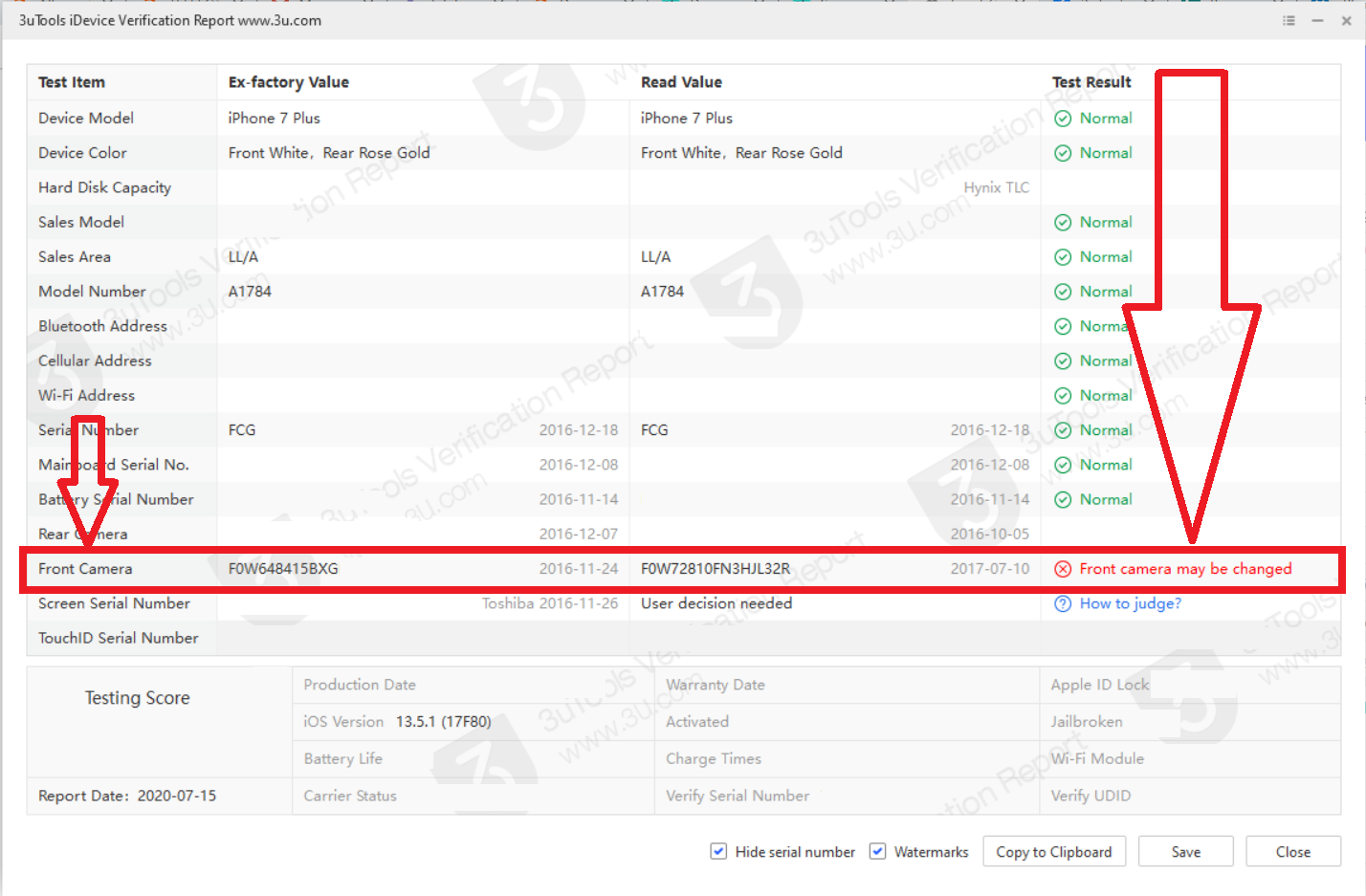
4. If the front camera has a different serial number than the one assigned to the motherboard, the program will show the information in red "Front camera may be changed". This means, no less, that in your phone camera has been replaced with a non-original part. Replace the front camera with the original one from the disassembly. However, if the program shows the information in green "Normal" (although this is not possible in my opinion), I do not promise that changing the camera will help something.
5. Look after the original disassembly camera. Search on local auction sites. Do not buy the camera on Aliexpress because you will get the cheapest replacement part there. Even the substitutes have the Apple logo, but of poor graphics quality! Therefore, if you want your front camera to work, try to get the original part. The price of original part is around $ 10 - $ 50.

6. Get the right tools for your phone. You will need: screwdrivers (pentalobe, tri-point Y000 and Phillips), suction cup and spudger. In addition, if you want to remain waterproof, a screen tape will be useful.

However, if you are not good at manual work, go to a technician! Wrong screws can kill your phone's motherboard!

A guide on how to replace the front camera can be found here: https://www.ifixit.com/Guide/iPhone+7+Plus+Front+Camera+and+Sensor+Cable+Replacement/95688

7. No need to restore the phone after replacement front camera.


If you found this post helpful, click "Helpful"

268 replies
Question marked as Top-ranking reply

Sep 30, 2020 7:27 AM in response to VincentCarlos

For disabled people I paste the solution post from page 14:


I've finally solved the problem!


I restored the iPhone 7 Plus with all available iOS versions (13.5, 13.5.1, 14beta1, 14beta2) and no version helped. It was just a waste of time! Apple will probably never fix this problem! Accept that a software update will not help.

I found a way to solve this problem.


First of all, I checked with 3uTools that I had the front camera replaced with a Chinese non-original camera! Apple has killed Chinese replacements parts and to solve the problem you need to replace your front camera with the original part from disassembly!


Step by step list of how to deal with the problem:


1. Install 3uTools (Windows only).

2. Connect iPhone to the computer via cable.

3. On the "iDevice" tab, click "View Verification Report".

4. If the front camera has a different serial number than the one assigned to the motherboard, the program will show the information in red "Front camera may be changed". This means, no less, that in your phone camera has been replaced with a non-original part. Replace the front camera with the original one from the disassembly. However, if the program shows the information in green "Normal" (although this is not possible in my opinion), I do not promise that changing the camera will help something.

5. Look after the original disassembly camera. Search on local auction sites. Do not buy the camera on Aliexpress because you will get the cheapest replacement part there. Even the substitutes have the Apple logo, but of poor graphics quality! Therefore, if you want your front camera to work, try to get the original part. The price of original part is around $ 10 - $ 50.

6. Get the right tools for your phone. You will need: screwdrivers (pentalobe, tri-point Y000 and Phillips), suction cup and spudger. In addition, if you want to remain waterproof, a screen tape will be useful.

However, if you are not good at manual work, go to a technician! Wrong screws can kill your phone's motherboard!

A guide on how to replace the front camera can be found here: https://www.ifixit.com/Guide/iPhone+7+Plus+Front+Camera+and+Sensor+Cable+Replacement/95688

7. No need to restore the phone after replacement front camera.


If you found this post helpful, click "Helpful"

May 22, 2020 11:36 AM in response to eugenio-gaeta

replacing a flexible camera is the solution I've been looking for so far

everything is going well now, get original parts or very good quality,

Yes, don't think the camera isn't broken because it works in the camera app,

Apples are indeed mysterious,

this works for me and one of my friend's iphone,

maybe an update has caused the system to reject parts that are not quality, maybe!

Jun 13, 2020 9:44 AM in response to Kuda_Adam

A while ago I replaced the front camera of my daughter's Iphone 7 with a non-original one. Everything worked fine until IOS 13.4.1. But now third-party apps that use the camera don't work. On my iphone 7 in which the front camera has never been changed everything works normally even in IOS 13.5.1. This week I will try to switch to an original front camera ...

Jul 5, 2020 5:12 PM in response to Kobe14

Just want to chime in and say I had this issue and replacing the front camera with an original Apple camera fixed it.


I changed the broken screen on my daughters iPhone 7 Plus. All was working including the front camera in the Camera app.

But, it would not work in FaceTime, Instagram, etc.


I took the original Apple camera off the broken screen and put it on the new screen, and everything is working.


I don’t quite understand why it would work in Camera mode but nowhere else. I suspect there is some kind of security hardware check happening and the third party cameras are not passing it.


good news is, replacing the camera is pretty easy.

Jul 2, 2020 1:00 PM in response to Kobe14

Skip to the bottom of you don’t want to read about my issue and how I found out what it was in my case


This will likely not fix your problem If you already have thrown your old screen away and it may not even be the cause of it but hear me out. I have the IPhone 7+ running the newest IOS. I dropped my phone and absolutely destroyed the screen. I bought a replacement off amazon and it came complete with everything but the home button(for those of you who don’t know some do not come with the camera, home button and/or the top microphone). I took my phone apart and put my home button in the new screen and thought it was good to go. I powered it up and everything looked good and I checked out the cameras, home button and 3D Touch and it was all fine so I put it back together and when I decided to get on Snapchat it crashed. I tried to open it again and it just kept crashing. I tried restarting my phone and it wouldn’t let me back on at all. I deleted it and reinstalled it and it was good till I flipped the camera to the front facing one then it would keep crashing again. I tried several apps and it was all the same. The back camera was fine but the front camera wouldn’t work and would often show up black or I’d get an error. After thinking for a bit I took my phone apart again and swapped the camera and top mic and now everything is running perfectly. My Snapchat is fixed and all apps are up and running like it was new.


In summary, if you have replaced your screen or have had someone to do it and you/they didn’t take the guts out of your old one then that might be your problem. Again this likely isn’t everyone’s problem but I really hope it could help at least one person. If you have anymore questions I’ll do my best to stay active on this topic and help out the best I can

Jun 17, 2020 12:52 PM in response to jmarciano1971

I never replaced my camera and still have this problem.

It's a software problem, more than 400 people had this problem too.

Everybody with this issue must repot to apple!!!!

Keep Providing Apple Info on This:

Inform Apple of how you came across this, and how you have troubleshot this thus far. The more they know of it, the more they'll see what's going on, and what needs to be looked in to. To leave Apple feedback,....

  1. Use this Site: Feedback - iPhone - Apple.
  2. Select: "Bug Report" for the "Feedback Type"
  3. Proceed from there as necessary.

OR/AND


https://www.apple.com/feedback/iphone.html

May 25, 2020 11:40 PM in response to harry_fu

How come it is because of the hardware issue?, everything was working until we update to this 13.4.1/13.4 iOS version, so are you saying this update caused the hardware issue for all these people randomly ?.

This issue is definitely caused by iOS Software update and Apple customer care has confirmed the same and they said they are working for a possible fix. you may have had a hardware issue but we don't. We will wait for Apple to fix it.

Jun 20, 2020 5:47 AM in response to Kobe14

Just for you know, this week I talked with apple support about this problem and I also showed this discussion to them, they got a little bit scared by the situation... they suggested that this problem may be envolve with the light sensor. They still didn't resolved my problem and ofered me 3 options: pay for replace the screen, replace de phone OR send this problem to engineering..of course I chosed the 3rd option. I recorded my iphone screen and sand the video showing the problem to them; they also ran a diagnostic on my phone that didn't show any hardware problem. In short, they will contact me on monday HOPEFULLY with a solution...


I'm cotinuing to advice to everybody who has this problem to give the feedback/report bug or contact apple suport so they aware about this ****!


Keep Providing Apple Info on This:

Inform Apple of how you came across this, and how you have troubleshot this thus far. The more they know of it, the more they'll see what's going on, and what needs to be looked in to. To leave Apple feedback,....

  1. Use this Site: Feedback - iPhone - Apple.
  2. Select: "Bug Report" for the "Feedback Type"
  3. Proceed from there as necessary.

OR/AND


https://www.apple.com/feedback/iphone.html

Jul 3, 2020 3:30 AM in response to harry_fu

Hello!!


apple engineerinf finally returned My call.

They assumed that the problem is a BUG!! They said that they are aware of this problem but still didn’t find the cause, but are trying to fix it. When they find out how to fix it, ir they will call to me to show me what to do OR they the correction Will come in a update of iOS.

there isn’t a due date for that, unfortunatelly.

but I am a little bit relieved that they know It’s a bug and are trying to fix it.


This thread has been closed by the system or the community team. You may vote for any posts you find helpful, or search the Community for additional answers.

Front Camera not working after ios 13.4.1 update

Welcome to Apple Support Community
A forum where Apple customers help each other with their products. Get started with your Apple Account.
